This article is contributed to Luna Cloud blog by Carles Mateo.
We architects, developers and start ups are facing new challenges.
We have now to create applications that have to scale and scale at world-wide level.
That puts over the table big and exciting challenges.
To allow that increasing level of scaling, we designed and architect tools and techniques and tricks, but fortunately now there are great products born to scale out and to deal with this problems: like NoSql databases like Cassandra, MongoDb, Riak, Hadoop’s Hbase, Couchbase or CouchDb, NoSql in-Memory like Memcached or Redis, big data solutions like Hadoop, distributed files systems like Hadoop’s HDFS, GlusterFs, Lustre, etc…
In this article I will cover the first steps to develop with Cassandra, under the Developer point of view.
As a first view you may be interested in Cassandra because:
- Is a Database with no single point of failure
- Where all the Database Servers work in Peer to Peer over Tcp/Ip
- Fault-tolerance. You can set replication factor, and the data will be sharded and replicated over different servers and so being resilient to node failures
- Because the Cassandra Cluster splits and balances the work across the Cluster automatically
- Because you can scale by just adding more nodes to the Cluster, that’s scaling horizontally, and it’s linear. If you double the number of servers, you double the performance
- Because you can have cool configurations like multi-datacenter and multi-rack and have the replication done automatically
- You can have several small, cheap, commodity servers, with big SATA disks with better result than one very big, very expensive, and unable-to-scale-more server with SSD or SAS expensive disks.
- It has the CQL language -Cassandra Query Language-, that is close to SQL
- Ability to send querys in async mode (the CPU can do other things while waiting for the query to return the results)
Cassandra is based in key/value philosophy but with columns. It supports multiple columns. That’s cool, as theoretically it supports 2 GB per column (at practical level is not recommended to go with data so big, specially in multi-user environments).
I will not lie to you: It is another paradigm, and comes with a lot of knowledge to acquire, but it is necessary and a price worth to pay for being able of scaling at nowadays required levels.
Cassandra only offers native drivers for: Java, .NET, C++ and Python 2.7. The rest of solutions are contributed, sadly most of them are outdated and unmantained.
You can find all the drivers here:
http://planetcassandra.org/client-drivers-tools/
To develop with PHP
Cassandra has no PHP driver officially, but has some contributed solutions.
By myself I created several solutions: CQLSÍ uses cqlsh to perform queries and interfaces without needing Thrift, and Cassandra Universal Driver is a Web Gateway that I wrote in Python that allows you to query Cassandra from any language, and recently I contributed to a PHP driver that speaks the Cassandra binary protocol (v1) directly using Tcp/Ip sockets.
That’s the best solution for me by now, as it is the fastest and it doesn’t need any third party library nor Thrift neither.
You can git clone it from:
https://github.com/uri2x/php-cassandra
Here we go with some samples:
Create a keyspace
KeySpace is the equivalent to a database in MySQL.
<?php

require_once 'Cassandra/Cassandra.php';

$o_cassandra = new Cassandra();

$s_server_host     = '127.0.0.1';    // Localhost
$i_server_port     = 9042;
$s_server_username = '';  // We don't use username
$s_server_password = '';  // We don't use password
$s_server_keyspace = '';  // We don't have created it yet

$o_cassandra->connect($s_server_host, $s_server_username, $s_server_password, $s_server_keyspace, $i_server_port);

// Create a Keyspace with Replication factor 1, that's for a single server
$s_cql = "CREATE KEYSPACE cassandra_tests WITH REPLICATION = { 'class': 'SimpleStrategy', 'replication_factor': 1 };";

$st_results = $o_cassandra->query($s_cql);
We can run it from web or from command line by using:
php -f cassandra_create.php
Create a table
<?php

require_once 'Cassandra/Cassandra.php';

$o_cassandra = new Cassandra();

$s_server_host     = '127.0.0.1';    // Localhost
$i_server_port     = 9042;
$s_server_username = '';  // We don't use username
$s_server_password = '';  // We don't use password
$s_server_keyspace = 'cassandra_tests';

$o_cassandra->connect($s_server_host, $s_server_username, $s_server_password, $s_server_keyspace, $i_server_port);

$s_cql = "CREATE TABLE carles_test_table (s_thekey text, s_column1 text, s_column2 text,PRIMARY KEY (s_thekey));";

$st_results = $o_cassandra->query($s_cql);
If we don’t plan to insert UTF-8 strings, we can use VARCHAR instead of TEXT type.
Do an insert
In this sample we create an Array of 100 elements, we serialize it, and then we store it.
<?php

require_once 'Cassandra/Cassandra.php';

// Note this code uses the MT notation http://blog.carlesmateo.com/maria-teresa-notation-for-php/
$i_start_time = microtime(true);

$o_cassandra = new Cassandra();

$s_server_host     = '127.0.0.1';    // Localhost
$i_server_port     = 9042;
$s_server_username = '';  // We don't have username
$s_server_password = '';  // We don't have password
$s_server_keyspace = 'cassandra_tests';

$o_cassandra->connect($s_server_host, $s_server_username, $s_server_password, $s_server_keyspace, $i_server_port);

$s_time = strval(time()).strval(rand(0,9999));
$s_date_time = date('Y-m-d H:i:s');

// An array to hold a emails
$st_data_emails = Array();

for ($i_bucle=0; $i_bucle<100; $i_bucle++) {
    // Add a new email
    $st_data_emails[] = Array('datetime'  => $s_date_time,
                              'id_email'  => $s_time);

}

// Serialize the Array
$s_data_emails = serialize($st_data_emails);

$s_cql = "INSERT INTO carles_test_table (s_thekey, s_column1, s_column2)
VALUES ('first_sample', '$s_data_emails', 'Some other data');";

$st_results = $o_cassandra->query($s_cql);

$o_cassandra->close();

print_r($st_results);

$i_finish_time = microtime(true);
$i_execution_time = $i_finish_time-$i_start_time;

echo 'Execution time: '.$i_execution_time."\n";
echo "\n";
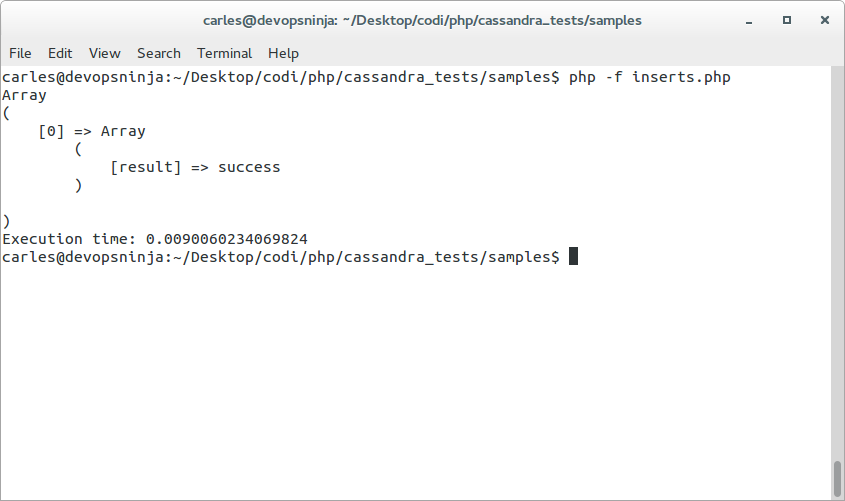
This insert took Execution time: 0.0091850757598877 seconds executed from CLI (Command line).
If the INSERT works well you’ll have a [result] => ‘success’ in the resulting array.
Do some inserts
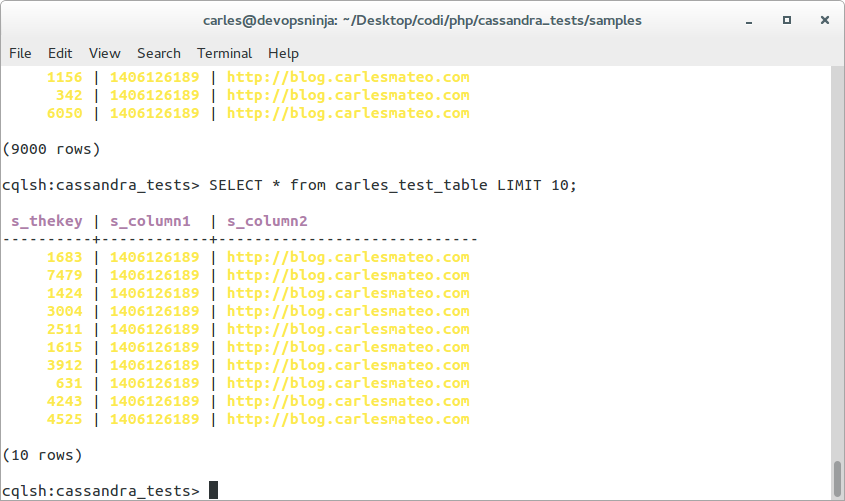
Here we do 9000 inserts.
<?php

require_once 'Cassandra/Cassandra.php';

// Note this code uses the MT notation http://blog.carlesmateo.com/maria-teresa-notation-for-php/
$i_start_time = microtime(true);

$o_cassandra = new Cassandra();

$s_server_host     = '127.0.0.1';    // Localhost
$i_server_port     = 9042;
$s_server_username = '';  // We don't have username
$s_server_password = '';  // We don't have password
$s_server_keyspace = 'cassandra_tests';

$o_cassandra->connect($s_server_host, $s_server_username, $s_server_password, $s_server_keyspace, $i_server_port);

$s_date_time = date('Y-m-d H:i:s');

for ($i_bucle=0; $i_bucle<9000; $i_bucle++) {
    // Add a sample text, let's use time for example
    $s_time = strval(time());

    $s_cql = "INSERT INTO carles_test_table (s_thekey, s_column1, s_column2)
VALUES ('$i_bucle', '$s_time', 'http://blog.carlesmateo.com');";

    // Launch the query
    $st_results = $o_cassandra->query($s_cql);

}

$o_cassandra->close();

$i_finish_time = microtime(true);
$i_execution_time = $i_finish_time-$i_start_time;

echo 'Execution time: '.$i_execution_time."\n";
echo "\n";
Those 9,000 INSERTs takes 6.49 seconds in my test virtual machine, executed from CLI (Command line).
Do a Select
<?php

require_once 'Cassandra/Cassandra.php';

// Note this code uses the MT notation http://blog.carlesmateo.com/maria-teresa-notation-for-php/
$i_start_time = microtime(true);

$o_cassandra = new Cassandra();

$s_server_host     = '127.0.0.1';    // Localhost
$i_server_port     = 9042;
$s_server_username = '';  // We don't have username
$s_server_password = '';  // We don't have password
$s_server_keyspace = 'cassandra_tests';

$o_cassandra->connect($s_server_host, $s_server_username, $s_server_password, $s_server_keyspace, $i_server_port);


$s_cql = "SELECT * FROM carles_test_table LIMIT 10;";

// Launch the query
$st_results = $o_cassandra->query($s_cql);
echo 'Printing 10 rows:'."\n";

print_r($st_results);

$o_cassandra->close();

$i_finish_time = microtime(true);
$i_execution_time = $i_finish_time-$i_start_time;

echo 'Execution time: '.$i_execution_time."\n";
echo "\n";
Printing 10 rows passing the query with LIMIT:
$s_cql = "SELECT * FROM carles_test_table LIMIT 10;";
echoing as array with print_r takes Execution time: 0.01090407371521 seconds (the cost of printing is high).
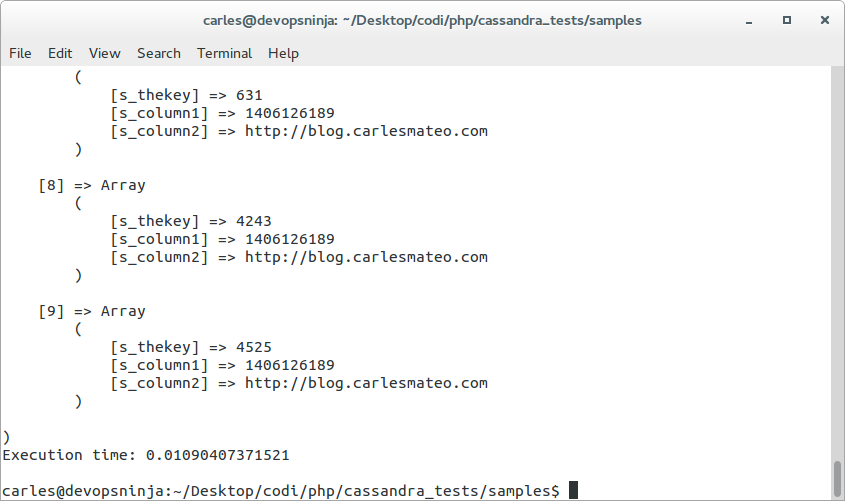
If you don’t print the rows, it takes only Execution time: 0.00714111328125 seconds.
Selecting 9,000 rows, if you don’t print them, takes Execution time: 0.18086194992065.
Java
The official driver for Java works very well.
The only initial difficulties may be to create the libraries required with Maven and to deal with the different Cassandra native data types.
To make that travel easy, I describe what you have to do to generate the libraries and provide you with a Db Class made by me that will abstract you from dealing with Data types and provide a simple ArrayList with the field names and all the data as String.
Datastax provides the pom.xml for maven so you’ll create you jar files. Then you can copy those jar file to Libraries folder of any project you want to use Cassandra with.
 My Db class:
/*
 * By Carles Mateo blog.carlesmateo.com
 * You can use this code freely, or modify it.
 */

package server;

import java.util.ArrayList;
import java.util.List;
import com.datastax.driver.core.*;

/**
 * @author carles_mateo
 */
public class Db {

    public String[] s_cassandra_hosts = null;
    public String s_database = "cchat";

    public Cluster o_cluster = null;
    public Session o_session = null;

    Db() {
        // The Constructor
        this.s_cassandra_hosts = new String[10];

        String s_cassandra_server = "127.0.0.1";

        this.s_cassandra_hosts[0] = s_cassandra_server;

        this.o_cluster = Cluster.builder()
                                        .addContactPoints(s_cassandra_hosts[0]) // More than 1 separated by comas
                                        .build();
        this.o_session = this.o_cluster.connect(s_database);  // This is the KeySpace

    }

    public static String escapeApostrophes(String s_cql) {
        String s_cql_replaced = s_cql.replaceAll("'", "''");

        return s_cql_replaced;
    }

    public void close() {
        // Destructor calles by the garbagge collector
        this.o_session.close();
        this.o_cluster.close();
    }

    public ArrayList query(String s_cql) {

        ResultSet rows = null;

        rows = this.o_session.execute(s_cql);

        ArrayList st_results = new ArrayList();
        List<String> st_column_names = new ArrayList<String>();
        List<String> st_column_types = new ArrayList<String>();

        ColumnDefinitions o_cdef = rows.getColumnDefinitions();

        int i_num_columns = o_cdef.size();
        for (int i_columns = 0; i_columns < i_num_columns; i_columns++) {
            st_column_names.add(o_cdef.getName(i_columns));
            st_column_types.add(o_cdef.getType(i_columns).toString());
        }

        st_results.add(st_column_names);

        for (Row o_row : rows) {

            List<String> st_data = new ArrayList<String>();
            for (int i_column=0; i_column<i_num_columns; i_column++) {
                if (st_column_types.get(i_column).equals("varchar") || st_column_types.get(i_column).equals("text")) {
                    st_data.add(o_row.getString(i_column));
                } else if (st_column_types.get(i_column).equals("timeuuid")) {
                    st_data.add(o_row.getUUID(i_column).toString());
                } else if (st_column_types.get(i_column).equals("integer")) {
                    st_data.add(String.valueOf(o_row.getInt(i_column)));
                }
                // TODO: Implement other data types

            }
            st_results.add(st_data);

        }

        return st_results;

    }

    public static String getFieldFromRow(ArrayList st_results, int i_row, String s_fieldname) {

        List<String> st_column_names = (List)st_results.get(0);

        boolean b_column_found = false;

        int i_column_pos = 0;

        for (String s_column_name : st_column_names) {
            if (s_column_name.equals(s_fieldname)) {
                b_column_found = true;
                break;
            }
            i_column_pos++;
        }

        if (b_column_found == false) {
            return null;
        }

        int i_num_columns = st_results.size();

        List<String> st_data = (List)st_results.get(i_row);

        String s_data = st_data.get(i_column_pos);

        return s_data;
    }

}
Python 2.7
There is no currently driver for Python 3. I requested Datastax and they told me that they are working in a new driver for Python 3.
To work with Datastax’s Python 2.7 driver:
1) Download the driver from http://planetcassandra.org/client-drivers-tools/ or git clone from https://github.com/datastax/python-driver
2) Install the dependencies for the Datastax’s driver
Install python-pip (Installer)
sudo apt-get install python-pip
Install python development tools
sudo apt-get install python-dev
This is required for some of the libraries used by original Cassandra driver.
Install Cassandra driver required libraries
sudo pip install futures
sudo pip install blist
sudo pip install metrics
sudo pip install scales
Query Cassandra from Python
The problem is the same as with Java, the different data types are hard to deal with.
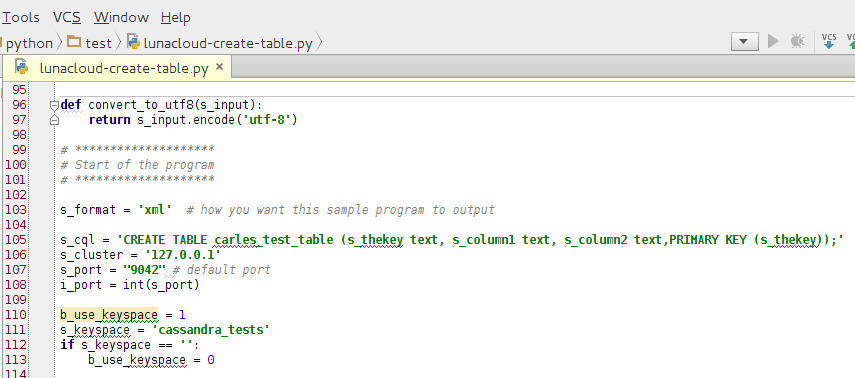
So I created a function convert_to_string that converts known data types to String, and so later we will only deal with Strings.
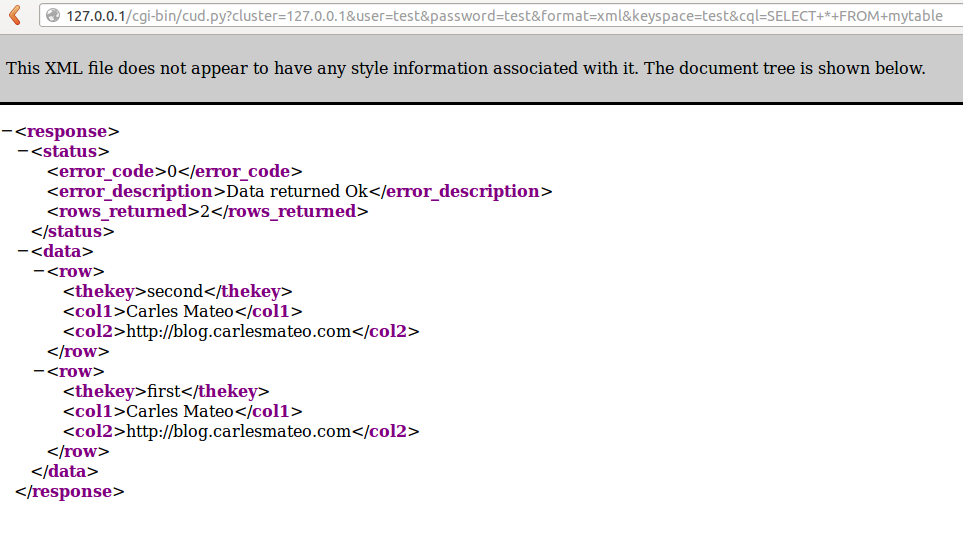
In this sample, the results of the query are rendered in xml or in html.
#!/usr/bin/env python
# -*- coding: UTF-8 -*-
# Use with Python 2.7+

__author__ = 'Carles Mateo'
__blog__ = 'http://blog.carlesmateo.com'

import sys

from cassandra import ConsistencyLevel
from cassandra.cluster import Cluster
from cassandra.query import SimpleStatement

s_row_separator = u"||*||"
s_end_of_row = u"//*//"
s_data = u""

b_error = 0
i_error_code = 0
s_html_output = u""
b_use_keyspace = 1 # By default use keyspace
b_use_user_and_password = 1 # Not implemented yet

def return_success(i_counter, s_data, s_format = 'html'):
    i_error_code = 0
    s_error_description = 'Data returned Ok'

    return_response(i_error_code, s_error_description, i_counter, s_data, s_format)
    return

def return_error(i_error_code, s_error_description, s_format = 'html'):
    i_counter = 0
    s_data = ''

    return_response(i_error_code, s_error_description, i_counter, s_data, s_format)
    return

def return_response(i_error_code, s_error_description, i_counter, s_data, s_format = 'html'):

    if s_format == 'xml':
        print ("Content-Type: text/xml")
        print ("")
        s_html_output = u"<?xml version='1.0' encoding='utf-8' standalone='yes'?>"
        s_html_output = s_html_output + '<response>' \
                                        '<status>' \
                                        '<error_code>' + str(i_error_code) + '</error_code>' \
                                        '<error_description>' + '<![CDATA[' + s_error_description + ']]>' + '</error_description>' \
                                        '<rows_returned>' + str(i_counter) + '</rows_returned>' \
                                        '</status>' \
                                        '<data>' + s_data + '</data>' \
                                        '</response>'
    else:
        print("Content-Type: text/html; charset=utf-8")
        print("")
        s_html_output = str(i_error_code)
        s_html_output = s_html_output + '\n' + s_error_description + '\n'
        s_html_output = s_html_output + str(i_counter) + '\n'
        s_html_output = s_html_output + s_data + '\n'

    print(s_html_output.encode('utf-8'))
    sys.exit()
    return

def convert_to_string(s_input):
    # Convert other data types to string

    s_output = s_input

    try:
        if value is not None:

            if isinstance(s_input, unicode):
                # string unicode, do nothing
                return s_output

            if isinstance(s_input, (int, float, bool, set, list, tuple, dict)):
                # Convert to string
                s_output = str(s_input)
                return s_output

            # This is another type, try to convert
            s_output = str(input)
            return s_output

        else:
            # is none
            s_output = ""
            return s_output

    except Exception as e:
        # Were unable to convert to str, will return as empty string
        s_output = ""

    return s_output

def convert_to_utf8(s_input):
    return s_input.encode('utf-8')

# ********************
# Start of the program
# ********************

s_format = 'xml'  # how you want this sample program to output

s_cql = 'SELECT * FROM test_table;'
s_cluster = '127.0.0.1'
s_port = "9042" # default port
i_port = int(s_port)

b_use_keyspace = 1
s_keyspace = 'cassandra_tests'
if s_keyspace == '':
    b_use_keyspace = 0

s_user = ''
s_password = ''
if s_user == '' or s_password == '':
    b_use_user_and_password = 0

try:
    cluster = Cluster([s_cluster], i_port)
    session = cluster.connect()
except Exception as e:
    return_error(200, 'Cannot connect to cluster ' + s_cluster + ' on port ' + s_port + '.' + e.message, s_format)

if (b_use_keyspace == 1):
    try:
        session.set_keyspace(s_keyspace)
    except:
        return_error(210, 'Keyspace ' + s_keyspace + ' does not exist', s_format)

try:
    o_results = session.execute_async(s_cql)
except Exception as e:
    return_error(300, 'Error executing query. ' + e.message, s_format)

try:
    rows = o_results.result()
except Exception as e:
    return_error(310, 'Query returned result error. ' + e.message, s_format)

# Query returned values
i_counter = 0
try:
    if rows is not None:
        for row in rows:
            i_counter = i_counter + 1

            if i_counter == 1 and s_format == 'html':
                # first row is row titles
                for key, value in vars(row).iteritems():
                    s_data = s_data + key + s_row_separator

                s_data = s_data + s_end_of_row

            if s_format == 'xml':
                s_data = s_data + ''

            for key, value in vars(row).iteritems():
                # Convert to string numbers or other types
                s_value = convert_to_string(value)
                if s_format == 'xml':
                    s_data = s_data + '<' + key + '>' + '<![CDATA[' + s_value + ']]>' + ''
                else:
                    s_data = s_data + s_value
                    s_data = s_data + s_row_separator


            if s_format == 'xml':
                s_data = s_data + ''
            else:
                s_data = s_data + s_end_of_row

except Exception as e:
    # No iterable data
    return_success(i_counter, s_data, s_format)

# Just print the data
return_success(i_counter, s_data, s_format)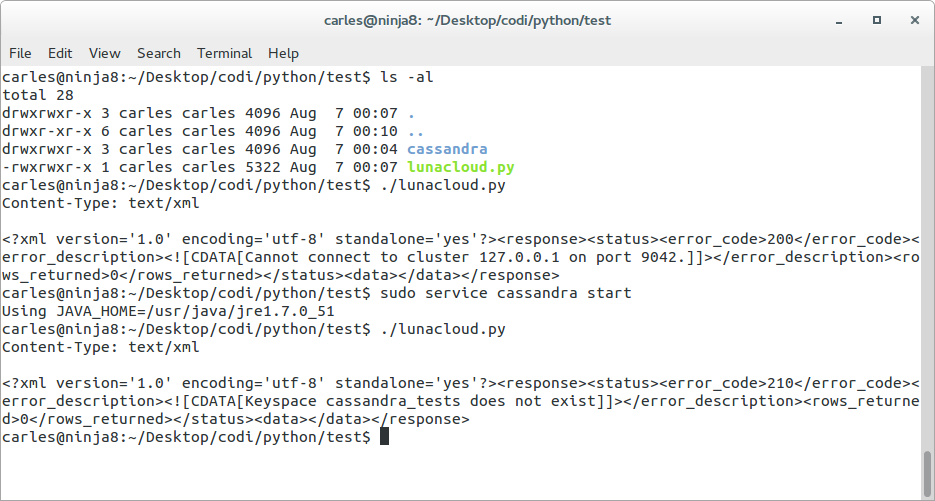
If you did not create the namespace like in the samples before, change those lines to:
s_cql = 'CREATE KEYSPACE cassandra_tests WITH REPLICATION = { \'class\': \'SimpleStrategy\', \'replication_factor\': 1 };'
s_cluster = '127.0.0.1'
s_port = "9042" # default port
i_port = int(s_port)

b_use_keyspace = 1
s_keyspace = ''
Run the program to create the Keyspace and you’ll get:
carles@ninja8:~/Desktop/codi/python/test$ ./lunacloud-create.py Content-Type: text/xml <error_code>0<error_description>Then you can create the table simply by setting:
s_cql = 'CREATE TABLE test_table (s_thekey text, s_column1 text, s_column2 text,PRIMARY KEY (s_thekey));' s_cluster = '127.0.0.1' s_port = "9042" # default port i_port = int(s_port) b_use_keyspace = 1 s_keyspace = 'cassandra_tests'
Cassandra Universal Driver
As mentioned above if you use a language Tcp/Ip enabled very new, or very old like ASP or ColdFusion, or from Unix command line and you want to use it with Cassandra, you can use my solution http://www.cassandradriver.com/.
It is basically a Web Gateway able to speak XML, JSon or CSV alike. It relies on the official Datastax’s python driver.
It is not so fast as a native driver, but it works pretty well and allows you to split your architecture in interesting ways, like intermediate layers to restrict even more security (For example WebServers may query the gateway, that will enstrict tome permissions instead of having direct access to the Cassandra Cluster. That can also be used to perform real-time map-reduce operations on the amount of data returned by the Cassandras, so freeing the webservers from that task and saving CPU).
Tip: If you use Cassandra for Development only, you can limit the amount of memory used by editing the file /etc/cassandra/cassandra-env.sh and hardcoding:
# limit the memory for development environment # -------------------------------------------- system_memory_in_mb="512" system_cpu_cores="1" # --------------------------------------------Just before the line:
# set max heap size based on the followingThat way Cassandra will believe your system memory is 512 MB and reserve only 256 MB for its use.