News from the Blog 2022-06-22

For the first part of June I’ve been quiet on Social Media as I was on holidays and taking some scheduled tests for my health in the hospital.

Carles in the Media/Press/Streaming

Twitch

I started streaming live Python coding sessions in Twitch. I’m giving it a try to see if coders have engagement.

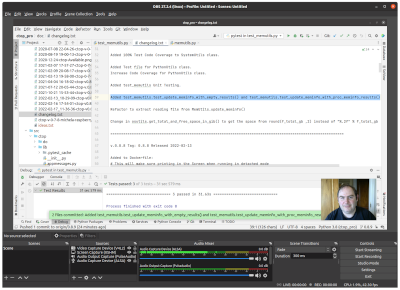
The Software I use to broadcast from Linux is OBS.

I started with my Open Source project ctop.

I had a very long and interesting session on 2022-06-06 about OpenZFS, Data Centers, NVMe, iSCSI, Hard Drives, Storage, performance, Data Centers

More funny things happened like when I was installing a VirtualBox VM live, and the ZFS pool became irresponsible due hardware errors in one SATA Spinning drive.

Things from broadcasting live…

Some of the feedback I got from talented Engineers is that even if the original matter to talk about was interesting, seeing everything falling apart live due to unexpected hardware problems, and me troubleshooting live is being the best of the show… which I found very amusing.

RAB Radio the new digital world

I keep doing my radio space for Radio America Barcelona, once per week, addressed to the Catalan Community across the world and expats.

This radio program, streamed also via Twitch, is available in Catalan language only. RAB.

Open Source

carleslibs

I’ve been working in version 1.0.8 branch, and after a session of refactor on Twitch where I found a bug in MenuUtils class, I fixed it and released v. 1.0.8. You can see the video on the link.

Now I’m working on the branch v. 1.0.9.

ctop

I’ve been working in the branch 0.8.9.

My first Twitch broadcast was about adding Unit Testing to MemUtils class.

You can see all my videos:

http://www.youtube.com/channel/UCYzY-2wJ9W_ooR64-QzEdJg

Infrastructure

OpenStack

I recommend you the videos in this page about Operating OpenStack at Scale.

Some of my Blizzard colleagues talk on it.

https://superuser.openstack.org/articles/upgrades-in-large-scale-openstack-infrastructure-openinfra-live-episode-6/

https://www.openstack.org/videos/summits/denver-2019/how-blizzard-entertainment-uses-autoscaling-with-overwatch

My last physical server in a Data Center

This week I decommissioned my last physical server in a Data Center.

It has been a long journey since I created my company to launch my own projects, and I started having my own infrastructure, back at 2000.

I was offering VPS at that time, with VMWare as Hypervisor.

This last Rack Server served me well for 21 years.

Now everything is Cloud, and is not viable to host and maintain servers unless this is your main occupation. Server’s motherboards die, hard drives die and they need to be replaced. Maintaining infrastructure it’s a full time job and you require somebody to do it. Also using fixed servers only prevents you from moving fast, locks a lot of money, and from spawning more compute capacity.

If you are curious this Rack Server is a Super Micro with Intel Xeon processor and SCSI drives.

Security

Firewall

I keep blocking thousands of IP Addresses every day.

When I see a pattern of an IP trying an attacks against the Server I look at the IP and if it’s from a hosting provider I just block the entire range.

I keep blocking any IP Address coming from Russia or Belarus since they invaded Ukraine.

My Health

I visited the hospital for a programmed following on my health.

The analysis are super good, and it’s super clear that I’ve improved radically. My discipline with the diet, taking the medicines and doing exercise regularly has been crucial.

My Doctor is confident that I’ll have a full recovery, but to do so I need to loss a lot of weight in a year or two.

So, I need to focus on my health and in doing exercise, being happy and avoid any kind of negative stress.

The cost of the travels and the medicines have put some stress into my economy, but I’m fortunate that I can handle it.

Entertainment / Life / Reflections

Star Wars and racism

I’m really enjoying new Start Wars series Obi Wan, and I’ve been profoundly shocked to read that there are fans being racist against the black characters.

https://www.theverge.com/2022/5/31/23148468/star-wars-obi-wan-moses-ingram-third-sister

So just writing here to show my support to human beings from all races, genders including transgender, LGTB+, conditions and preferences.

Fixing the Error Can’t locate IPC/Run.pm in @INC in CentOS 7.5

So if you get an error like this:

Can't locate IPC/Run.pm in @INC (@INC contains: /usr/local/lib64/perl5 /usr/local/share/perl5 /usr/lib64/perl5/vendor_perl /usr/share/perl5/vendor_perl /usr/lib64/perl5 /usr/share/perl5 .) at ./check_ipmi_sensor line 35.
BEGIN failed--compilation aborted at ./check_ipmi_sensor line 35.

The solutions is simple.

sudo yum makecache

yum install perl-IPC-Run

You’ll see the list of mirrors and an output similar to this:

Loaded plugins: fastestmirror, versionlock
Loading mirror speeds from cached hostfile
centos-updates                                                                                                                                          | 3.4 kB  00:00:00
epel                                                                                                                                                    | 4.7 kB  00:00:00
extras                                                                                                                                                  | 3.4 kB  00:00:00
Resolving Dependencies
--> Running transaction check
---> Package perl-IPC-Run.noarch 0:0.92-2.el7 will be installed
--> Processing Dependency: perl(IO::Pty) >= 1.08 for package: perl-IPC-Run-0.92-2.el7.noarch
--> Running transaction check
---> Package perl-IO-Tty.x86_64 0:1.10-11.el7 will be installed
--> Finished Dependency Resolution

Dependencies Resolved

===============================================================================================================================================================================
 Package                                     Arch                                  Version                                    Repository                                  Size
===============================================================================================================================================================================
Installing:
 perl-IPC-Run                                noarch                                0.92-2.el7                                 centos-base                                122 k
Installing for dependencies:
 perl-IO-Tty                                 x86_64                                1.10-11.el7                                centos-base                                 42 k

Transaction Summary
===============================================================================================================================================================================
Install  1 Package (+1 Dependent package)

Total download size: 163 k
Installed size: 397 k
Downloading packages:
(1/2): perl-IO-Tty-1.10-11.el7.x86_64.rpm                                                                                                               |  42 kB  00:00:00
(2/2): perl-IPC-Run-0.92-2.el7.noarch.rpm                                                                                                               | 122 kB  00:00:11
-------------------------------------------------------------------------------------------------------------------------------------------------------------------------------
Total                                                                                                                                           15 kB/s | 163 kB  00:00:11
Running transaction check
Running transaction test
Transaction test succeeded
Running transaction
  Installing : perl-IO-Tty-1.10-11.el7.x86_64                                                                                                                              1/2
  Installing : perl-IPC-Run-0.92-2.el7.noarch                                                                                                                              2/2
  Verifying  : perl-IPC-Run-0.92-2.el7.noarch                                                                                                                              1/2
  Verifying  : perl-IO-Tty-1.10-11.el7.x86_64                                                                                                                              2/2

Installed:
  perl-IPC-Run.noarch 0:0.92-2.el7

Dependency Installed:
  perl-IO-Tty.x86_64 0:1.10-11.el7

Complete!

Twitch Stream about ZFS, zpool scrubbing, Hard drives, Data Centers, NVMe, Rack Servers…

Twitch stream on 2022-06-06 10:50 IST

In this very long session we went through actual errors in a ZFS pool, we check the Kernel, we remove and reinsert the drive, conduct zpool scrub… in the meantime I talked about Rack, Rack Servers, PSU, redundant components, ECC RAM…

Sorting an Array of Tuples in Python

In this video I show a nice way to work with Data in Python, by using Tuples.

I also show how to easily and conveniently sort the Data based on your preferred criteria by using lambdas.

What happens if we have accents, ç, Ç etc…

You can download the code from:

https://gitlab.com/carles.mateo/python_combat_guide/-/blob/master/src/arrays_with_tuples.py

Fixing the problems installing napalm-base in Ubuntu 20.04 LTS

One of my friends wanted to use SaltStack and https://github.com/napalm-automation/napalm-salt

But he had problems installing napalm-base package.

Note that the package is no longer maintained.

He tried with the last one, and with the previous one (0.25.0), but he always got the error: ModuleNotFoundError: No module named ‘pip.req’

pip3 install napalm-base==0.25.0

Defaulting to user installation because normal site-packages is not writeable
Collecting napalm-base==0.25.0
  Using cached napalm-base-0.25.0.tar.gz (35 kB)
  Preparing metadata (setup.py) ... error
  error: subprocess-exited-with-error
  
  × python setup.py egg_info did not run successfully.
  │ exit code: 1
  ╰─> [6 lines of output]
      Traceback (most recent call last):
        File "<string>", line 2, in <module>
        File "<pip-setuptools-caller>", line 34, in <module>
        File "/tmp/pip-install-gzd07xzq/napalm-base_aace1b03ac0e4045bbc85e27c788ebc1/setup.py", line 5, in <module>
          from pip.req import parse_requirements
      ModuleNotFoundError: No module named 'pip.req'
      [end of output]
  
  note: This error originates from a subprocess, and is likely not a problem with pip.
error: metadata-generation-failed

× Encountered error while generating package metadata.
╰─> See above for output.

note: This is an issue with the package mentioned above, not pip.
hint: See above for details.

TL;TR: The problem is that pip version 10, changed the structure for req.

There are several solutions that can be done to make it work, but the easiest way is to downgrade pip, and install the package. After pip can be upgraded again.

python -m pip install pip==9.0.3
pip3 install napalm-base

News from the Blog 2022-05-22

Media, Press, Radio

I was contributing already but since the 2th of May I started my radio space, also streamed in Twitch, google Podcast, Apple, Spotify… in Radio America Barcelona.

My space is named The New Digital World (“el nou món digital”) and I talk about tech news, technology, videogames and handy tricks.

This content is in Catalan language only, so I added to the blog as ending in [CA]

New Projects: Erasure Code

For my university thesis I’ve been creating an Erasure Coding solution that allows to encode and distribute the files seamlessly across an universe of Servers in different cloud providers, balancing the disk space used, super easy to use, and resilient to disaster and recovery.

I created my project, named Erasure Code www.erasurecode.com as Open Source, so all size of companies will be able to benefit from this technology, only available to multinationals until now.

Here you can watch a presentation and a demo:

Erasure Code project

I hope this will help tons of companies and startup, hopefully scientific startups, to save costs and focus more in their business and to make a better world.

My final presentation was the 20th of May.

Books

Python Combat Guide

I’ve updated my book Python Combat Guide with few additions.

Currently is 405 pages DIN-A4 size plus gitlab downloadable code.

It can be downloaded as PDF DRM-free.

Updates to this version 1.08 2022-05-11:

  • Added an example of .copy() for Arrays and mention to deepcopy()
  • Example on how to sort a dictionary of key/counter
  • Improvements to MT Notation updated
  • Added packages recommended: colorama, pynput, bisect
  • Added Personal WebServer examples.
  • Added examples of Python misbehaving with Floats.
  • Explanations about redefining reserved keywords like print or exit as a variable.
  • Style modification to add lines over the line number and over the Footnote.

My health

My health is improving.

Thanks to my self discipline, following a good diet, taking the medicines… I’ve seen an spectacular improvement since I was sent urgently to he hospital with risk for my life.

I’ve very grateful that amazing doctors care of me.

I had some ups and downs and downs while pushing to finish my final project for the HDip in Computer Science Cloud Computing, but I managed to complete everything on time.

I had to travel to visit amazing specialists, and had to pay the expensive treatments, however everything worked and my health has improved drastically. I am very happy to count with additional source of income, like the teaching programming and my technical books, which helped me to be able to deal with all these sorts of unexpected expenses. I appreciate every single sale of my books, as it made me feel useful and appreciated when I was a bit low, and the nice details some of the readers had. Thanks.

Firewall

I’ve keep blocking in the Firewall any IP and that network coming to the blog from Russia and Belarus. I’ve blocked millions of IP Addresses so far.

I’ve also blocked the traffic coming from CSP when I detect an attack and the IP belongs to them. Most of the attacks were coming from Digital Ocean, after your-server.de and hetzer.de and finally Amazon. Curiously some attacks came from IPs from Microsoft.

I’ve blocked all these ranges of IPs, hundreds of thousands.

Despite blocking all these IPs from CSPs, the number of visitors keeps growing.

At the end my blog is for Engineers and for people, I don’t have interest in bots, and I don’t get any revenue from ads (I never added ads) so I’m perfectly happy with having less visitors, but being humans that find help in the blog.

Humor

Why I think in Python is not a good idea to raise exceptions inside your methods

Last update: 2022-05-18 10:48 Irish Time

Recently a colleague was asking me for advice on their design of error handling in a Python application.

They were catching an error and raising an Exception, inside the except part of a method, to be catch outside the method.

And at some point a simple logic got really messy and unnecessarily complicated. Also troubleshooting and debugging an error was painful because they were only getting a Custom Exception and not context.

I explained to my colleague that I believed that the person that created that Exception chain of catch came from Java background and why I think they choose that path, and why I think in Python it’s a bad idea.

In Java, functions and methods can only return one object.

I programmed a lot in Java in my career, and it was a pain having to create value objects, and having to create all kind of objects for the return. Is it a good thing that types are strongly verified by the language? Yes. It worked? Yes. It made me invest much more time than necessary? Also yes.

Having the possibility to return only one object makes it mandatory having a way to return when there was an error. Otherwise you would need to encapsulate an error code and error description fields in each object, which is contrary to the nature of the object.

For example, a class Persona. Doesn’t make any sense having an attribute inside the class Persona to register if an operation related to this object went wrong.

For example, if we are in a class Spaceship that has a method GetPersonaInCommand() and there is a problem in that method, doesn’t make any sense to return an empty Persona object with attributes idError, errorDescription. Probably the Constructor or Persona will require at least a name or Id to build the object…. so in this case, makes sense that the method raises an Exception so the calling code catches it and knows that something went wrong or when there is no data to return.

This will force to write Custom Exceptions, but it’s a solution.

Another solution is creating a generic response object which could be an Object with these attributes:

  • idError
  • errorDescription
  • an Object which is the response, in our example Persona or null

I created this kind of approach for my Cassandra libraries to easily work with Cassandra from Java and from PHP, and for Cassandra Universal Driver (a http/s gateway created in year 2014).

Why this in not necessary in Python

Python allows you to return multiple values, so I encourage you tor return a boolean for indicating the success of the operation, and the object/value you’re interested.

You can see it easily if you take a look to FileUtils class from my OpenSource libraries carleslibs.

The method get_file_size_in_bytes(self, s_file) for example:

    def get_file_size_in_bytes(self, s_file):

        b_success = False
        i_file_size = 0

        try:
            # This will help with Unit Testing by raisin IOError Exception
            self.test_helper()

            i_file_size = os.path.getsize(s_file)
            b_success = True
        except IOError:
            b_success = False

        return b_success, i_file_size

It will always return a boolean value to indicate success or failure of the operation and an integer for the size of the file.

The calling code will do something like this:

o_fileutils = FileUtils()
b_success, i_bytes = o_fileutils.get_file_size_in_bytes("profile.png")
if b_succes is False:
    print("Error! The file does not exist or cannot be accessed!")
    exit(1)

if i_bytes < 1024:
    print("The profile picture should be at least 1KB")
    exit(1)

print("Profile picture exists and is", i_bytes, " bytes in length!")

The fact that Python can return multiple variables makes super easy dealing with error handling without having to take the road of Custom Exceptions.

And it is Ok if you want to follow this path, but in my opinion, for most of the developers up to Senior levels, it only over complicates the logic of your code and the amount of try/excepts you have to have everywhere.

If you use PHP you can mix different types in an Array, so you can always return an Array with a boolean, or an i_id_error, and your object or data of whatever type it’s.

Getting back to my carleslibs Open Source package, it is super easy to Unit Test these methods.

In my opinion, this level of simplicity, brings only advantages. Including Software Development speed, which is good for the business.

I’m not advocating for not using Custom Exceptions or to not develop a Exceptions Raising strategy if you need it and you know what you’re doing. I’m just suggesting why I think most of the developments in Python do not really need this and only over complicates the development. There are situations where raising exceptions will be a perfectly useful or even the best approach, there are many scenarios, but I think that in most of cases, using raise inside except will only multiply the time of the development and slow down the speed of bringing new features to the business, over complicating Unit Test as well, and be a real pain for the Junior and Intermediate developers.

The Constructor

Obviously, as the Constructor doesn’t return any value, it is perfectly fine to raise an exception in there, or just to use try/except in the code that is instancing the objects.

Working on a Sudoku Solver in Python (Source Code)

This is a document previous to a live code review session.

It has the information to prepare for the upcoming code review session, where I plan to share the lessons learned, decision I took, mistakes I did, refactors I had to overcome, and tentatively we will refactor code in order to add some Unit Testing.

History

I used to play sudoku with my family, so from time to time I do by myself.

Once I found a sudoku that was impossible and it happened that it was a typo from the newspaper, so, when I found another impossible sudoku I wanted to know if it was me, or if there was a typo or similar, so I decided to write a Sudoku Solver that will solve the sudoku for me.

The bad guys

I had problems solving these two sudokus:

Some Screenshots

The Source Code

You can clone the project from here:

https://gitlab.com/carles.mateo/sudo-ku-solver

You will have to install colorama package, as I used it for giving colors to the output:

pip3 install colorama

The main program sudokusolver.py:

import copy
from lib.colorutils import ColorUtils


class SudokuMap():
    
    def __init__(self, i_width, i_height, o_color=ColorUtils()):
        self.i_width = i_width
        self.i_height = i_height
        self.o_color = o_color

        self.a_map = self.generate_empty_map()

    def generate_empty_map(self):
        a_map = []
        a_row = []
        a_i_possible_numbers = [1, 2, 3, 4, 5, 6, 7, 8, 9]
        for i_x in range(self.i_width):
            a_row.append(a_i_possible_numbers.copy())

        for i_y in range(self.i_height):
            a_map.append(copy.deepcopy(a_row))

        return a_map

    def set_number(self, i_number, i_x, i_y):
        """
        Sets a well known (already defined in the original map) number for a position
        :param i_number:
        :param i_x:
        :param i_y:
        :return:
        """
        self.a_map[i_y][i_x] = [i_number]

    def detect_and_remove_a_number_from_possibles_from_a_row(self, i_y):
        """
        We will elinate this possibility from the row
        :return: Boolean
        """

        b_found = False
        self.o_color.print_label("Detecting numbers to remove from row " + str(i_y))

        for i_x in range(0, self.i_width):
            a_i_numbers_possible = self.a_map[i_y][i_x]
            if len(a_i_numbers_possible) == 1:
                b_found = True
                i_number_found = self.a_map[i_y][i_x][0]
                print("Found a number that will be removed from horizontal and vertical and in quadrant", i_number_found, "at", i_x, i_y)
                self.remove_a_number_from_possibles_in_a_row(i_number_to_remove=i_number_found, i_y=i_y)
                self.remove_a_number_from_possibles_in_a_column(i_number_to_remove=i_number_found, i_x=i_x)
                self.remove_a_number_from_possibles_in_quadrant(i_number_to_remove=i_number_found, i_x=i_x, i_y=i_y)

        return b_found

    def remove_a_number_from_possibles_in_a_row(self, i_number_to_remove, i_y):
        """
        Removes a number from the list of possibles in that row
        :param i_number_to_remove:
        :param i_y:
        :return:
        """

        self.o_color.print_label("> Scanning for removing " + str(i_number_to_remove) + " in row " + str(i_y))

        for i_x in range(0, self.i_width):
            a_i_numbers_possible = self.a_map[i_y][i_x]
            if len(a_i_numbers_possible) == 1 and a_i_numbers_possible[0] == i_number_to_remove:
                # This is the right cell, ignore it
                pass
            else:
                # Subtract the number from the sequence
                if i_number_to_remove in a_i_numbers_possible:
                    a_i_numbers_possible_old = a_i_numbers_possible.copy()
                    a_i_numbers_possible.remove(i_number_to_remove)
                    print("> Removed", i_number_to_remove, "From:", str(i_x) + "x" + str(i_y), a_i_numbers_possible_old, "Pending:", a_i_numbers_possible)
                    self.a_map[i_y][i_x] = a_i_numbers_possible
                    if len(a_i_numbers_possible) == 1:
                        # Trigger it again for the number recently discovered
                        i_new_number_to_remove = a_i_numbers_possible[0]
                        self.o_color.print_success("> Found " + str(i_new_number_to_remove) + " From: " + str(i_x) + "x" + str(i_y))
                        self.remove_a_number_from_possibles_in_a_row(i_number_to_remove=i_new_number_to_remove, i_y=i_y)
                        self.remove_a_number_from_possibles_in_a_column(i_number_to_remove=i_new_number_to_remove, i_x=i_x)
                        self.remove_a_number_from_possibles_in_quadrant(i_number_to_remove=i_new_number_to_remove, i_x=i_x, i_y=i_y)

        self.o_color.print_label("> Leaving scan for " + str(i_number_to_remove) + " in row " + str(i_y))

    def remove_a_number_from_possibles_in_a_column(self, i_number_to_remove, i_x):
        """
        Removes a number from the list of possibles in that row
        :param i_number_to_remove:
        :param i_y:
        :return:
        """

        self.o_color.print_label("V Scanning for removing " + str(i_number_to_remove) + " in col " + str(i_x))

        for i_y in range(0, self.i_height):
            a_i_numbers_possible = self.a_map[i_y][i_x]
            if len(a_i_numbers_possible) == 1 and a_i_numbers_possible[0] == i_number_to_remove:
                # This is the right cell, ignore it
                pass
            else:
                # Subtract the number from the sequence
                if i_number_to_remove in a_i_numbers_possible:
                    a_i_numbers_possible_old = a_i_numbers_possible.copy()
                    a_i_numbers_possible.remove(i_number_to_remove)
                    print("V Removed", i_number_to_remove, "From:", i_x, i_y, a_i_numbers_possible_old, "Pending:", a_i_numbers_possible)
                    # @TODO: Remove, as it's a pointer it is not needed
                    self.a_map[i_y][i_x] = a_i_numbers_possible
                    if len(a_i_numbers_possible) == 1:
                        # Trigger it again for the number recently discovered
                        i_new_number_to_remove = a_i_numbers_possible[0]
                        self.o_color.print_success("Found " + str(i_new_number_to_remove) + " From: " + str(i_x) + " " + str(i_y))
                        self.remove_a_number_from_possibles_in_a_row(i_number_to_remove=i_new_number_to_remove, i_y=i_y)
                        self.remove_a_number_from_possibles_in_a_column(i_number_to_remove=i_new_number_to_remove, i_x=i_x)
                        self.remove_a_number_from_possibles_in_quadrant(i_number_to_remove=i_new_number_to_remove, i_x=i_x, i_y=i_y)

        self.o_color.print_label("V Leaving scan for " + str(i_number_to_remove) + " in col " + str(i_x))

    def remove_a_number_from_possibles_in_quadrant(self, i_number_to_remove, i_x, i_y):
        """

        :param i_number_to_remove:
        :param i_x:
        :param i_y:
        :return:
        """

        i_x_quadrant = int(i_x / 3)
        i_y_quadrant = int(i_y / 3)

        i_x_ini = i_x_quadrant * 3
        i_x_end = i_x_ini + 2

        i_y_ini = i_y_quadrant * 3
        i_y_end = i_y_ini + 2

        for i_y_rel in range(i_y_ini, i_y_end + 1):
            for i_x_rel in range(i_x_ini, i_x_end + 1):
                a_i_numbers_possible = self.a_map[i_y_rel][i_x_rel]
                if len(a_i_numbers_possible) == 1 and a_i_numbers_possible[0] == i_number_to_remove:
                    # This is the right cell, ignore it
                    pass
                else:
                    # Subtract the number from the sequence
                    if i_number_to_remove in a_i_numbers_possible:
                        a_i_numbers_possible_old = a_i_numbers_possible.copy()
                        a_i_numbers_possible.remove(i_number_to_remove)
                        print("X Removed", i_number_to_remove, "From:", i_x_rel, i_y_rel, a_i_numbers_possible_old, "Pending:", a_i_numbers_possible)
                        # Nota: Here I had a bug and I was "liant-la parda"
                        # if len(a_i_numbers_possible) == 1:
                        #     # Trigger it again for the number recently discovered
                        #     i_new_number_to_remove = a_i_numbers_possible[0]
                        #     string_ints = [str(int) for int in ints]
                        #     self.o_color.print_success("X Found " + str(i_new_number_to_remove) + " From: " + str(i_x) + "x" + str(i_y) + "[]")
                        #     self.remove_a_number_from_possibles_in_a_row(i_number_to_remove=i_new_number_to_remove, i_y=i_y)
                        #     self.remove_a_number_from_possibles_in_a_column(i_number_to_remove=i_new_number_to_remove, i_x=i_x)

    def check_if_number_possibles_in_quadrant_is_unique(self, i_number_to_check, i_x, i_y):
        """

        :param i_number_to_remove:
        :param i_x:
        :param i_y:
        :return: b_found
        """

        i_x_quadrant = int(i_x / 3)
        i_y_quadrant = int(i_y / 3)

        i_x_ini = i_x_quadrant * 3
        i_x_end = i_x_ini + 2

        i_y_ini = i_y_quadrant * 3
        i_y_end = i_y_ini + 2

        i_number_of_occurrences_found = 0
        i_x_position_number = 0
        i_y_position_number = 0

        b_unique = False

        for i_y_rel in range(i_y_ini, i_y_end + 1):
            for i_x_rel in range(i_x_ini, i_x_end + 1):
                a_i_numbers_possible = self.a_map[i_y_rel][i_x_rel]
                for i_number_in_possibles in a_i_numbers_possible:
                    if len(a_i_numbers_possible) > 1 and i_number_in_possibles == i_number_to_check:
                        # This is the right cell, ignore it
                        i_number_of_occurrences_found += 1
                        i_x_position_number = i_x_rel
                        i_y_position_number = i_y_rel
                        if i_number_of_occurrences_found > 1:
                            # Unsuccessful
                            break

        if i_number_of_occurrences_found == 1:
            # Success!
            a_i_numbers_possible = [i_number_to_check]
            self.a_map[i_y_position_number][i_x_position_number] = a_i_numbers_possible
            b_unique = True

        return b_unique, i_x_position_number, i_y_position_number

    def check_if_number_possibles_in_row_is_unique(self, i_number_to_check, i_y):
        """

        :param i_number_to_check:
        :param i_x:
        :param i_y:
        :return:
        """

        i_number_of_occurrences_found = 0
        i_x_position_number = 0
        i_y_position_number = 0

        b_unique = False

        for i_x_rel in range(0, 9):
            a_i_numbers_possible = self.a_map[i_y][i_x_rel]
            for i_number_in_possibles in a_i_numbers_possible:
                if len(a_i_numbers_possible) > 1 and i_number_in_possibles == i_number_to_check:
                    # This is the right cell, ignore it
                    i_number_of_occurrences_found += 1
                    i_x_position_number = i_x_rel
                    i_y_position_number = i_y
                    if i_number_of_occurrences_found > 1:
                        # Unsuccessful
                        break

        if i_number_of_occurrences_found == 1:
            # Success!
            a_i_numbers_possible = [i_number_to_check]
            self.a_map[i_y_position_number][i_x_position_number] = a_i_numbers_possible
            b_unique = True

        return b_unique, i_x_position_number, i_y_position_number

    def get_map_drawing_as_string(self, a_map_alternative=None):
        s_map = ""
        i_counter_y = 0
        s_separator_rows = "="

        a_map_to_use = self.a_map
        if a_map_alternative is not None:
            a_map_to_use = a_map_alternative

        s_map = s_map + s_separator_rows * 37 + "\n"
        for a_row in a_map_to_use:
            i_counter_y += 1
            if i_counter_y == 3:
                i_counter_y = 0
                s_separator_rows = "="
            else:
                s_separator_rows = "-"

            s_map = s_map + "|"
            i_counter = 0
            for a_i_numbers_possible in a_row:
                i_counter += 1

                if len(a_i_numbers_possible) == 1:
                    s_number = str(a_i_numbers_possible[0])
                else:
                    s_number = " "

                if i_counter == 3:
                    s_separator = "|"
                    i_counter = 0
                else:
                    s_separator = "¦"
                s_map = s_map + " " + s_number + " " + s_separator
            s_map = s_map + "\n"

            s_map = s_map + s_separator_rows * 37 + "\n"

            # Replace 0 by " "
            s_map = s_map.replace("0", " ")

        s_map = s_map + "\n\n"
        i_total_numbers_found, a_s_numbers_found = self.get_total_numbers_found()
        s_map = s_map + "Total numbers found: " + str(i_total_numbers_found) + " Numbers found: " + " ".join(a_s_numbers_found) + "\n"

        return s_map

    def get_map_drawing_of_possibles_as_string(self, a_map_alternative=None):
        s_map = ""
        i_counter_y = 0
        s_separator_rows = "="

        a_map_to_use = self.a_map
        if a_map_alternative is not None:
            a_map_to_use = a_map_alternative

        s_map = s_map + self.o_color.color_blue(s_separator_rows * ((9 * ( 9 + 2 )) + 10)) + "\n"
        for a_row in a_map_to_use:
            i_counter_y += 1
            if i_counter_y == 3:
                i_counter_y = 0
                s_separator_rows = "="
            else:
                s_separator_rows = "-"

            s_map = s_map + self.o_color.color_blue("|")
            i_counter = 0
            for a_i_numbers_possible in a_row:
                i_counter += 1

                if len(a_i_numbers_possible) == 1:
                    # The right number
                    s_number = str(a_i_numbers_possible[0]).center(9)
                    s_number = self.o_color.color_success(s_number)
                else:
                    a_i_numbers_possible_string = []
                    for i_number in a_i_numbers_possible:
                        s_number = str(i_number)
                        # Replace by the color sequence
                        if i_number == 2:
                            s_number = self.o_color.color_red(s_number)
                        if i_number == 3:
                            s_number = self.o_color.color_yellow(s_number)
                        if i_number == 4:
                            self.o_color.color_magenta(s_number)
                        a_i_numbers_possible_string.append(s_number)
                    # s_number = "".join(a_i_numbers_possible_string).ljust(9)
                    s_number = "".join(a_i_numbers_possible_string) + " " * (9-len(a_i_numbers_possible))

                if i_counter == 3:
                    s_separator = self.o_color.color_blue("|")
                    i_counter = 0
                else:
                    s_separator = self.o_color.color_blue("¦")
                s_map = s_map + " " + s_number + " " + s_separator
            s_map = s_map + "\n"

            s_map = s_map + self.o_color.color_blue(s_separator_rows * ((9 * (9 + 2)) + 10)) + "\n"

            # Replace 0 by " "
            s_map = s_map.replace("0", " ")

        return s_map

    def get_total_numbers_found(self):

        i_total_numbers_found = 0
        a_s_numbers_found = []

        for i_y in range(0, self.i_height):
            for i_x in range(0, self.i_width):
                a_i_numbers_possible = self.a_map[i_y][i_x]
                if len(a_i_numbers_possible) == 1:
                    i_total_numbers_found = i_total_numbers_found + 1
                    i_number_found = self.a_map[i_y][i_x][0]
                    s_number_found = str(i_number_found)
                    if s_number_found not in a_s_numbers_found:
                        a_s_numbers_found.append(s_number_found)

        return i_total_numbers_found, a_s_numbers_found


if __name__ == "__main__":

    o_color = ColorUtils()

    o_map = SudokuMap(9, 9, o_color=o_color)
    o_map.set_number(i_number=1, i_x=1, i_y=0)
    o_map.set_number(3, 4, 0)
    o_map.set_number(8, 7, 0)

    o_map.set_number(8, 0, 1)
    o_map.set_number(7, 3, 1)
    o_map.set_number(4, 5, 1)
    o_map.set_number(6, 8, 1)

    o_map.set_number(3, 2, 2)
    o_map.set_number(9, 6, 2)

    o_map.set_number(2, 1, 3)
    o_map.set_number(4, 4, 3)
    o_map.set_number(6, 7, 3)

    o_map.set_number(5, 0, 4)
    o_map.set_number(6, 3, 4)
    o_map.set_number(2, 5, 4)
    o_map.set_number(8, 8, 4)

    o_map.set_number(3, 1, 5)
    o_map.set_number(8, 4, 5)
    o_map.set_number(7, 7, 5)

    o_map.set_number(2, 2, 6)
    o_map.set_number(6, 6, 6)

    o_map.set_number(9, 0, 7)
    o_map.set_number(4, 3, 7)
    o_map.set_number(3, 5, 7)
    o_map.set_number(2, 8, 7)

    o_map.set_number(8, 1, 8)
    o_map.set_number(6, 4, 8)
    o_map.set_number(1, 7, 8)

    # Extra
    # o_map.set_number(2, 0, 0)

    # Speculative
    o_map.set_number(7, 0, 3)


    # Another map
    o_map2 = SudokuMap(9, 9, o_color=o_color)
    o_map2.set_number(i_number=5, i_x=0, i_y=0)
    o_map2.set_number(i_number=9, i_x=5, i_y=0)

    o_map2.set_number(i_number=7, i_x=2, i_y=1)
    o_map2.set_number(i_number=2, i_x=7, i_y=1)

    o_map2.set_number(i_number=2, i_x=0, i_y=2)
    o_map2.set_number(i_number=3, i_x=4, i_y=2)
    o_map2.set_number(i_number=1, i_x=5, i_y=2)
    o_map2.set_number(i_number=9, i_x=7, i_y=2)

    o_map2.set_number(i_number=7, i_x=0, i_y=3)
    o_map2.set_number(i_number=1, i_x=2, i_y=3)
    o_map2.set_number(i_number=6, i_x=3, i_y=3)
    o_map2.set_number(i_number=9, i_x=4, i_y=3)
    o_map2.set_number(i_number=4, i_x=8, i_y=3)

    o_map2.set_number(i_number=1, i_x=4, i_y=4)

    o_map2.set_number(i_number=6, i_x=0, i_y=5)
    o_map2.set_number(i_number=7, i_x=4, i_y=5)
    o_map2.set_number(i_number=4, i_x=5, i_y=5)
    o_map2.set_number(i_number=3, i_x=6, i_y=5)
    o_map2.set_number(i_number=1, i_x=8, i_y=5)

    o_map2.set_number(i_number=5, i_x=1, i_y=6)
    o_map2.set_number(i_number=3, i_x=3, i_y=6)
    o_map2.set_number(i_number=6, i_x=4, i_y=6)
    o_map2.set_number(i_number=8, i_x=8, i_y=6)

    o_map2.set_number(i_number=6, i_x=1, i_y=7)
    o_map2.set_number(i_number=7, i_x=6, i_y=7)

    o_map2.set_number(i_number=9, i_x=3, i_y=8)
    o_map2.set_number(i_number=3, i_x=8, i_y=8)

    # Extra help while not implemented the best algorithm
    # =============================================================================================================
    # |     5     ¦ 148       ¦ 48        |     7     ¦     2     ¦     9     | 148       ¦     3     ¦     6     |
    # -------------------------------------------------------------------------------------------------------------
    # | 13489     ¦ 13489     ¦     7     | 48        ¦ 48        ¦     6     | 148       ¦     2     ¦     5     |
    # -------------------------------------------------------------------------------------------------------------
    # |     2     ¦ 48        ¦     6     |     5     ¦     3     ¦     1     | 48        ¦     9     ¦     7     |
    # =============================================================================================================
    # |     7     ¦ 38        ¦     1     |     6     ¦     9     ¦ 358       |     2     ¦ 58        ¦     4     |
    # -------------------------------------------------------------------------------------------------------------
    # | 348       ¦ 2348      ¦ 3458      | 28        ¦     1     ¦ 358       |     6     ¦     7     ¦     9     |
    # -------------------------------------------------------------------------------------------------------------
    # |     6     ¦ 289       ¦ 589       | 28        ¦     7     ¦     4     |     3     ¦ 58        ¦     1     |
    # =============================================================================================================
    # | 14        ¦     5     ¦     2     |     3     ¦     6     ¦     7     |     9     ¦ 14        ¦     8     |
    # -------------------------------------------------------------------------------------------------------------
    # | 3489      ¦     6     ¦ 3489      |     1     ¦ 458       ¦ 58        |     7     ¦ 45        ¦     2     |
    # -------------------------------------------------------------------------------------------------------------
    # | 148       ¦     7     ¦ 48        |     9     ¦ 458       ¦     2     | 145       ¦     6     ¦     3     |
    # =============================================================================================================
    # By best algorithm I mean that the last in the middle vertical quadrant from the top right horizontally,
    # only 5 can be in a column. That clarifies that 5 must go to the other column in last quadrant, first column. Coord 6x8
    # o_map2.set_number(i_number=5, i_x=6, i_y=8)
    # ERROR traces from a bug fixed to mentioned during the code review
    # Surprisingly this fails
    # > Leaving scan for 8 in row1
    # V Scanning for removing 8 in col 4
    # V Removed 8 From: 4 7 [5, 8] Pending: [5]
    # Found 5 From: 4 7
    #
    # > Scanning for removing 5 in row 7
    # > Removed 5 From: 5 7 [5, 8] Pending: [8]
    # > Found 8 From: 5 7
    #
    # > Scanning for removing 8 in row 7
    # > Removed 8 From: 0 7 [3, 8] Pending: [3]
    # > Found 3 From: 0 7

    o_map = o_map2

    print(o_map.get_map_drawing_as_string())

    b_changes_found = True
    while b_changes_found is True:
        b_changes_found = False

        for i_y in range(0, o_map.i_height):
            b_found = o_map.detect_and_remove_a_number_from_possibles_from_a_row(i_y=i_y)
            if b_found is True:
                print(o_map.get_map_drawing_as_string())

        for i_y in range(0, o_map.i_height):
            o_map.o_color.print_label("Scanning quadrants for row " + str(i_y))
            for i_number in range(1, 10):
                for i_x in range(0, o_map.i_width):
                    b_found, i_x_found, i_y_found = o_map.check_if_number_possibles_in_quadrant_is_unique(i_number_to_check=i_number, i_x=i_x, i_y=i_y)
                    if b_found is True:
                        # Search again
                        b_changes_found = True
                        o_map.remove_a_number_from_possibles_in_a_row(i_number_to_remove=i_number, i_y=i_y_found)
                        o_map.remove_a_number_from_possibles_in_a_column(i_number_to_remove=i_number, i_x=i_x_found)

                    b_found, i_x_found, i_y_found = o_map.check_if_number_possibles_in_row_is_unique(i_number_to_check=i_number, i_y=i_y)
                    if b_found is True:
                        b_changes_found = True
                        o_map.remove_a_number_from_possibles_in_a_column(i_number_to_remove=i_number, i_x=i_x_found)

                if b_changes_found is True:
                    print(o_map.get_map_drawing_as_string())

    # @TODO: Implement check if number in quadrant can only go to a column, to remove the non possible in that column from another quadrant
    # @TODO: Implement check if in a line only one number can go to a column.

    print(o_map.get_map_drawing_as_string())
    print(o_map.get_map_drawing_of_possibles_as_string())

The color library lib/colorutils.py:

from colorama import Fore, Back, Style , init


class ColorUtils:

    def __init__(self):
        # For Colorama on Windows
        init()

    def print_error(self, m_text, s_end="\n"):
        """
        Prints errors in Red.
        :param s_text:
        :return:
        """

        # If they pass numbers
        s_text = str(m_text)

        print(Fore.RED + s_text)
        print(Style.RESET_ALL, end=s_end)

    def print_success(self, m_text, s_end="\n"):
        """
        Prints errors in Green.
        :param s_text:
        :return:
        """

        # If they pass numbers
        s_text = str(m_text)
        print(Fore.GREEN + s_text)
        print(Style.RESET_ALL, end=s_end)

    def color_success(self, m_text):
        """
        Colors only this
        :param m_text:
        :return:
        """

        s_text = str(m_text)
        return Fore.GREEN + s_text + Fore.RESET

    def color_black(self, m_text):
        s_text = str(m_text)
        return Fore.BLACK + s_text + Fore.RESET

    def color_blue(self, m_text):
        s_text = str(m_text)
        return Fore.BLUE + s_text + Fore.RESET

    def color_red(self, m_text):
        s_text = str(m_text)
        return Fore.RED + s_text + Fore.RESET

    def color_yellow(self, m_text):
        s_text = str(m_text)
        return Fore.YELLOW + s_text + Fore.RESET

    def color_magenta(self, m_text):
        s_text = str(m_text)
        return Fore.MAGENTA + s_text + Fore.RESET

    def print_label(self, m_text, s_end="\n"):
        """
        Prints a label and not the end line
        :param s_text:
        :return:
        """

        # If they pass numbers
        s_text = str(m_text)

        print(Fore.BLUE + s_text, end="")
        print(Style.RESET_ALL, end=s_end)

    def return_text_blue(self, s_text):
        """
        Restuns a Text
        :param s_text:
        :return: String
        """
        s_text_return = Fore.BLUE + s_text + Style.RESET_ALL
        return s_text_return

News from the blog 2022-04-22

Media/Press

I was interviewed by Radio America Barcelona, in their studios in Barcelona.

RAB is a radio for the Catalan diaspora and expats.

The interview was broadcasted by Twitch and can be watched. It’s in Catalan language:

https://www.twitch.tv/videos/1448895585

You can follow them:

Sant Jordi discounted books (promo)

Tomorrow 23th of April is Sant Jordi (Saint George), the patron of Catalonia, and the Catalan traditional celebration consist in this day women gifting a book to the men they love and men gifting a rose to the women they love.

I created a voucher for all my Python books, so, since during 23th of April you can acquire the four books per $10 USD in total.

This voucher is limited to 100 sales.

https://leanpub.com/b/python3all/c/SANTJORDI2022

Python 3

I wrote an article with a Python 3 code that shows the length for file names in Linux ext3 and ext4 Filesystems and in ZFS Pools Filesystem.

I show basically how ASCii characters over 127 are encoded, reducing the maximum length of 255 bytes for the filename.

ZFS

I’ve updated an article explaining how to create a ZPool raidz (RAID 5 equivalent) from three loop devices based on local files.

Thanks to those that bought my ZFS book this month. :)

HTML and JavaScript

I wrote a super simple code to hide the <p> using jQuery and JavaScript.

Free books

https://books.goalkicker.com/

Books I bought

This month I bought these books.

Firewall

I continued to block any Russian or Belarus Ip Address that connects to the blog.

I also started to block entire ranges of Ip’s from Digital Ocean, as many attacks come from Servers in their infrastructure.

Despite blocking tens of thousands of Ip Addresses, the number of visitors keep growing.

My Health

Thanks to my strict discipline I managed to recover super well and I’m healthier than before and guided by the satisfied doctors we removed two daily medicines.

I started a new medicine that is for the final phase of my recuperation, which doctors expect to be completely. In fact I’m much more healthier than I was before going to the hospital.

Humor

Will AI take the world?
Sadly, true history. The responsibility to deliver is from all of us.