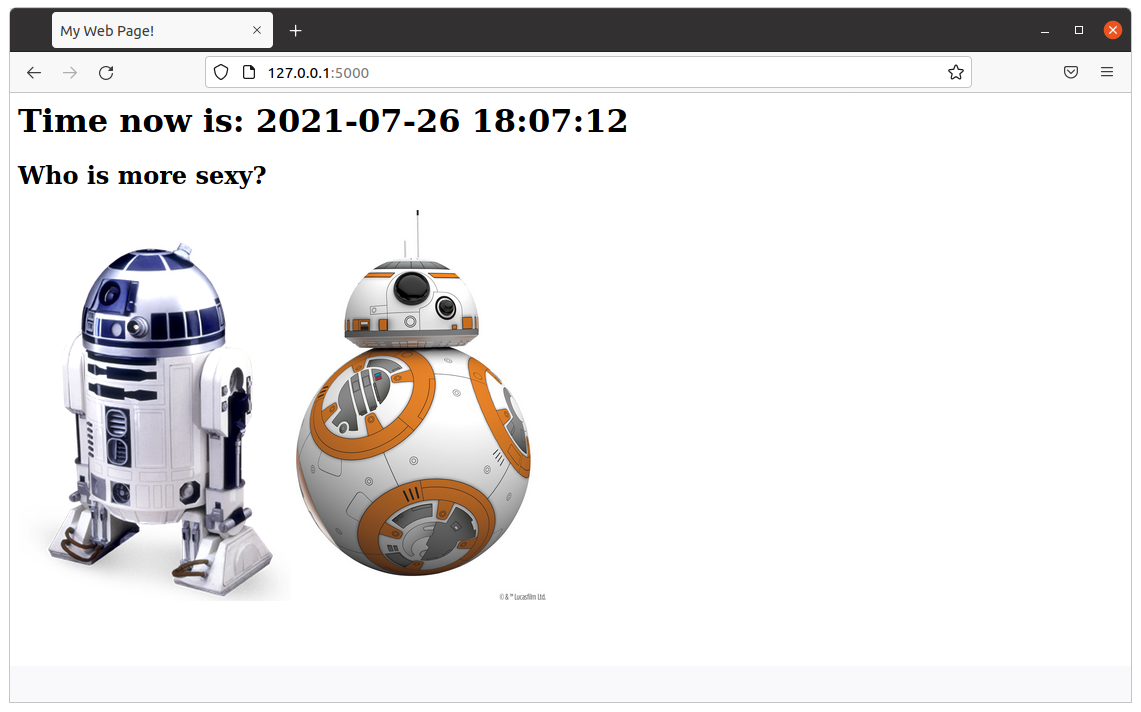
After Docker Image flask_app is built, you can run a Docker Container based on it with:
sudo docker run -d -p 5000:5000 --name flask_app flask_app
After you’re done, in order to stop the Container type:
sudo docker stop flask_app
Here is the source code of the Python file flask_app.py:
#
# flask_app.py
#
# Author: Carles Mateo
# Creation Date: 2020-05-10 20:50 GMT+1
# Description: A simple Flask Web Application
#              Part of the samples of https://leanpub.com/pythoncombatguide
#              More source code for the book at https://gitlab.com/carles.mateo/python_combat_guide
#

from flask import Flask
import datetime


def get_datetime(b_milliseconds=False):
    """
    Return the datetime with miliseconds in format YYYY-MM-DD HH:MM:SS.xxxxx
    or without milliseconds as YYYY-MM-DD HH:MM:SS
    """
    if b_milliseconds is True:
        s_now = str(datetime.datetime.now())
    else:
        s_now = str(datetime.datetime.now().strftime("%Y-%m-%d %H:%M:%S"))

    return s_now


app = Flask(__name__)

# Those variables will keep their value as long as Flask is running
i_votes_r2d2 = 0
i_votes_bb8 = 0


@app.route('/')
def page_root():
    s_page = "<html>"
    s_page += "<title>My Web Page!</title>"
    s_page += "<body>"
    s_page += "<h1>Time now is: " + get_datetime() + "</h1>"
    s_page += """<h2>Who is more sexy?</h2>
<a href="r2d2"><img src="static/r2d2.png"></a> <a href="bb8"><img width="250" src="static/bb8.jpg"></a>"""
    s_page += "</body>"
    s_page += "</html>"

    return s_page


@app.route('/bb8')
def page_bb8():
    global i_votes_bb8

    i_votes_bb8 = i_votes_bb8 + 1

    s_page = "<html>"
    s_page += "<title>My Web Page!</title>"
    s_page += "<body>"
    s_page += "<h1>Time now is: " + get_datetime() + "</h1>"
    s_page += """<h2>BB8 Is more sexy!</h2>
                <img width="250" src="static/bb8.jpg">"""
    s_page += "<p>I have: " + str(i_votes_bb8) + "</p>"
    s_page += "</body>"
    s_page += "</html>"

    return s_page


@app.route('/r2d2')
def page_r2d2():
    global i_votes_r2d2

    i_votes_r2d2 = i_votes_r2d2 + 1

    s_page = "<html>"
    s_page += "<title>My Web Page!</title>"
    s_page += "<body>"
    s_page += "<h1>Time now is: " + get_datetime() + "</h1>"
    s_page += """<h2>R2D2 Is more sexy!</h2>
                <img src="static/r2d2.png">"""
    s_page += "<p>I have: " + str(i_votes_r2d2) + "</p>"
    s_page += "</body>"
    s_page += "</html>"

    return s_page


if __name__ == "__main__":
    app.run(host="0.0.0.0", port=5000, debug=True)
As always, the naming of the variables is based on MT Notation.
The Dockerfile is very straightforward:
FROM ubuntu:20.04

MAINTAINER Carles Mateo

ARG DEBIAN_FRONTEND=noninteractive

RUN apt update && \
    apt install -y vim python3-pip &&  pip3 install pytest && \
    apt-get clean

ENV PYTHON_COMBAT_GUIDE /var/python_combat_guide

RUN mkdir -p $PYTHON_COMBAT_GUIDE

COPY ./ $PYTHON_COMBAT_GUIDE

ENV PYTHONPATH "${PYTHONPATH}:$PYTHON_COMBAT_GUIDE/src/:$PYTHON_COMBAT_GUIDE/src/lib"

RUN pip3 install -r $PYTHON_COMBAT_GUIDE/requirements.txt

# This is important so when executing python3 -m current directory will be added to Syspath
# Is not necessary, as we added to PYTHONPATH
#WORKDIR $PYTHON_COMBAT_GUIDE/src/lib

EXPOSE 5000

# Launch our Flask Application
CMD ["/usr/bin/python3", "/var/python_combat_guide/src/flask_app.py"]
I’ve released v. 0.99 of carleslibs package This package includes utilities for:
Files and Directories handling
Date/Time retrieval
Python version detection
You can install it with:
pip install carleslibs
The minimum requirement declared is Python 3.6, although they work with Python 3.5 and Python 2.7, as I want to drop support for no longer supported versions.
If you are enrolled with Linux Academy, I recommend you this Python course: Python 3 Scripting for System Administrators https://linuxacademy.com/cp/modules/view/id/168 Does not cover OOP, but it does a bit of Unit Testing, and talks a lot about PIP and Virtual Environments.
This article is written at 2021-03-22 so this conclusion will evolve as time passes.
Some of my articles are checked after 7 years, so be advised this choice will not be valid in a year. Although the reasoning and considerations to take in count will be the same.
I answer to the question: Why Carles, do you suggest to adopt Python 3.8, and not 3.9 or 3.7 for our Internal Automation Tools?.
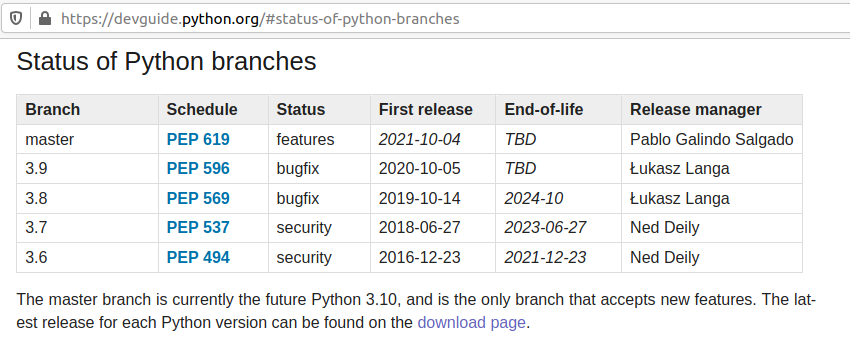
Python 3.6 was released on 2016-12-23 and will get EOL on 2021-12-23.
That’s EOL in 9 months. We don’t want to recommend that.
Python 3.7 was released on 2018-06-27 and will get EOL 2023-06-27.
That’s 2 years and 3 months from now. The Status of development is focus in Security bugfixes.
Python 3.9 was released 2020-10-05 that’s 5 months approx from now.
Honestly, I don’t recommend for Production a version of Software that has not been in the market for a year.
Most of the bugs and security bugs appears before the first year.
New features released, often are not widely fully tested , and bugs found and fixed, once a year has passed.
Python 3.8 was released on 2019-10-14.
That means that the new features have been tested for a year and five months approximately.
This is enough time to make appear most bugs.
EOL is 2024-10, that is 3 years and 7 months from now. A good balance of EOL for the effort to standardize.
Finally Python 3.8 is the Python mainline for Ubuntu 20.04 LTS.
If our deploy strategy is synchronized, we want to use Long Time Support versions, of course.
So my recommendation would be, at least for your internal tools, to use containers based in Ubuntu 20.04 LTS with Python 3.8.
We know Docker images will be bigger using Ubuntu 20.04 LTS than using other images, but that disk space is really a small difference, and we get the advantage of being able to install additional packages in the Containers if we need to debug.
An Ubuntu 20.04 Image with Pyhton 3.8 and pytest, uses 540 MB.
This is a small amount of space nowadays. Even if very basic Alpine images can use 25MB only, when you install Python they start to grow close to Ubuntu, to 360MB. The difference is not much, and if you used Alpine and you have suffered from Community packages being updated and becoming incompatible with wheel and you lost hours fixing the dependencies, you’ll really appreciate using my Ubuntu LTS packages approach.
If accidentally you removed PIP from your windows machine, or you attempted a PIP upgrade which failed after removing the current version, and let you unable to install it anymore, you can address it this way.
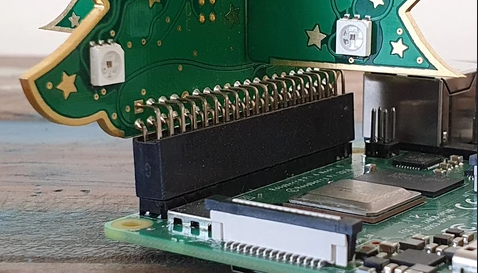
So you are trying to program the Raspberry expansion PINS in Python, for example for this 3D LED Christmas Tree, and you’re getting the error:
GPIO.setup(self.number, GPIO.IN, self.GPIO_PULL_UPS[self._pull]) RuntimeError: Not running on a RPi!
I’m running this on Ubuntu 20.04LTS with a Raspberry 4.
The first thing:
Make sure you have an official Raspberry Pi charger.
Or at least, make sure your USB charger provides enough intensity to power the Raspberry and the LEDs.
The LED power comes from the motherboard and if Raspberry Pi has not enough energy this is not going to work.
My colleague Michela had her tree not working because of the charger was not able to provide enough energy. When she ordered a new charger, it worked like a charm.
Install the base Software
In order to communicate with General Purpose Input Output ports (GPIO) you need to install this Software:
I saw many people stuck, in the forums, because of that.
To work with the LEDs you need to run the samples as root.
Some code examples
To provide a bit of “the whole package” here are some simple examples.
Turn to red the LED’s one by one
from tree import RGBXmasTree
from time import sleep

o_tree = RGBXmasTree()

for o_pixel in o_tree:
    o_pixel.color = (1, 0, 0)
    sleep(0.1)
Turn to a different color, sleep, and again
from tree import RGBXmasTree
from time import sleep

o_tree = RGBXmasTree()

a_t_colors = [(1, 0, 0), (0, 1, 0), (0, 0, 1)]

for t_color in a_t_colors:
    o_tree.color = t_color
    sleep(1)
Turn off the lights
from tree import RGBXmasTree

o_tree = RGBXmasTree()

o_tree.color = (0, 0, 0)
That’s one of the problems with Python. Blocks of code are defined by their indentation position.
That’s a pain when you copy and past and the IDE reindents the code thinking that is doing great, or generate a new inner class instead of replacing all the code.
Well, this error is very annoying cause it means that you mixed spaces and Tabs as indent separators.
But you can go crazy trying to find a tab in your code, so there is a trick that I came with:
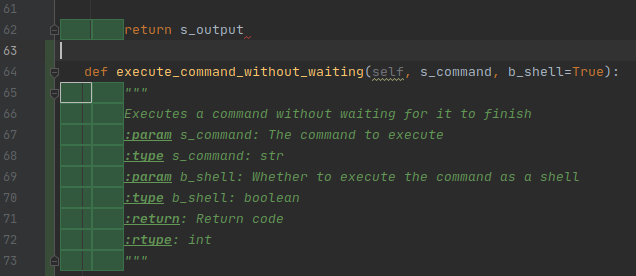
Basically go to Menu Edit > Find and then type 4 times space. PyCharm will highlight all the places were this indentation (4 spaces) is present, so you’ll find the impostor without going blind or losing to many time.
As you can see, in front of def execute_command_without_waiting we don’t have 4 spaces. And in this case the impostor was not a camouflaged tab \t but 3 spaces instead of four.
I tried to continue following it since I left Sanmina. ZFS is really an amazing Software and it’s lead by an amazing Community of super cool Engineers and companies. I would like to continue contributing ASAP.
I bought some new hard drives in order to work a bit on this. You don’t need to have dedicated hardware if you want to test features. You can run in a VirtualBox or VMWare Workstation.
I received more books about DevOps and Python
None is perfect. I see flaws in all of them and bad architecture practices*, however from all I learn interesting things.
You know, I study every day. At least 30 minutes, after work. As part of my healthy routines.
But I also study and learn during the work, as we have time available for this.
I’m very fortunate that Blizzard gives me time every day to study. That’s amazing. They also send us to events paying the ticket, travel, hotel, expenses… now with covid-19 we only go to virtual events, but the company still pay for this and give free days. Is a very nice company.
I continue having purchases of my book, and I’m very happy about that. I’m working on improving it and providing more contents and samples going from the scratch, with step by step code samples. From spaghetti code reading CSV files, to OOP with Full Coverage.
My application for a Higher degree Computer Science Cloud Computing (Level 8) has been accepted. The Irish government pays me 90% of the degree, and Blizzard will pay me the other 10% after I pass the first year course.
I’m really grateful to this beautiful country, Ireland.
Having an Irish degree is something that brings me an special illusion.
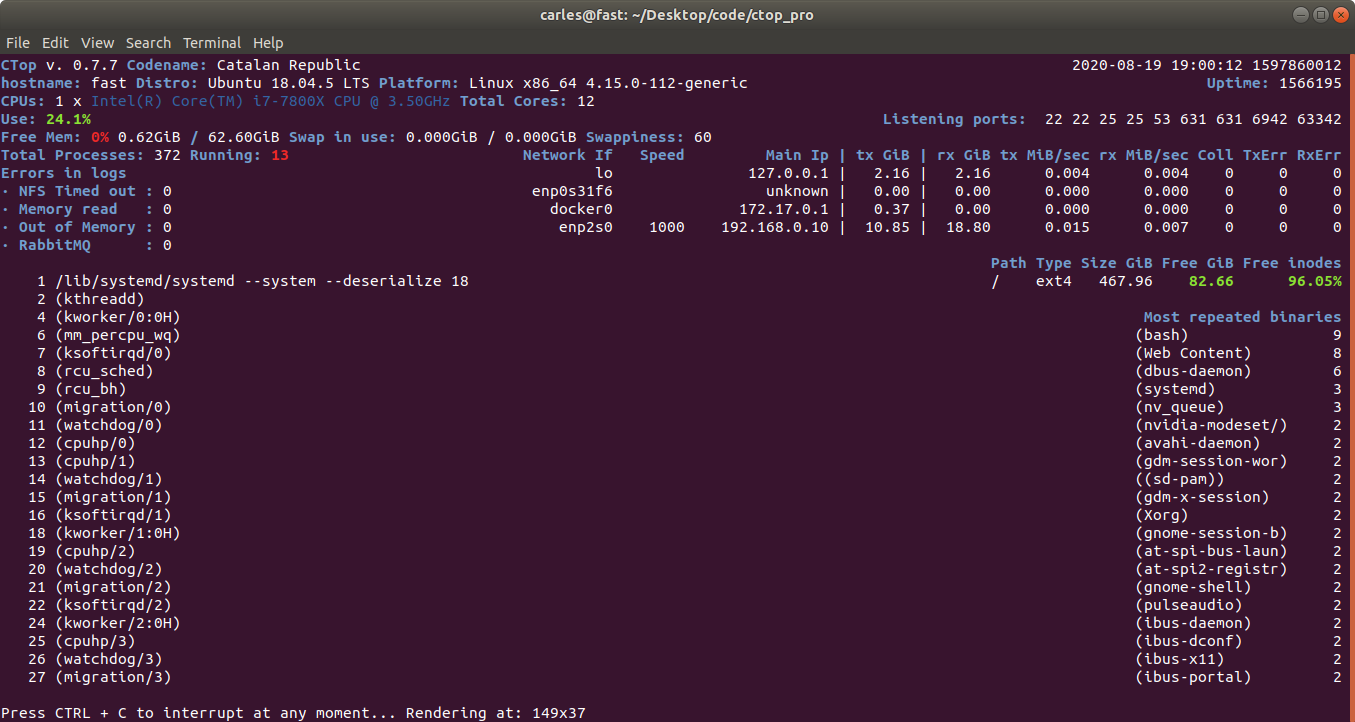
I have updated CTOP.py with some interesting features
It allows to pass a fixed width and height for the terminal render. That’s very useful when you run CTOP in a Docker non interactive session, or from a Cron, with the –iterations=1 so the output can be captured programmatically.
Jetbrains has provided me with a Free License of all their products, in order to support my work in Open Source projects. That’s very nice. I’m using now mainly PyCharm and PhpStorm.
At the beginning of the covid-19 I wrote a simulator in Python. That’s why I was able to anticipate that the number of cases and deaths would be very much higher when nobody around me knew what was going to happen. My first simulations were simple, and the algorithms were growing in complexity until I had a full rich Object Oriented modeler. Maybe I’ll write an article about this someday.
I studied the evolution of several countries and I was working with simulations in Spain until their government started blocking the information and stop providing transparent and accurate metrics.
I’m seeing how the covid is affecting and transforming several kind of business:
Meetup.com I see meetups with more than 1,000 users closing, as they are no meeting anymore
Airlines, obviously
Hotels, offering less services
Metasearchers and OTAs (Online travel agencies)
I can imagine the impact on airbnb
Discos, nightclubs are closing doors
Restaurants, they will lose the Christmas season (with families and companies doing lunch and dinners)
At the same time, other companies are hitting records in sales
Videogames companies
Hardware is being sold, to accommodate WFH and remote working.
Companies like Amazon or Overstock.com are delivering well where people before were buying into stores.
VPN solutions for Remote Working are being implemented in those places that had not enabled Remote Working.
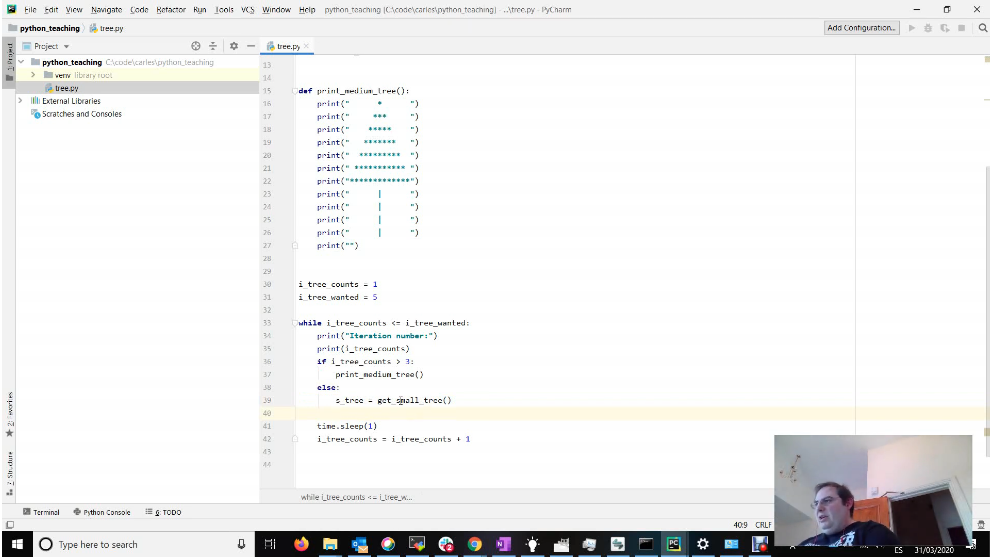
After doing a Masterclass to some colleagues about Refactor, Code Reliability, Quality, The non-happy path and Unit Testing, I’m preparing some contents that I’ll publish to the Community soon. So far I created this repo, where I added the source code for lesson 0: starting to program in Python videos that I created few months ago to help beginners.
I also added some contents to lesson 1, where we refactor pure spaghetti code with no error control, to something more elaborated with unit testing and full code coverage. Still procedural, but I will jump to next class in two weeks, where we will move to OOP and Dependency Injection.
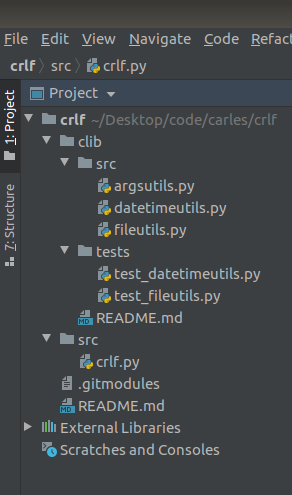
If you are using Git Submodules, is very probable that at some point you will create you own libraries. Probably those libraries will have their own structure, even with their own tests/ folder and you’re adding into a subfolder into your new project and maybe you have problems using relative imports.
This is a trick you can use to add the relevant root folder of your project to the System Path, so the libraries are found, specially when you call by command line from anywhere in the filesystem. This works for Python2 and Python3.
#!/usr/bin/env python3

import sys
import os

s_path_program = os.path.dirname(__file__)
sys.path.append(s_path_program + '../../')

from clib.src.argsutils import ArgsUtils
from clib.src.datetimeutils import DateTimeUtils
from clib.src.fileutils import FileUtils
I wanted to automate certain operations that we do very often, and so I decided to do a PoC of how handy will it be to create GUI applications that can automate tasks.
As locating information in several repositories of information (ldap, databases, websites, etc…) can be tedious I decided to create a small program that queries LDAP for the information I’m interested, in this case a Location. This small program can very easily escalated to launch the VPN, to query a Database after querying LDAP if no results are found, etc…
I share with you the basic application as you may find interesting to create GUI applications in Python, compatible with Windows, Linux and Mac.
I’m super Linux fan but this is important, as many multinationals still use Windows or Mac even for Engineers and SRE positions.
With the article I provide a Dockerfile and a docker-compose.yml file that will launch an OpenLDAP Docker Container preloaded with very basic information and a PHPLDAPMIN Container.