This article is written at 2021-03-22 so this conclusion will evolve as time passes.
Some of my articles are checked after 7 years, so be advised this choice will not be valid in a year. Although the reasoning and considerations to take in count will be the same.
I answer to the question: Why Carles, do you suggest to adopt Python 3.8, and not 3.9 or 3.7 for our Internal Automation Tools?.
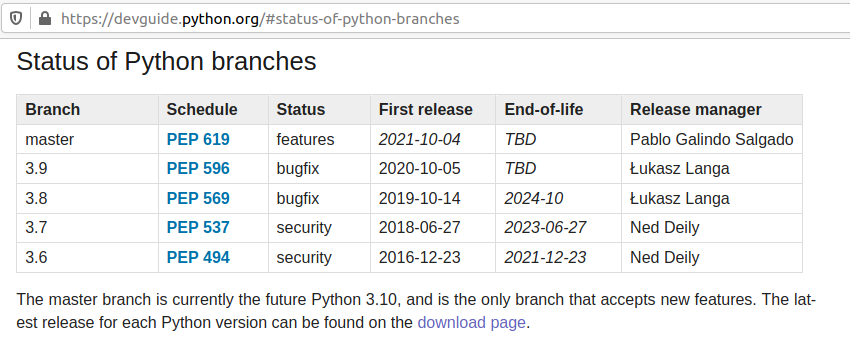
Python 3.6 was released on 2016-12-23 and will get EOL on 2021-12-23.
That’s EOL in 9 months. We don’t want to recommend that.
Python 3.7 was released on 2018-06-27 and will get EOL 2023-06-27.
That’s 2 years and 3 months from now. The Status of development is focus in Security bugfixes.
Python 3.9 was released 2020-10-05 that’s 5 months approx from now.
Honestly, I don’t recommend for Production a version of Software that has not been in the market for a year.
Most of the bugs and security bugs appears before the first year.
New features released, often are not widely fully tested , and bugs found and fixed, once a year has passed.
Python 3.8 was released on 2019-10-14.
That means that the new features have been tested for a year and five months approximately.
This is enough time to make appear most bugs.
EOL is 2024-10, that is 3 years and 7 months from now. A good balance of EOL for the effort to standardize.
Finally Python 3.8 is the Python mainline for Ubuntu 20.04 LTS.
If our deploy strategy is synchronized, we want to use Long Time Support versions, of course.
So my recommendation would be, at least for your internal tools, to use containers based in Ubuntu 20.04 LTS with Python 3.8.
We know Docker images will be bigger using Ubuntu 20.04 LTS than using other images, but that disk space is really a small difference, and we get the advantage of being able to install additional packages in the Containers if we need to debug.
An Ubuntu 20.04 Image with Pyhton 3.8 and pytest, uses 540 MB.
This is a small amount of space nowadays. Even if very basic Alpine images can use 25MB only, when you install Python they start to grow close to Ubuntu, to 360MB. The difference is not much, and if you used Alpine and you have suffered from Community packages being updated and becoming incompatible with wheel and you lost hours fixing the dependencies, you’ll really appreciate using my Ubuntu LTS packages approach.
I’ve released cmemgzip v. 0.4.1, with colors, and is now a package available to install download from PIP.
pip3 install cmemgzip
I keep teaching to learn to program in Python, to become a Junior BackEnd Developer. To groups and individuals. It is so beautiful and wonderful seeing people transform their minds, their lives and their confidence with the coding skills and being able to chase after better jobs, and so funny and beautiful when this happens in a group dynamic, with friendship, that I’m thinking about assembling a new Group of Students. Those classes are in English but I got some suggestions to do group classes in Spanish. Even if Catalan is speak by around 11 Million people in the world if I have enough requests I’ll gladly do it. if you’re interested reach me in LinkedIn.
I’ve made CTOP.py compatible with Python 2 in order to support legacy Servers.
I’ve updated my book Python Combat Guide as I regularly do. One of the things you’ll find is my script to upload packages to pypi.org very easily so you and the rest of the world can download with pip install package. I’ve added my script in a blog post too.
One person named True as surname gets locked in iCloud due to a bug in their coding, confusing the surname by a boolean property.
Can get your coders to free my last name from icloud jail? Been locked out for 6+ months because of an uncapitalized t in TRUE, my surname but also a computer command.
I always smile when I find bugs. Bugs are everywhere, but always make me smile when important companies with tons of resources make them.
Today I show this bug received in my email from Glassdoor. :)
You can see how in the email they assume that key will exist, and doesn’t, so a KEY NOT FOUND error is displayed. :)
It is funny, but remembers us the importance of doing our best trying to avoid bugs, working seriously with Methodology, implementing Unit Testing, Functional Testing, having also QA.. all the mechanisms we can, as they can be the last line of defense to avoid releasing bugs to Production.
In the past I taught Java and PHP, and I still help my mates with their Assembler Practices in their Masters, so I could not stop laughing with this:
#!/bin/bash

# By Carles Mateo - https://blog.carlesmateo.com
# Compress older than two days files.
# I use for logs and core dumps. Normally at /var/core/

# =======================================================0
# FUNCTIONS
# =======================================================0


function quit {
    # Quits with message in param1 and error code in param2
    s_MESSAGE=$1
    i_EXIT_CODE=$2

    echo $s_MESSAGE
    exit $i_EXIT_CODE
}

function add_ending_slash {
    # Check if Path has ending /
    s_LAST_CHAR_PATH=$(echo $s_PATH | tail -c 2)

    if [ "$s_LAST_CHAR_PATH" != "/" ];
    then
        s_PATH="$s_PATH/"
    fi
}

function get_list_files {
    # Never follow symbolic links
    # Show only files
    # Do not enter into subdirs
    # Show file modified more than X days ago
    # Find will return the path already
    s_LIST_FILES=$(find -P $s_PATH -maxdepth 1 -type f -mtime +$i_DAYS | tr " " "|")
}

function check_dir_exists {
    s_DIRECTORY="$1"
    if [ ! -d "$s_DIRECTORY" ];
    then
        quit "Directory $s_DIRECTORY does not exist." 1
    fi
}

function compress_files {
    echo "Compressing files from $s_PATH modified more than $i_DAYS ago..."
    for s_FILENAME in $s_LIST_FILES
    do
        s_FILENAME_SANITIZED=$(echo $s_FILENAME | tr "|" " ")
        s_FILEPATH="$s_PATH$s_FILENAME_SANITIZED"
        echo "Compressing $s_FILENAME_SANITIZED..."
        # Double quotes around $s_FILENAME_SANITIZED avoid files with spaces failing
        gzip "$s_FILENAME_SANITIZED"
        i_ERROR=$?
        if [ $i_ERROR -ne 0 ];
        then
            echo "Error $i_ERROR happened"
        fi
    done

}


# =======================================================0
# MAIN PROGRAM
# =======================================================0

# Check Number of parameters
if [ "$#" -lt 1 ] || [ "$#" -gt 2 ];
then
    quit "Illegal number of parameters. Pass a directory and optionally the number of days to exclude from mtime. Like: compress_old.sh /var/log 2" 1
fi

s_PATH=$1

if [ "$#" -eq 2 ];
then
    i_DAYS=$2
else
    i_DAYS=2
fi

add_ending_slash

check_dir_exists $s_PATH

get_list_files

compress_files
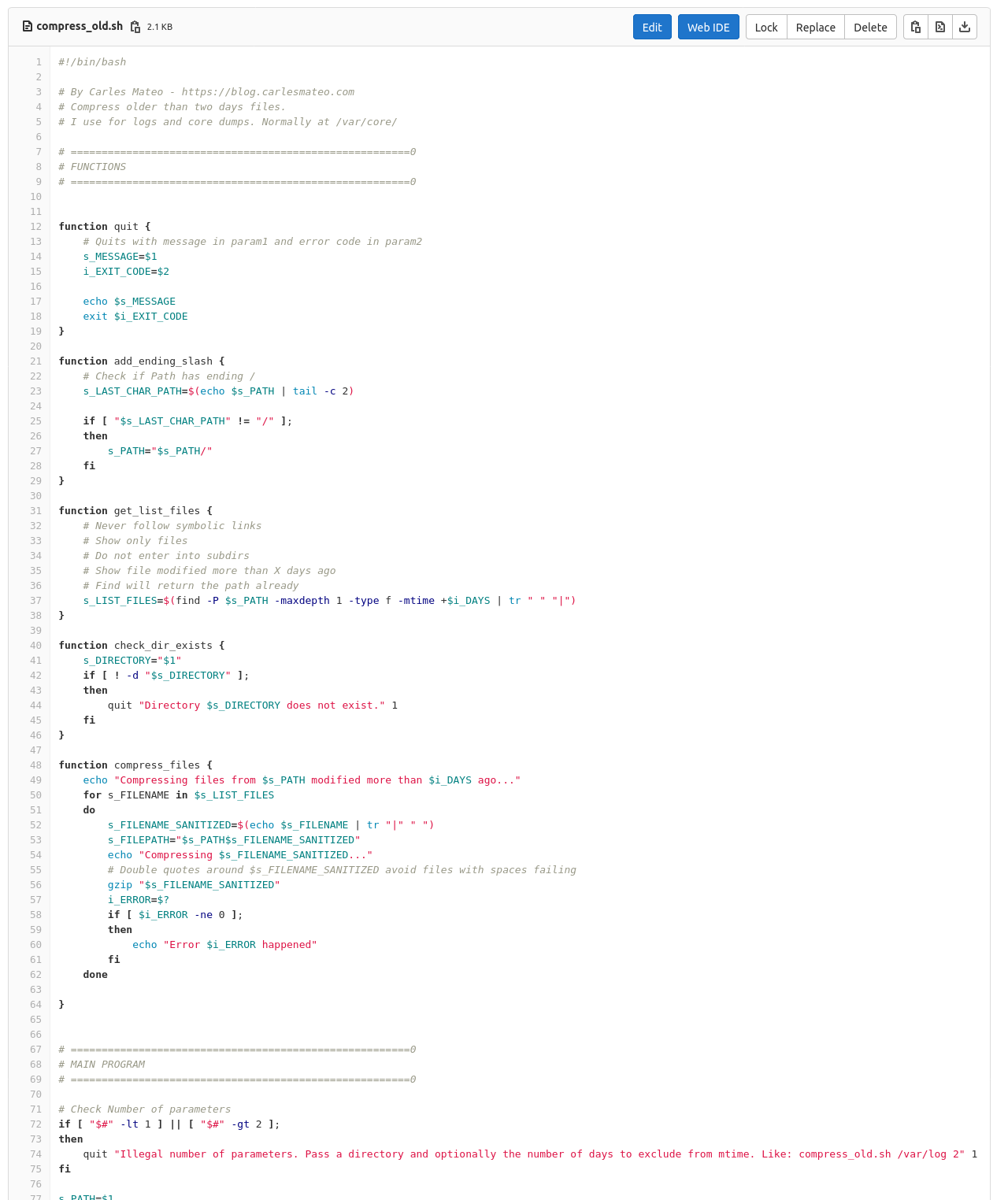
Fragment of the code in gitlab
If you want to compress everything in the current directory, event files modified today run with:
I’ve recorded two live sessions of Refactoring and Unit Testing working on the project cmemgzip v.0.4. It is basically the exercise of Refactoring a code that is too big, and extracting sections to small methods, and then adding pytest Unit Testing code coverage. I explain the arrays I use for testing a battery of cases instead of few of them. Is an exercise of talking loud what I do normally, so you can understand many small details so subtle as the order of parameters or consistency. I use this material so my students, colleagues learning Unit Testing, and other people can learn and make their code more resilient and high quality.
I’ve implemented a plugin for my Open Source Software CTOP that allows to interact with LED through the Raspberry Pi GPIO.
Plugins architecture in CTOP is something I really like. I had a lot of fun creating it, and is super powerful. Basically I load Python plugins on demand, that are able to register the methods to be called, using hooks. The plugins receives an instance of CTOP itself, injected as dependency, so they have completely visibility over all the status of the machines.
I’ve been developed a new version of CTOP compatible with Python 2.7. I will be adding to master branch and releasing as part of tag 0.8 soon.
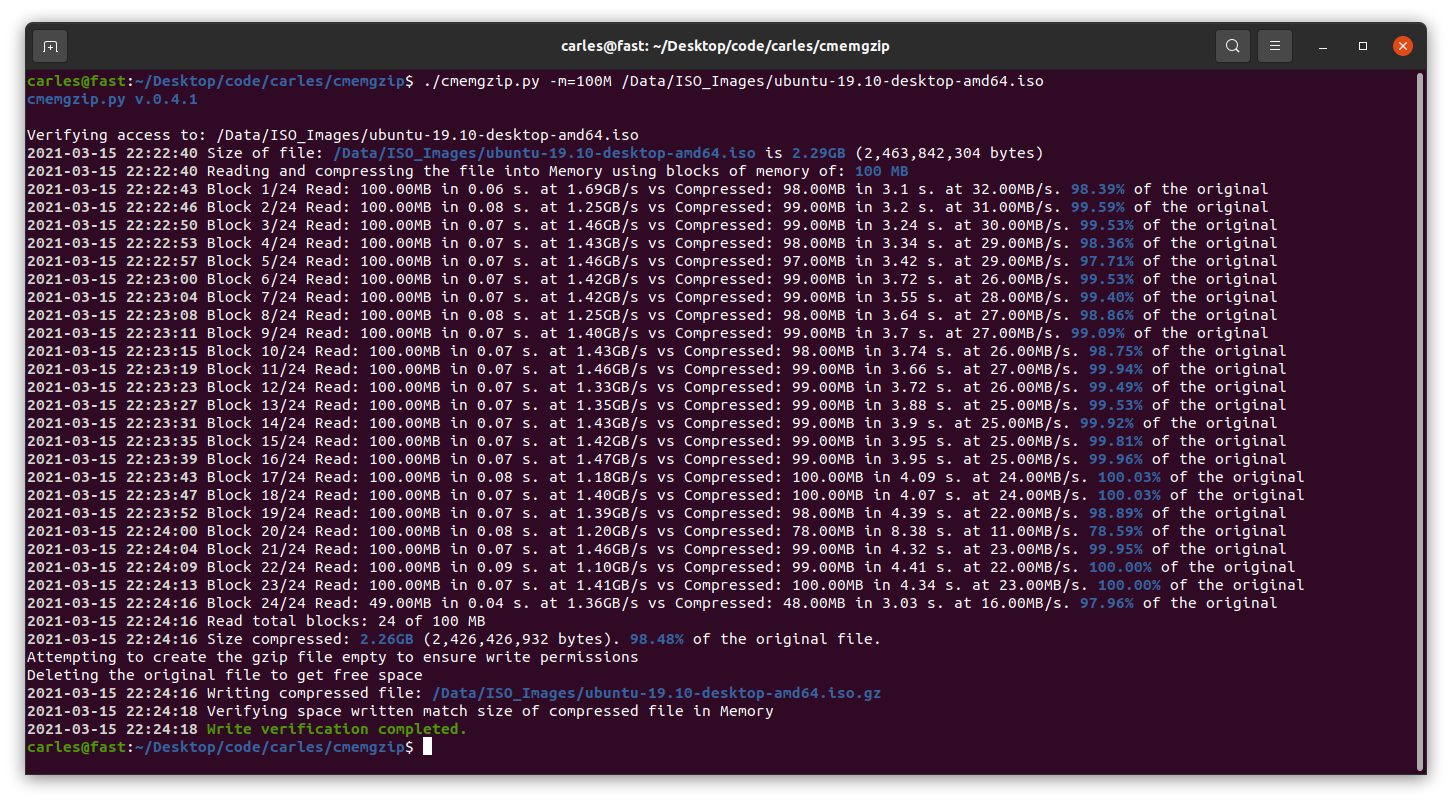
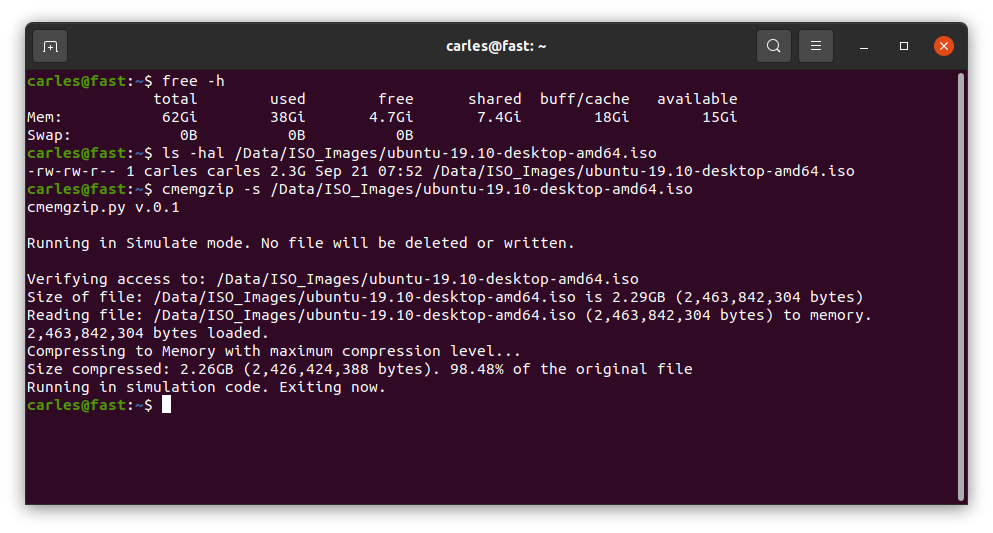
I’ve released cmemgzip v.0.3 (stable) and v.0.4 (ongoing) which is a Python 3 Open Source utility like gzip, with the difference that the files are loaded into memory, then compressed in memory, then the original file is deleted and the compressed data is written to a .gz file.
That means that you can use it on systems that have no space left on the disk, as long as you have memory.
Please note, is possible to compress files much bigger than actual size of the memory as the Block size to be compressed can be indicated with parameter -m. Resulting gz file are completely compatible with gzip/gunzip, zcat, etc…
I’ve made a donation to vokoScreen author €25 (around $30 USD).
This is the Software that I’ve been using recently in Linux, and is very useful, specially having several monitors, so I’m thanking the author with a donation.
I’ve been using this Software to record the classes for my students, so I find nice to share the love.
For windows time ago I bought a commercial Software and it doesn’t do more than vokoScreen, which is available for Windows too.
During covid I lowered the price of my books to the minimum allowed by LeanPub, to $5 USD, and I find it so nice when people donate more, that I’m happy to contribute to brilliant authors. I support authors since I started to get my first salary several decades ago.
I’m an author. I create Software and Books. So I think is normal, common sense and healthy that we, developers, value our work and support other authors. :)
Long time ago I wrote an article about zoning and NDS-4600. A colleague asked me for help, as he bought a second hand unit and it was doing tests. I wrote and explained everything, and added this information to my ZFS in Ubuntu book.
I was very happy to see that you keep buying my books. :)
If accidentally you removed PIP from your windows machine, or you attempted a PIP upgrade which failed after removing the current version, and let you unable to install it anymore, you can address it this way.
All the Operation Engineers and SREs that work with systems have found the situation of having a Server with the disk full of logs and needing to keep those logs, and at the same time needing the system to keep running.
This is an uncomfortable situation.
I remember when I was being interviewed in Facebook, in Menlo Park, for a SDM position in the SRE (Software Development Manager) back in 2013-2014. They asked me about a situation where they have the Server disk full, and they deleted a big log file from Apache, but the space didn’t come back. They told me that nobody ever was able to solve this.
I explained that what happened is that Apache still had the fd (file descriptor), and that he will try to write to end of that file, even if they removed the huge log file with rm command, from the system they will not get back any free space. I explained that the easiest solution was to stop apache. They agreed and asked me how we could do the same without restarting the Webserver and I said that manipulating the file descriptors under /proc. They told me what I was the first person to solve this.
How it works
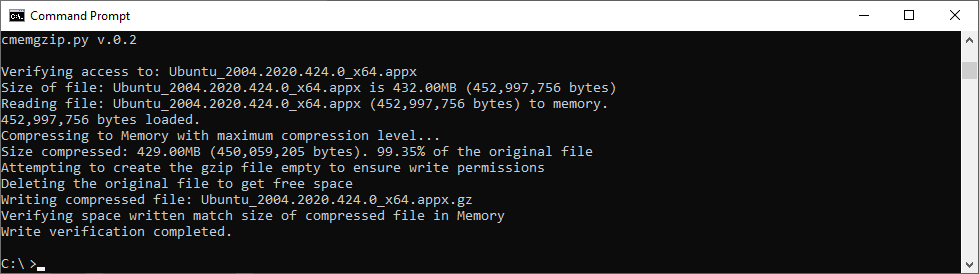
Basically cmemgzip will read a file, as binary, and will load it completely in to Memory.
Then it will compress it also in Memory. Then it will release the memory used to keep the original, will validate write permissions on the folder, will check that the compressed file is smaller than the original, and will delete the original and, using the new space now available in disk, write the compressed and smaller version of the file in gzip format.
Since version 0.3 you can specify an amount of memory that you will use for the blocks of data read from the file, so you can limit greatly the memory usage and compress files much more bigger than the amount of memory.
If for whatever reason the gz version cannot be written to disk, you’ll be asked for another route.
I mentioned before about File Descriptors, and programs that may keep those files open.
So my advice here, is that if you have to compress Apache logs or logs from a multi-thread program, and disk is full, and several instances may be trying to write to the log file: to stop Apache service if you can, and then run cmemgzip. I want to add it the future to auto-release open fd, but this is delicate and requires a lot of time to make sure it will be reliable in all the circumstances and will obey the exact desires of the SRE realizing the operation, without unexpected undesired side effects. It can be implemented with a new parameter, so the SysAdmin will know what is requesting.
Get the source code
You can decompress it later with gzip/gunzip.
So about cmemgzip you can git clone the project from here:
The program is written in Python 3, and I gave it License MIT, so you can use it and the Open Source really with Freedom.
Do you want to test in other platforms?
This is a version 0.3.
I have only tested it in:
Ubuntu 20.04 LTS Linux for x64
Ubuntu 20.04 LTS 64 bits under Raspberry Pi 4 (ARM Processors)
Windows 10 Professional x64
Mac OS X
CentOS
It should work in all the platforms supporting Python, but if you want to contribute testing for other platforms, like Windows 32 bit, Solaris or BSD, let me know.
Alternative solutions
You can create a ramdisk and compress it to there. Then delete the original and move the compressed file from ramdisk to the hard drive, and unload the ramdrive Kernel Module. However we find very often with this problems in Docker containers or in instances that don’t have the Kernel module installed. Is much more easier to run cmemgzip.
Another strategy you can do for the future is to have a folder based on ZFS and compression. Again, ZFS should be installed on the system, and this doesn’t happen with Docker containers.
cmemgzip is designed to work when there is no free space, if there is free space, you should use gzip command.
In a real emergency when you don’t have enough RAM, neither disk space, neither the possibility to send the log files to another server to be compressed there, you could stop using the swap, and fdisk the swap partition to be a ext4 Linux format, format it, mount is, and use the space to compress the files. And after moving the files compressed to the original folder, fdisk the old swap partition to change type to Swap again, and enable swap again (swapon).
Memory requirements
As you can imagine, the weak point of cmemgzip, is that, if the file is completely loaded into memory and then compressed, the requirements of free memory on the Server/Instance/VM are at least the sum of the size of the file plus the sum of the size of the file compressed. You guess right. That’s true.
If there is not enough memory for loading the file in memory, the program is interrupted gracefully.
I decided to keep it simple, but this can be an option for the future.
So if your VM has 2GB of Available Memory, you will be able to use cmemgzip in uncompressed log files around 1.7GB.
In version 0.3 I implemented the ability to load chunks of the original file, and compress into memory, so I would be able use less memory. But then the compression is less efficient and initial tests point that I’ll have to keep a separate file for each compressed chunk. So I will need to created a uncompress tool as well, when now is completely compatible with gzip/gunzip, zcat, the file extractor from Ubuntu, etc…
For a big Server with a logfile of 40TB, around 300GB of RAM should be sufficient (the Servers I use have 768 GB of RAM normally).
Honestly, nowadays we find ourselves more frequently with VMs or Instances in the Cloud with small drives (10 to 15GB) and enough Available RAM, rather than Servers with huge mount points. This kind of instances, which means scaling horizontally, makes more difficult to have NFS Servers were we can move those logs, for security.
So cmemgzip covers very well some specific cases, while is not useful for all the scenarios.
I think it’s safe to say it covers 95% of the scenarios I’ve found in the past 7 years.
cmemgzip will not help you if you run out inodes.
Usage
Usage is very simple, and I kept it very verbose as the nature of the work is Operations, Engineers need to know what is going on.
I return error level/exit code 0 if everything goes well or 1 on errors.
./cmemgzip.py /home/carles/test_extract/SherlockHolmes.txt

 cmemgzip.py v.0.1

 Verifying access to: /home/carles/test_extract/SherlockHolmes.txt
 Size of file: /home/carles/test_extract/SherlockHolmes.txt is 553KB (567,291 bytes)
 Reading file: /home/carles/test_extract/SherlockHolmes.txt (567,291 bytes) to memory.
 567,291 bytes loaded.
 Compressing to Memory with maximum compression level…
 Size compressed: 204KB (209,733 bytes). 36.97% of the original file
 Attempting to create the gzip file empty to ensure write permissions
 Deleting the original file to get free space
 Writing compressed file /home/carles/test_extract/SherlockHolmes.txt.gz
 Verifying space written match size of compressed file in Memory
 Write verification completed.
You can also simulate, without actually delete or write to disk, just in order to know what will be the
Installation
There are no third party libraries to install. I only use the standard ones: os, sys, gzip
So clone it with git in your preferred folder and just create a symbolic link with your favorite name:
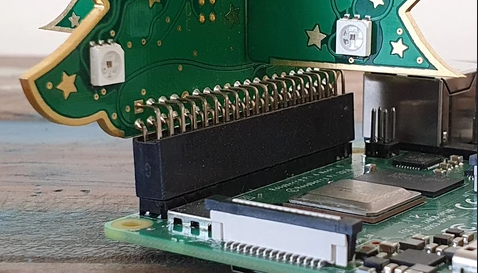
So you are trying to program the Raspberry expansion PINS in Python, for example for this 3D LED Christmas Tree, and you’re getting the error:
GPIO.setup(self.number, GPIO.IN, self.GPIO_PULL_UPS[self._pull]) RuntimeError: Not running on a RPi!
I’m running this on Ubuntu 20.04LTS with a Raspberry 4.
The first thing:
Make sure you have an official Raspberry Pi charger.
Or at least, make sure your USB charger provides enough intensity to power the Raspberry and the LEDs.
The LED power comes from the motherboard and if Raspberry Pi has not enough energy this is not going to work.
My colleague Michela had her tree not working because of the charger was not able to provide enough energy. When she ordered a new charger, it worked like a charm.
Install the base Software
In order to communicate with General Purpose Input Output ports (GPIO) you need to install this Software:
I saw many people stuck, in the forums, because of that.
To work with the LEDs you need to run the samples as root.
Some code examples
To provide a bit of “the whole package” here are some simple examples.
Turn to red the LED’s one by one
from tree import RGBXmasTree
from time import sleep

o_tree = RGBXmasTree()

for o_pixel in o_tree:
    o_pixel.color = (1, 0, 0)
    sleep(0.1)
Turn to a different color, sleep, and again
from tree import RGBXmasTree
from time import sleep

o_tree = RGBXmasTree()

a_t_colors = [(1, 0, 0), (0, 1, 0), (0, 0, 1)]

for t_color in a_t_colors:
    o_tree.color = t_color
    sleep(1)
Turn off the lights
from tree import RGBXmasTree

o_tree = RGBXmasTree()

o_tree.color = (0, 0, 0)
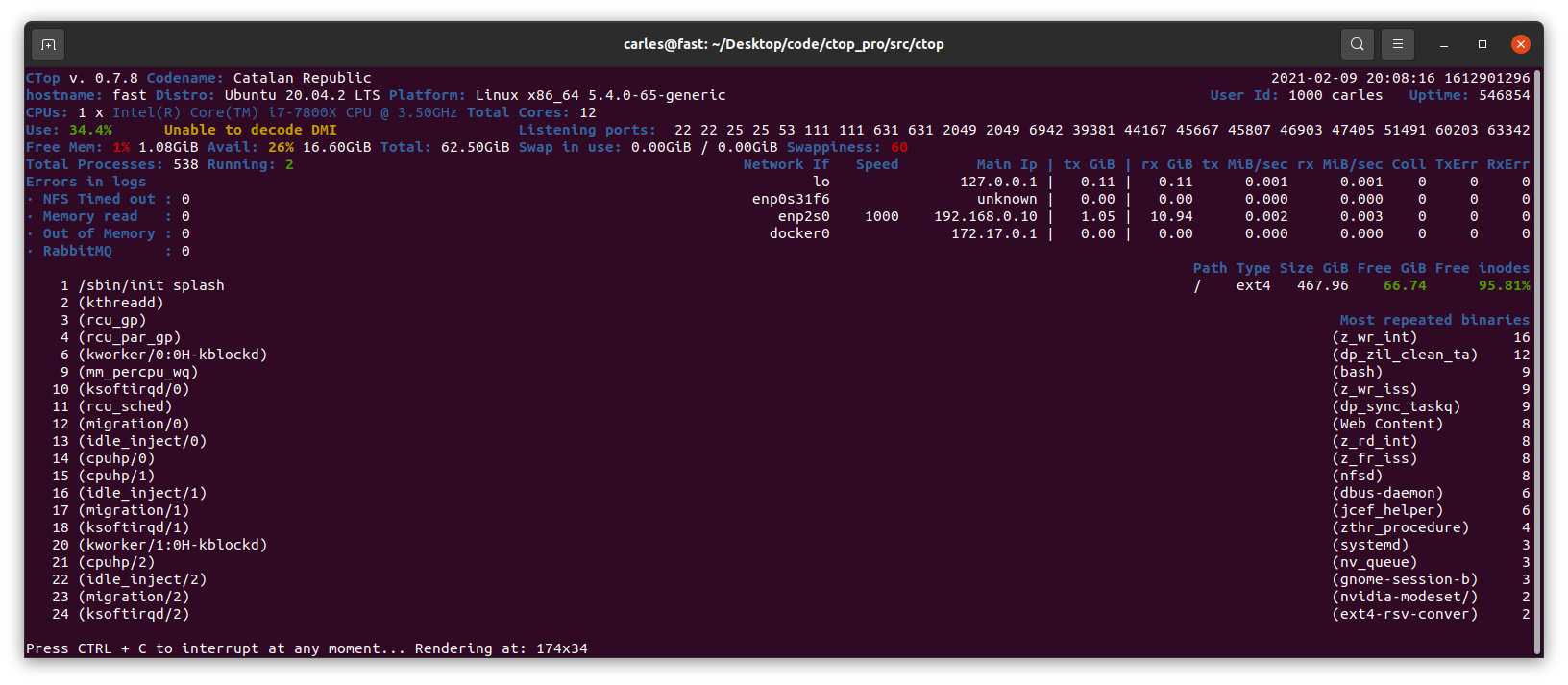
I have updated CTOP.py so now it detects if is running in a Google GCP instance.
So the list of instances/type of virtualization detected is:
Amazon AWS
Google GCP
OpenStack
VirtualBox
Docker containers
LXC
I’m working in detecting Raspberry Pi, models running CTOP, and in enabling the plugins system so anybody can easily expand the functionality of ctop.py.
v.0.7.8
Commented annotations and type hinting, to make CTOP compatible with Python 3.5.0.
Added Available RAM.
Added Google GCP detection.
Inform if it doesn't have permissions to decode DMI.
Print the userId (numeric) and the User (string), like: 1000 carles or 0 root.
Logic for swappiness <= 10 Ok, >10 and <= 30 warning, >30 red (alert).
Reduced digits for swap to 2, to avoid confusions.
I have updated my book Python 3 Combat Guide, with another full cycle, step by step, to convert an ugly script that escapes to shell to a nice OOP code with Unit Testing, step by step.
I have updated my book ZFS for Ubuntu 20.04 LTS, adding how to create a pool and Datasets for home, sharing NFS for the Media Player.
If you like Star Wars and the Mandalorian, you may laugh has much as I did with this video:
As you see I’m writing more articles about Windows, Mac Os X, and proprietary Software. Some of my colleagues work in companies and use proprietary Software, so I’ll be writing more articles about those ecosystems. I spend more time now with colleagues working on all kind of projects, and with students that have other problems too, so I help them. However my main focus is Open Source, Architecture, Scaling, programming in Python and Java.