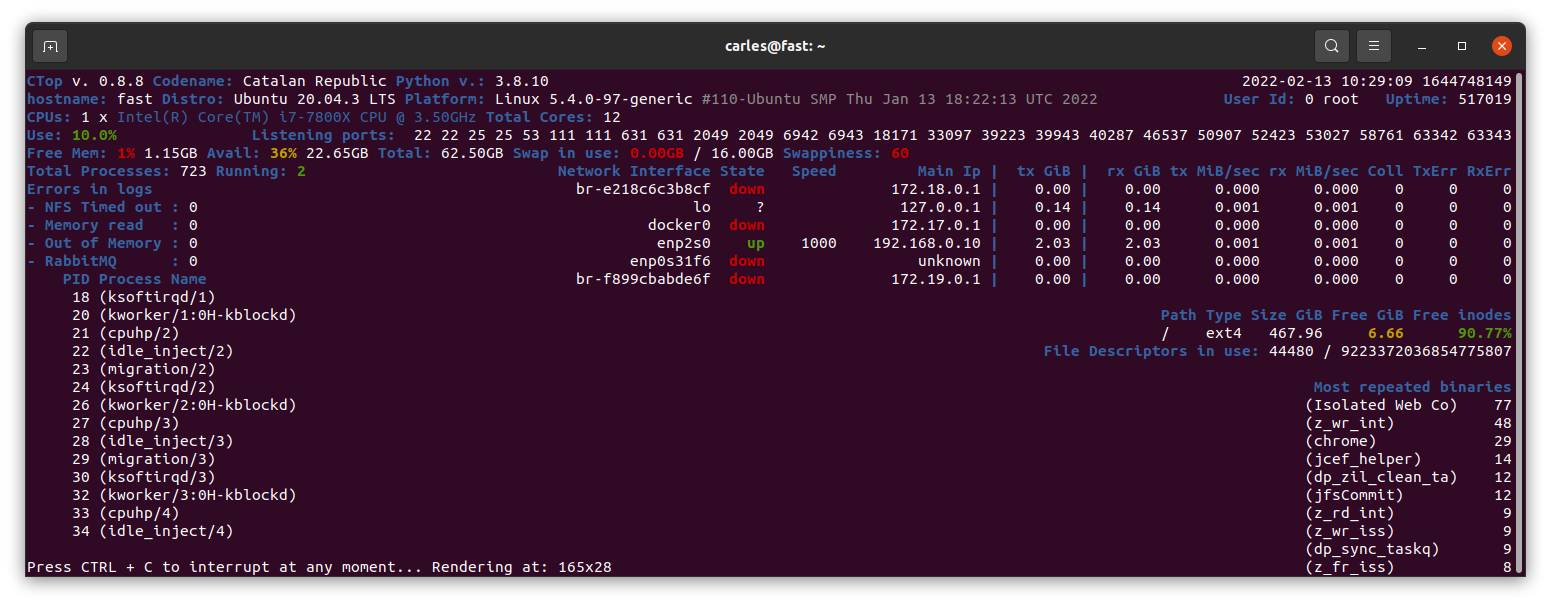
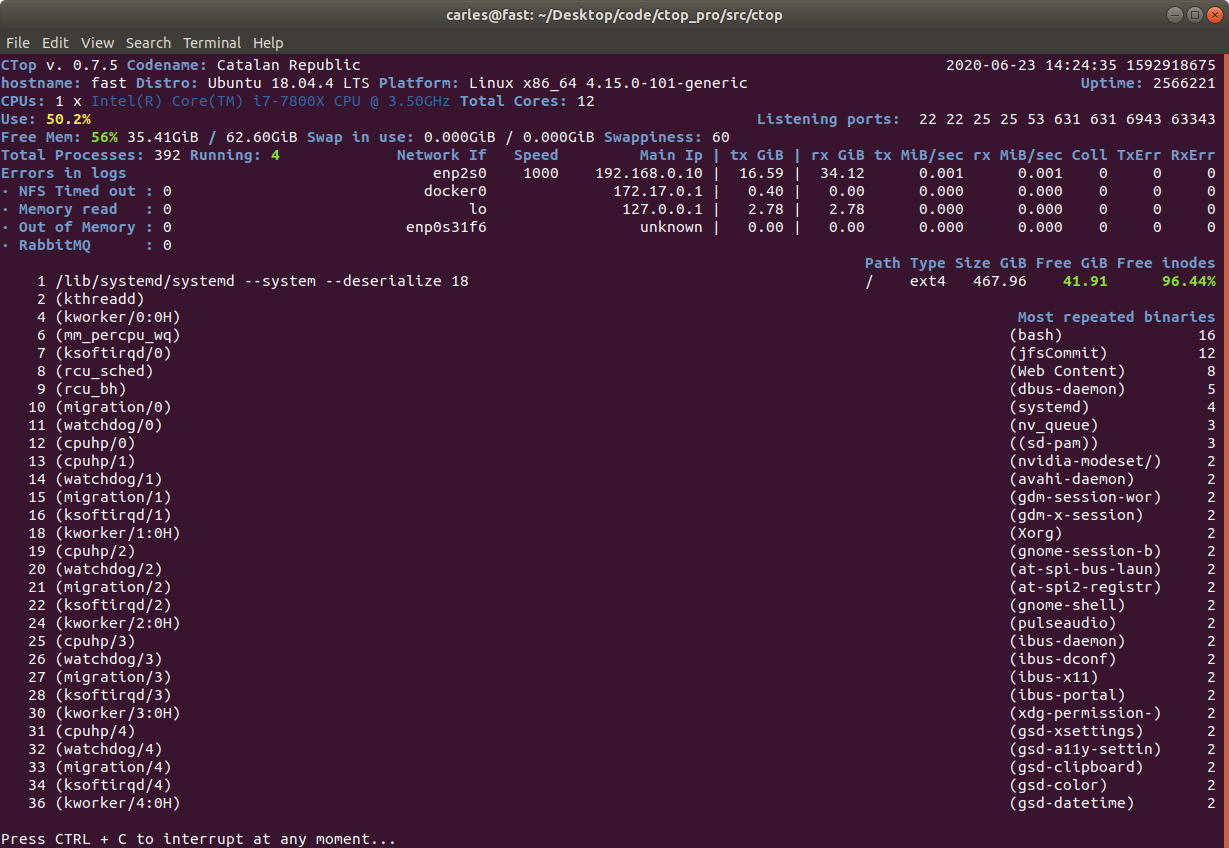
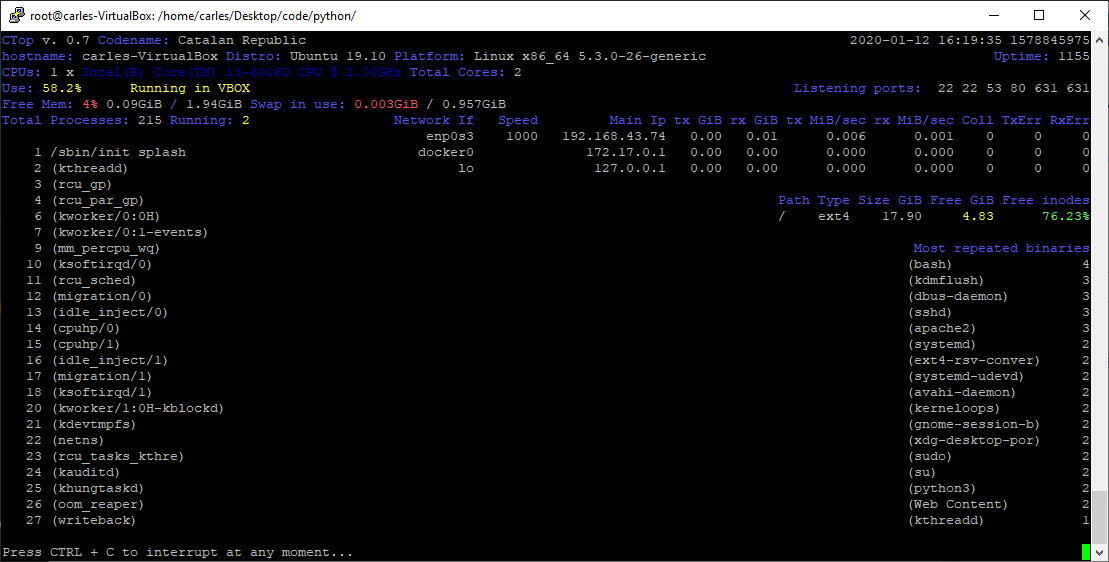
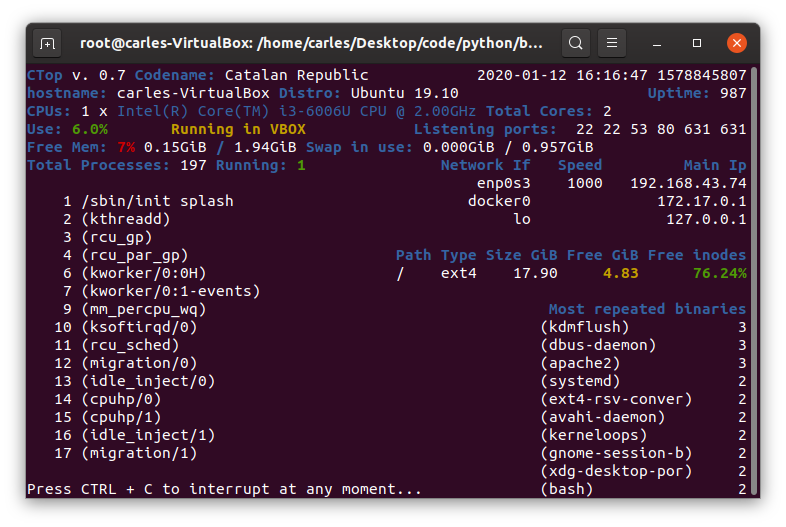
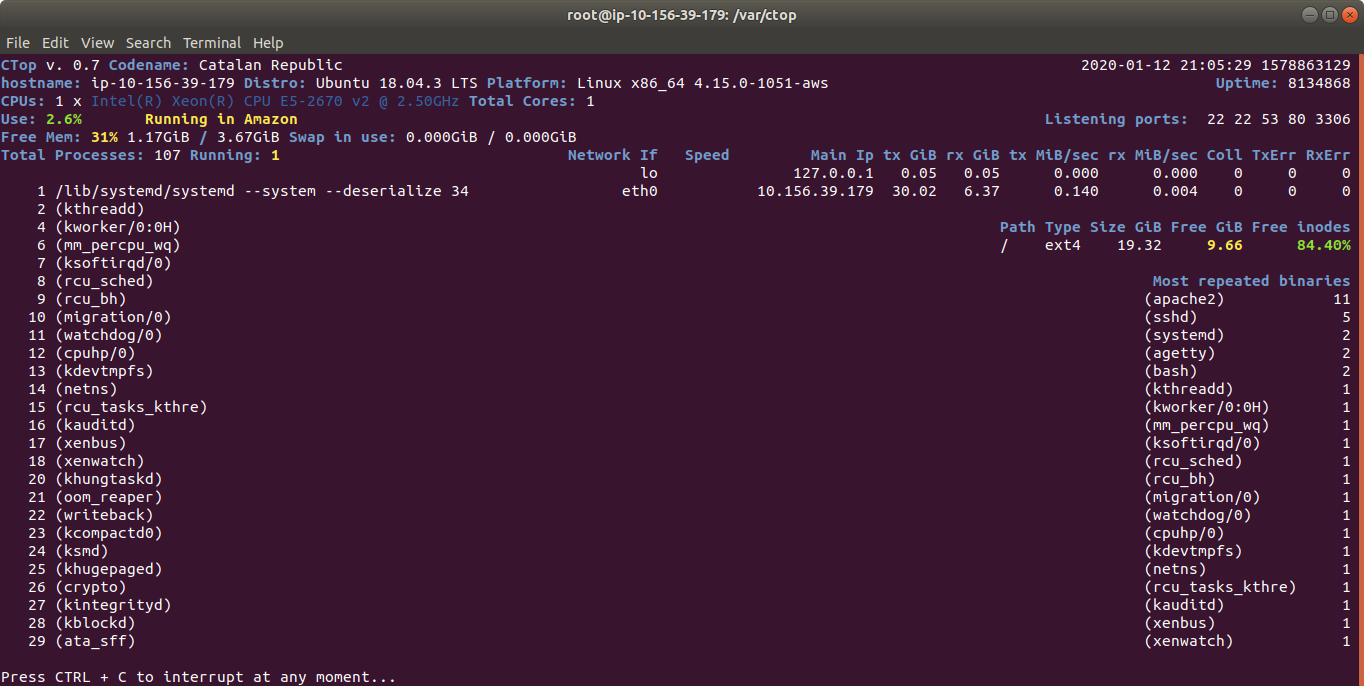
ctop.py is an Open Source tool for Linux System Administration that I’ve written in Python3. It uses only the System (/proc), and not third party libraries, in order to get all the information required. I use only this modules, so it’s ideal to run in all the farm of Servers and Dockers:
os
sys
time
shutil (for getting the Terminal width and height)
The purpose of this tool is to help to troubleshot and to identify problems with a single view to a single tool that has all the typical indicators.
It provides in a single view information that is typically provided by many programs:
top, htop for the CPU usage, process list, memory usage
meminfo
cpuinfo
hostname
uptime
df to see the free space in / and the free inodes
iftop to see real-time bandwidth usage
ip addr list to see the main Ip for the interfaces
netstat or lsof to see the list of listening TCP Ports
uname -a to see the Kernel version
Other cool things it does is:
Identifying if you’re inside an Amazon VM, Google GCP, OpenStack VMs, Virtual Box VMs, Docker Containers or lxc.
Compatible with Raspberry Pi (tested on 3 and 4, on Raspbian and Ubuntu 20.04LTS)
Uses colors, and marks in yellow the warnings and in red the errors, problems like few disk space reaming or high CPU usage according to the available cores and CPUs.
Redraws the screen and adjust to the size of the Terminal, bigger terminal displays more information
It doesn’t use external libraries, and does not escape to shell. It reads everything from /proc /sys or /etc files.
Identifies the Linux distribution
Supports Plugins loaded on demand.
Shows the most repeated binaries, so you can identify DDoS attacks (like having 5,000 apache instances where you have normally 500 or many instances of Python)
Indicates if an interface has the cable connected or disconnected
Shows the Speed of the Network Connection (useful for Mellanox cards than can operate and 200Gbit/sec, 100, 50, 40, 25, 10…)
It displays the local time and the Linux Epoch Time, which is universal (very useful for logs and to detect when there was an issue, for example if your system restarted, your SSH Session would keep latest Epoch captured)
No root required
Displays recent errors like NFS Timed outs or Memory Read Errors.
You can enforce the output to be in a determined number of columns and rows, for data scrapping.
You can specify the number of loops (1 for scrapping, by default is infinite)
You can specify the time between screen refreshes, for long placed SSH sessions
You can specify to see the output in b/w or in color (default)
Plugins allow you to extend the functionality effortlessly, without having to learn all the code. I provide a Plugin sample for starting lights on a Raspberry Pi, depending on the CPU Load, and playing a message “The system is healthy” or “Warning. The CPU is at 80%”.
Limitations:
It only works for Linux, not for Mac or for Windows. Although the idea is to help with Server’s Linux Administration and Troubleshot, and Mac and Windows do not have /proc
The list of process of the System is read every 30 seconds, to avoid adding much overhead on the System, other info every second
It does not run in Python 2.x, requires Python 3 (tested on 3.5, 3.6, 3.7, 3.8, 3.9)
I decided to code name the version 0.7 as “Catalan Republic” to support the dreams and hopes and democratic requests of the Catalan people, to become and independent republic.
I created this tool as Open Source and if you want to help I need people to test under different versions of:
Atypical Linux distributions
If you are a Cloud Provider and want me to implement the detection of your VMs, so the tool knows that is a instance of the Amazon, Google, Azure, Cloudsigma, Digital Ocean… contact me through my LinkedIn.
Monitoring an Amazon Instance, take a look at the amount of traffic sent and received
Some of the features I’m working on are parsing the logs checking for errors, kernel panics, processed killed due to lack of memory, iscsi disconnects, nfs errors, checking the logs of mysql and Oracle databases to locate errors
As the company I was working for, Sanmina, has decided to move all the Software Development to Colorado, US, and closing the offices in Bishopstown, Cork, Ireland I found myself with the need to get a new laptop. At work I was using two Dell laptops, one very powerful and heavy equipped with an Intel Xeon processor and 32 GB of RAM. The other a lightweight one that I updated to 32 GB of RAM.
I had an accident around 8 months ago, that got my spine damaged, and so I cannot carry much weight.
My personal laptops at home, in Ireland are a 15″ with 16 GB of RAM, too heavy, and an Acer 11,6″ with 8GB of RAM and SSD (I upgraded it), but unfortunately the screen crashed. I still use it through the HDMI port. My main computer is a tower with a Core i7, 64GB of RAM and a Samsung NVMe SSD drive. And few Raspberrys Pi 4 and 3 :)
I was thinking about what ultra-lightweight laptop to buy, but I wanted to buy it in Barcelona, as I wanted a Catalan keyboard (the layout with the broken ç and accents). I tried by Amazon.es but I have problems to have shipped the Catalan keyboard layout laptops to my address in Ireland.
I was trying to find the best laptop for me.
While I was investigating I found out that none of the laptops in the market were convincing me.
The ones in around 1Kg, which was my initial target, were too big, and lack a proper full size HDMI port and Gigabit Ethernet. Honestly, some models get the HDMI or the Ethernet from an USB 3.1, through an adapter, or have mini-HDMI, many lack the Gigabit port, which is very annoying. Also most of the models come with 8GB of RAM only and were impossible to upgrade. I enrolled my best friend in my quest, in the research, and had the same conclusions.
I don’t want to have to carry adapters with me to just plug to a monitor or projector. I don’t even want to carry the power charger. I want a laptop that can work with me for a complete day, a full work session, without needing to recharge.
So while this investigation was going on, I decided to buy a cheap laptop with a good trade off of weight and cost, in order to be able to work on the coffee. I needed it for writing documents in Google Docs, creating microservices architectures, programming in Java and PHP, and writing articles in my blog. I also decided that this would be my only laptop with Windows, as honestly I missed playing Star Craft 2, and my attempts with Wine and Linux did not success.
Not also, for playing games :) , there are tools that are only available for Windows or for Mac Os X and Windows, like: POSTMAN, Kitematic for managing dockers visually, vSphere…
(Please note, as I reviewed the article I realized that POSTMAN is available for Linux too)
Please note: although I use mainly Linux everywhere (Ubuntu, CentOS, and RedHat mainly) and I contribute to Open Source projects, I do have Windows machines.
I created my Start up in 2004, and I still have Windows Servers, physical machines in a Data Center in Barcelona, and I still have VMs and Instances in Public Clouds with Windows Servers. Also I programmed some tools using Visual Studio and Visual Basic .NET, ASP.NET and C#, but when I needed to do this I found more convenient spawn an instance in Amazon or Azure and pay for its use.
When I created my Start up I offered my infrastructure as a way to get funding too, and I offered VMs with VMWare. I found that having my Mail Servers in VMs was much more convenient for Backups, cloning, to scale up, to avoid disruption and for Disaster and Recovery.
I wanted a cheap laptop that will not make feel bad if transporting it in a daily basis gets a hit and breaks, or that if it rains (and this happens more than often in Ireland) and it breaks is not super-hurtful, or even if it gets stolen. Yes, I’m from a big city, like is Barcelona, Catalonia, and thieves are a real problem. I travel, so I want a laptop decent enough that I can take to travel, and for going for a coffee, coding anything, and I feel comfortable enough that if something happens to it is not the end of the world.
Cork is not a big city, so the options were reduced. I found a laptop that meets my needs.
It is equipped with a Intel® Core™ i3-6006U (2 GHz, 3 MB cache, 2 cores) , a 500GB SATA HDD, and 4 GB of DDR4 RAM.
The information on HP webpage is really scarce, but checking other pages I was able to see that the motherboard has 2 memory banks, accepting a max of 16GB of RAM.
I saw that there was an slot, unclear if supporting NVMe SSD drives, but supporting M.2 SSD for sure.
So I bought in Amazon 2x8GB and a M.2 500GB drive.
Since I was 5 years old I’ve been upgrading and assembling by myself all the computers. And this is something that I want to keep doing. It keeps me sharp, knowing the new ports, CPUs, and motherboard architectures, and keeps me in contact with the Hardware. All my life I’ve thought that specializing Software Engineers and Systems Engineers, like if computers were something separate, is a mistake, so I push myself to stay up to date of the news in all the fields.
I removed the spinning 500 GB SATA HDD, cause it’s slow and it consumes a lot of energy. With the M.2 SSD the battery last forever.
The interesting part is how I cloned the drive from the Spinning HDD to the new M.2.
I did:
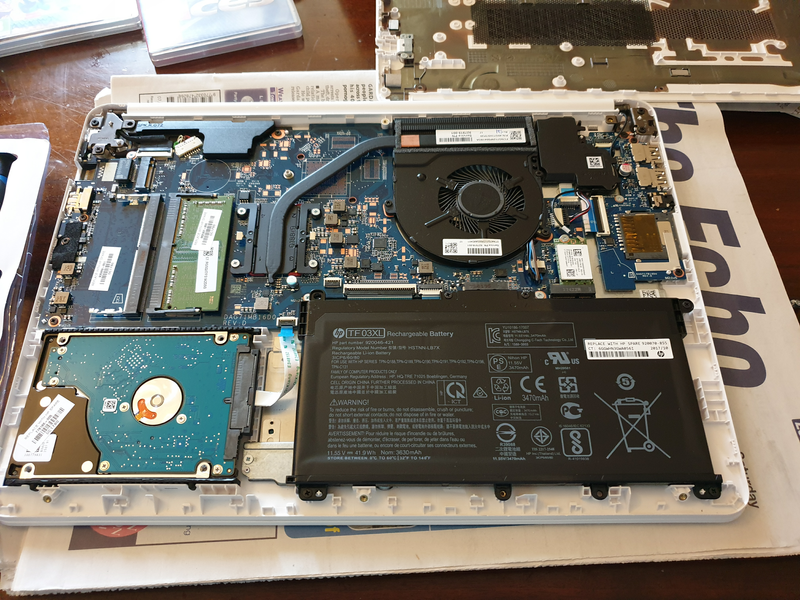
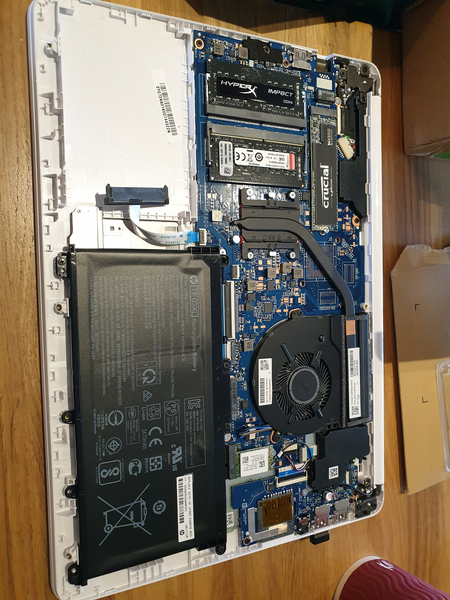
Open the computer (see pics below) and Insert the new drive M.2
Boot with an USB Linux Rescue distribution (to do that I had to enable Legacy Boot on BIOS and boot with the USB)
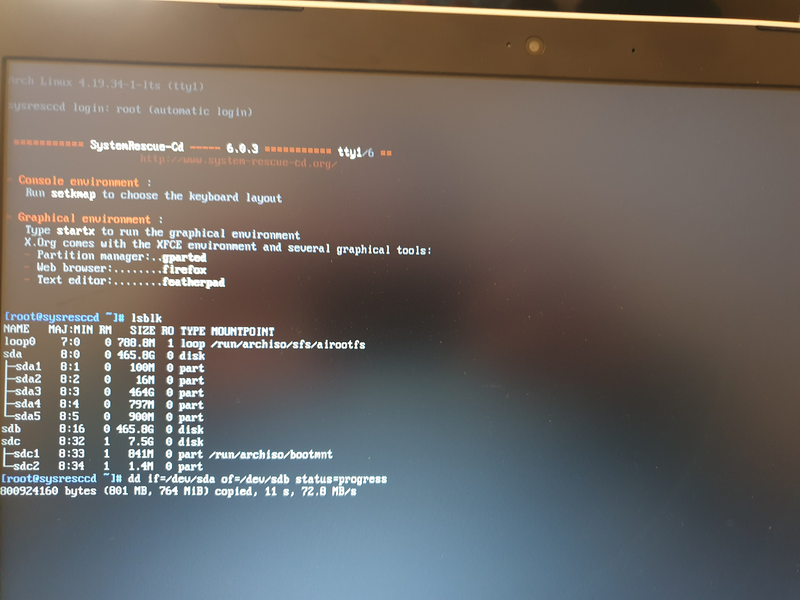
Use lsblk command to identify the HDD drive, it was easy as it was the one with partitions
dd from if=/dev/sda to of=/dev/sdb with status=progress to see live status and speed (around 70MB/s) and estimated time to complete.
Please note that the new drive should be bigger or at least have the same number of bytes to avoid problems with the last partition.
I removed the HDD drive, this reduces the weight of my laptop by 100 grams
Disable Legacy Boot, and boot the computer. Windows started perfectly :)
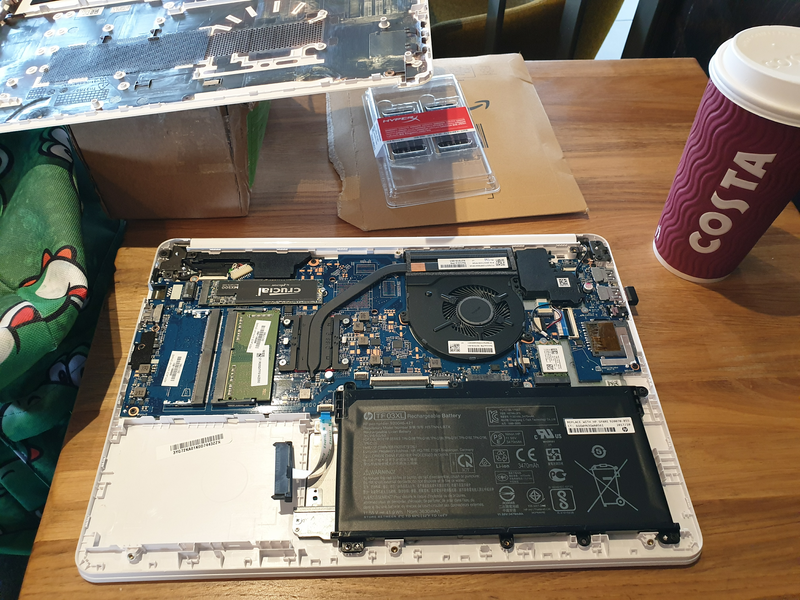
I found so few information about this model, that I wanted to share the pictures with the Community. Here are the pictures of the upgrade process.
Here you can see the Crucial M.2 SSD installed and the Spinning HDD removed. Yes, I did in a coffee :)Final step, installing the 2x8GB RAM memory modules
My Team in The States report an issue with a Red Hat iSCSI Initiator having issues connecting to a Volume exported by a ZFS Server.
There is an issue on GitLab.
As I always do when I troubleshot a problem, I create a forensics post-mortem document recording everything I do, so later, others can learn how I fix it, or they can learn the steps I did in order to troubleshoot.
Please note: Some Ip addresses have been manually edited.
2019-08-09 10:20:10 Start of the investigation
I log into the Server, with Ip Address: xxx.yyy.16.30. Is an All-Flash-Array Server with RHEL6.10 and DRAID v.08091350.
Htop shows normal/low activity.
I check the addresses in the iSCSI Initiator (client), to make sure it is connecting to the right Server.
[root@Host-164 ~]# ip addr list
1: lo: <LOOPBACK,UP,LOWER_UP> mtu 65536 qdisc noqueue state UNKNOWN qlen 1
    link/loopback 00:00:00:00:00:00 brd 00:00:00:00:00:00
    inet 127.0.0.1/8 scope host lo
    valid_lft forever preferred_lft forever
    inet6 ::1/128 scope host
    valid_lft forever preferred_lft forever
2: eno1: <BROADCAST,MULTICAST,UP,LOWER_UP> mtu 1500 qdisc mq state UP qlen 1000
    link/ether 00:25:90:c5:1e:ea brd ff:ff:ff:ff:ff:ff
    inet xxx.yyy.13.164/16 brd xxx.yyy.255.255 scope global eno1
    valid_lft forever preferred_lft forever
    inet6 fe80::225:90ff:fec5:1eea/64 scope link
    valid_lft forever preferred_lft forever
3: eno2: <NO-CARRIER,BROADCAST,MULTICAST,UP> mtu 1500 qdisc mq state DOWN qlen 1000
    link/ether 00:25:90:c5:1e:eb brd ff:ff:ff:ff:ff:ff
4: enp3s0f0: <BROADCAST,MULTICAST,UP,LOWER_UP> mtu 1500 qdisc mq state UP qlen 1000
    link/ether 24:8a:07:a4:94:9c brd ff:ff:ff:ff:ff:ff
    inet 192.168.100.164/24 brd 192.168.100.255 scope global enp3s0f0
    valid_lft forever preferred_lft forever
    inet6 fe80::268a:7ff:fea4:949c/64 scope link
    valid_lft forever preferred_lft forever
5: enp3s0f1: <BROADCAST,MULTICAST,UP,LOWER_UP> mtu 1500 qdisc mq state UP qlen 1000
    link/ether 24:8a:07:a4:94:9d brd ff:ff:ff:ff:ff:ff
    inet 192.168.200.164/24 brd 192.168.200.255 scope global enp3s0f1
    valid_lft forever preferred_lft forever inet6 fe80::268a:7ff:fea4:949d/64 scope link
    valid_lft forever preferred_lft forever
I see the luns on the host, connecting to the 10Gbps of the Server:
/dev/sdg1 on /mnt/large type ext4 (ro,relatime,seclabel,data=ordered)
Lsblk shows that /dev/sdg is not present:
[root@Host-164 ~]# lsblk
 NAME
 MAJ:MIN RM SIZE RO TYPE MOUNTPOINT
 sda 8:0 0 119.2G 0 disk
 ├─sda1 8:1 0 500M 0 part /boot
 └─sda2 8:2 0 118.8G 0 part
  ├─rhel-swap 253:0 0 11.9G 0 lvm [SWAP]
  └─rhel-root 253:1 0 106.8G 0 lvm /
 sdb 8:16 0 100G 0 disk
 sdc 8:32 0 100G 0 disk
 sdd 8:48 0 100G 0 disk
 sde 8:64 0 100G 0 disk
 sdf 8:80 0 100G 0 disk
And as expected:
[root@Host-164 ~]# ls -al /mnt/large
 ls: reading directory /mnt/large: Input/output error
 total 0
I see that the Volumes appear to not having being partitioned:
[root@Host-164 ~]# fdisk /dev/sdf
 Welcome to fdisk (util-linux 2.23.2).
 Changes will remain in memory only, until you decide to write them.
 Be careful before using the write command.
 Device does not contain a recognized partition table
 Building a new DOS disklabel with disk identifier 0xddf99f40.
 Command (m for help): p
 Disk /dev/sdf: 107.4 GB, 107374182400 bytes, 209715200 sectors
 Units = sectors of 1 * 512 = 512 bytes
 Sector size (logical/physical): 512 bytes / 512 bytes
 I/O size (minimum/optimal): 512 bytes / 512 bytes
 Disk label type: dos
 Disk identifier: 0xddf99f40
 Device Boot
 Start
 End
 Blocks Id System
 Command (m for help): q
I create a partition and format with ext2
[root@Host-164 ~]# mke2fs /dev/sdb1
 mke2fs 1.42.9 (28-Dec-2013)
 Filesystem label=
 OS type: Linux
 Block size=4096 (log=2)
 Fragment size=4096 (log=2)
 Stride=0 blocks, Stripe width=0 blocks
 6553600 inodes, 26214144 blocks
 1310707 blocks (5.00%) reserved for the super user
 First data block=0
 Maximum filesystem blocks=4294967296
 800 block groups
 32768 blocks per group, 32768 fragments per group
 8192 inodes per group
 Superblock backups stored on blocks:
 32768, 98304, 163840, 229376, 294912, 819200, 884736, 1605632, 2654208,
 4096000, 7962624, 11239424, 20480000, 23887872
 Allocating group tables: done
 Writing inode tables: done
 Writing superblocks and filesystem accounting information: done
I mount:
[root@Host-164 ~]# mount /dev/sdb1 /mnt/vol1
I fill the volume from the client, and it works. I check the activity in the Server with iostat and there are more MB/s written to the Server’s drives than actually speed copying in the client.
I completely fill 100GB but speed is slow. We are working on a 10Gbps Network so I expected more speed.
I check the connections to the Server:
[root@obs4602-1810 ~]# netstat | grep -v "unix"
Active Internet connections (w/o servers)
Proto Recv-Q Send-Q Local Address               Foreign Address             State
tcp        0      0 192.168.10.10:iscsi-target  192.168.10.180:55300        ESTABLISHED
tcp        0      0 192.168.10.10:iscsi-target  192.168.10.180:55298        ESTABLISHED
tcp        0      0 xxx.yyy.18.10:ssh            xxx.yyy.12.154:57137         ESTABLISHED
tcp        0      0 192.168.10.10:iscsi-target  192.168.10.180:55304        ESTABLISHED
tcp        0      0 192.168.10.10:iscsi-target  192.168.10.180:55301        ESTABLISHED
tcp        0      0 192.168.10.10:iscsi-target  192.168.10.180:55306        ESTABLISHED
tcp        0      0 xxx.yyy.18.10:ssh            xxx.yyy.12.154:56395         ESTABLISHED
tcp        0      0 xxx.yyy.18.10:ssh            xxx.yyy.14.52:57330          ESTABLISHED
tcp        0      0 192.168.10.10:iscsi-target  192.168.10.180:55296        ESTABLISHED
tcp        0      0 192.168.10.10:iscsi-target  192.168.10.180:55305        ESTABLISHED
tcp        0      0 xxx.yyy.18.10:ssh            xxx.yyy.12.154:57133         ESTABLISHED
tcp        0      0 192.168.10.10:iscsi-target  192.168.10.180:55303        ESTABLISHED
tcp        0      0 192.168.10.10:iscsi-target  192.168.10.180:55299        ESTABLISHED
tcp        0      0 192.168.10.10:iscsi-target  192.168.10.176:57542        ESTABLISHED
tcp        0      0 192.168.10.10:iscsi-target  192.168.10.180:55302        ESTABLISHED
I see many connections from Host 180, I check that and another member of the Team is using that client to test with vdbench against the Server.
This explains the slower speed I was getting.
Conclusions
There was a local problem on the Host. The problems with the disconnection seem to be related to a connection that was lost (sdg). All that information was written to iSCSI buffer, not to the Server. In fact, that volume was mapped in the system with another letter, sdg was not in use.
Speed was slow due to another client pushing Data to the Server too
Windows clients with auto reconnect option are not reporting timeout reports while in Red Hat clients iSCSI connection timeouts. It should be increased
2020-03-10 22:16 IST TIP: At that time we were using Google suite and Skype to communicate internally with the different members across the world. If we had used a tool like Slack, and we had a channel like #engineering for example or #sanjoselab, then I could have paged and asked “Is somebody using obs4602-1810?“
This is the history it happen to me some time ago, and so the commands I used to troubleshot. The purpose is to share knowledge in a interactive way. There are some hidden gems that you’ll acquire if you have the patience to go over all the document and read it all…
I had qualified Intel Xeon single processor platform to run my DRAID (ZFS Declustered RAID) project for my employer.
The platforms I qualified were:
1) single processor for Cold Storage (SAS Spinning drives): 4U60, newest models 4602
2) for multiprocessor: the 4U90 (90 Spinning drives) and Flash: All-Flash-Arrays.
The amounts of RAM I was using for my tests range for 64GB to 384GB.
Somebody in the company, at executive level, assembled an experimental config that was totally new for us and wanted to try by their own. It was the 4602 with multiprocessor and 32GB of RAM.
When they were unable to make it work at the expected speed, they required me to troubleshot and to make it work.
The 4602 single processor had two IOC (Input Output Controller, LSI Logic / Symbios Logic SAS3008 PCI-Express Fusion-MPT SAS-3 (rev 02) ), while the 4602 double processor had four IOC, so given that each of those IOC can perform at peaks of 6GB/s, with a maximum total of 24 GB/s, the performance when reading/writing from all the drives should be better.
But this Server was returning double times for Rebuilding, respect the single processor version, which didn’t make any sense.
I had to check everything. There was the commands I ran:
Check the upgrade of the CPU:
htop
lscpu
Changing the Zoning.
Those Servers use SAS drives dual ported, which means that two different computers can be connected to the same drive and operate at the same time. Is up to you to make sure you don’t introduce corruption. Those systems are used mainly for HA (High Availability).
Those Systems allow to be configured in different zoning modes. That’s the way on how each of the two servers (Controllers) see the disk. In one zoning each Controller sees only 30 drives, in another each IOC sees all the drives (for redundancy but performance constrained to 1 IOC Speed).
The config I set is each IOC will see 15 drives, so each one of the 4 IOC will have 6GB/s for 15 drives. Given that these spinning drives perform in the outtermost part of the cylinder at 265MB/s, that means that at maximum speed one IOC will be using 3.97 GB/s, will say 4GB/s. Plenty of bandwidth.
Note: Spinning drives have different performance depending on how close you’re to the cylinder. In the innermost part it goes under 145 MB/s, and if you read all of those drive sequentially with dd it will return an average speed of 145 MB/s.
With this command you can sive live how it performs and the average read speed in real time. Use skip to jump to that position (relative to bs) in the drive, so you can test directly the speed at the innermost close to the cylinder part of t.
dd if=/dev/sda of=/dev/null bs=1M status=progress
I saw that the zoning was not right one, so I set it correctly:
The sleeps after rebooting the expanders are recommended. Rebooting the Operating System too, to avoid problems with some Software as the expanders changed live.
If you have ZFS pools or workloads stop them and export the pool before messing with the expanders.
In order to check to which drives is connected each IOC:
I do this for all the drives at the same time and with iostat:
iostat -y 1 1
I check the status of the memory with:
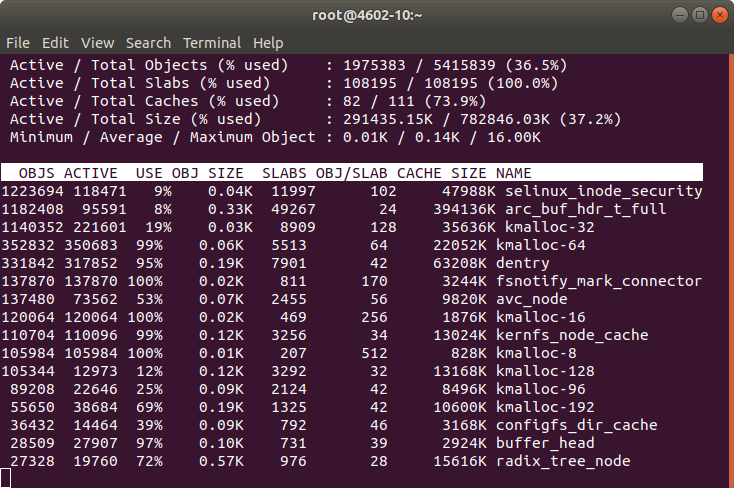
slabtop
free
htop
I checked the memory and htop during a Rebuild. Memory was more than enough. However CPU usage was higher than expected.
The red bars in the image correspond to kernel processes, in this case is the DRAID Rebuild. I see that the load is higher than the usual with a single processor.
I capture all the parameters from ZFS with:
zfs get all
All this information is logged into my forensics document, so later can be checked by my Team or I can share with other Architects or other members of the company. I started this methodology after I knew how Google do their SRE forensics / postmortem documents. Also for myself is useful for the future to have a log of the commands I executed and a verbose output of the results.
I install the smp_utils
yum install smp_utils
Check things:
ls -al  /dev/bsg/
total 0drwxr-xr-x.  2 root root     3020 May 22 10:16 .
drwxr-xr-x. 20 root root     8680 May 22 10:16 ..
crw-------.  1 root root 248,  76 May 22 10:00 1:0:0:0
crw-------.  1 root root 248, 126 May 22 10:00 10:0:0:0
crw-------.  1 root root 248, 127 May 22 10:00 10:0:1:0
crw-------.  1 root root 248, 136 May 22 10:00 10:0:10:0
crw-------.  1 root root 248, 137 May 22 10:00 10:0:11:0
crw-------.  1 root root 248, 138 May 22 10:00 10:0:12:0
crw-------.  1 root root 248, 139 May 22 10:00 10:0:13:0
[...]
There are some errors, and I check with the Hardware Team, which pass a battery of tests on the machine and say that the machine passes. They tell me that if the errors counted were in order of millions then it would be a problem, but having few of them is usual.
My colleagues previously reported that the memory was performing well, and the CPU too. They told me that the speed was exactly double respect a platform with one single CPU of the same kind.
Even if they told me that, I ran cmips tests to make sure.
git clone https://github.com/cmips/cmips_bin
It scored 16,000. The performance was Ok in general terms but the problem is that I didn’t have a baseline for that processor in single processor, so I cannot make sure that the memory bandwidth was Ok. The performance was less that an Amazon c3.8xlarge. The system I was testing is a two processor system, but each CPU is cheap, around USD $400.
Still my gut feeling was telling me that this double processor server should score more.
lscpu
[root@DRAID-1135-14TB-2CPU ~]# lscpu
 Architecture:          x86_64
 CPU op-mode(s):        32-bit, 64-bit
 Byte Order:            Little Endian
 CPU(s):                32
 On-line CPU(s) list:   0-31
 Thread(s) per core:    2
 Core(s) per socket:    8
 Socket(s):             2
 NUMA node(s):          2
 Vendor ID:             GenuineIntel
 CPU family:            6
 Model:                 79
 Model name:            Intel(R) Xeon(R) CPU E5-2620 v4 @ 2.10GHz
 Stepping:              1
 CPU MHz:               2299.951
 CPU max MHz:           3000.0000
 CPU min MHz:           1200.0000
 BogoMIPS:              4199.73
 Virtualization:        VT-x
 L1d cache:             32K
 L1i cache:             32K
 L2 cache:              256K
 L3 cache:              20480K
 NUMA node0 CPU(s):     0-7,16-23
 NUMA node1 CPU(s):     8-15,24-31
 Flags:                 fpu vme de pse tsc msr pae mce cx8 apic sep mtrr pge mca cmov pat pse36 clflush dts acpi mmx fxsr sse sse2 ss ht tm pbe syscall nx pdpe1gb rdtscp lm constant_tsc arch_perfmon pebs bts rep_good nopl xtopology nonstop_tsc aperfmperf eagerfpu pni pclmulqdq dtes64 monitor ds_cpl vmx smx est tm2 ssse3 sdbg fma cx16 xtpr pdcm pcid dca sse4_1 sse4_2 x2apic movbe popcnt tsc_deadline_timer aes xsave avx f16c rdrand lahf_lm abm 3dnowprefetch epb cat_l3 cdp_l3 intel_ppin intel_pt ibrs ibpb stibp tpr_shadow vnmi flexpriority ept vpid fsgsbase tsc_adjust bmi1 hle avx2 smep bmi2 erms invpcid rtm cqm rdt_a rdseed adx smap xsaveopt cqm_llc cqm_occup_llc cqm_mbm_total cqm_mbm_local dtherm ida arat pln pts spec_ctrl intel_stibp
I check the memory configuration with:
dmidecode -t memory
I examined the results, I see that the processor can only operate the DDR4 ECC 2400 Memory at 2133 and… I see something!. This Controller before was a single processor with 2 Memory Sticks of 16GB each, dual rank.
I see that now I have the same number of sticks in that machine, but I have two CPU!. So 2 Memory sticks in total, for 2 CPU.
That’s no good. The memory must be in pairs and in the right slots to get the maximum performance.
1 memory module for 1 CPU doesn’t allow to have Dual Channel and probably is affecting the performance. Many Servers will not even boot if you add an odd number of memory sticks per CPU.
And many Servers can operate at full speed only if all the banks are filled.
I request to the Engineers in Silicon Valley to add 4 modules in the right slots. They did, and I repeated the tests and the performance was doubled then.
After some days I had some time with the machine, I repeated the test and I got a CMIPS Score of around 20,000.
Multiprocessor world is far more complicated than single processor. Some times things can work not as expected, and not be evident, for example cache pipeline can act diferent for a program working in multiprocessor and single processor. Or the QPI could be saturated.
After this I shared my forensics document with as many Engineers as I could, so they could learn how I did to troubleshot the problem, and what was the origin of it, and I asked them to do the same so we can track their steps and progress if something needs to be troubleshoot.
After proper intensive testing the Server was qualified. Lesson here is that changes cannot be commited quickly, need their time.
I encountered that Server, Xeon, 128 GB of RAM, with those 58 Spinning drives 10 TB and 2 SSD of 2 TB each, where I was testing the latest version of my Software.
Monitoring long term tests, data validation, checking for memory leaks… I notice the Server is using 70 GB of RAM. Only 5.5 GB are used for buffers according to the usual tools (top, htop, free, cat /proc/meminfo, ps aux…) and no programs are eating that amount, so where is the RAM?. The rest of the Servers are working well, including models: same mode, 4U60 with 64 GB of RAM, 4U90 with 128 GB and All-Flash-Array with 256 GB of RAM, only using around 8 GB of RAM even under load. iSCSI sharings being used, with I/O, iSCSI initiators trying to connect and getting rejected, several requests for second, disk pulling, and that usual stuff. And this is the only unit using so many memory, so what?. I checked some modules to see memory consumption, but nothing clear. Ok, after a bit of investigation one member of the Team said “Oh, while you was on holidays we created a Ramdisk and filled it for some validations, we deleted that already but never rebooted the Server”. Ok. The easy solution would be to reboot, but that would had hidden a memory leak it that was the cause. No, I had to find the real cause.
I requested assistance of one my colleagues, specialist, Kernel Engineer. He confirmed that processes were not taking that memory, and ask me to try to drop the cache.
So I did:
sync
echo 3 > /proc/sys/vm/drop_caches
Then the memory usage drop to 11.4 GB and kept like that while I maintain sustained the load.
That’s more normal taking in count that we have 16 Volumes shared and one host is attempting to connect to Volumes that do not exist any more like crazy, Services and Cronjobs run in background and we conduct tests degrading the pool, removing drives, etc..
After tests concluded memory dropped to 2 GB, which is what we use when we’re not under load.
Note: In order to know about the memory being used by Kernel slab cache in real time you can use command:
This trick may be useful for you. Almost surely if you power cycle, completely powering down your Server you’ll fix booting too. Unfortunately we do not always have access to the Data Center or Remote Hands service available, so this trick may be useful for you.
Ok, as you know I work with ZFS, DRAID, Erasure Coding… and Cold Storage.
I work with big disks, SAS, SSD, and NVMe.
Sometimes I need to conduct some tests that involve filling completely to 100% the pool.
That’s very slow having to fill 14TB drives, with Servers with 60, 90 and 104 drives, for obvious reasons. So here is a handy script for partitioning those drives with a small partition, then you use the small partition for creating a pool that will fill faster.
1. Get the list of drives in the system
For example this script can help
If your drives had a previous partition this script will detect them, and will use only the drives with wwn identifier.
Warning: some M.2 booting drives have wwn where others don’t. Use with caution.
2. Identify the boot device and remove from the list
3. Do the loop with for DRIVE in $DRIVES or manually:
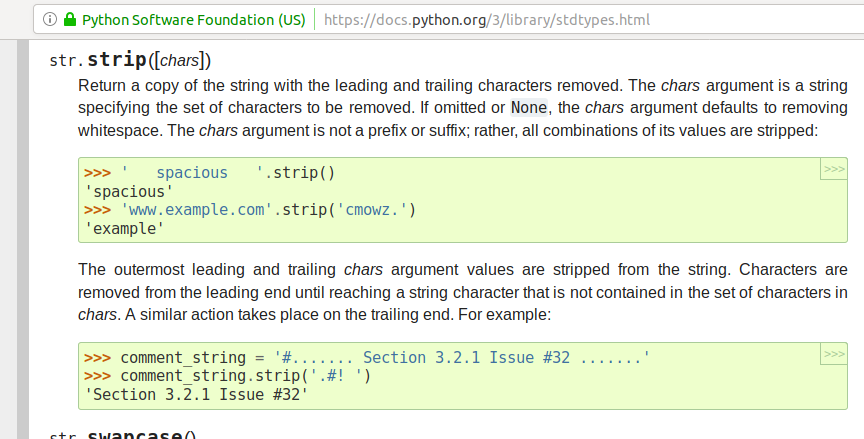
If you see the Official Python3 documentation for strip(), it says that strip without parameters will return the string without the leading and trailing white spaces.
Optionally you can pass a string with the characters you want to eliminate.
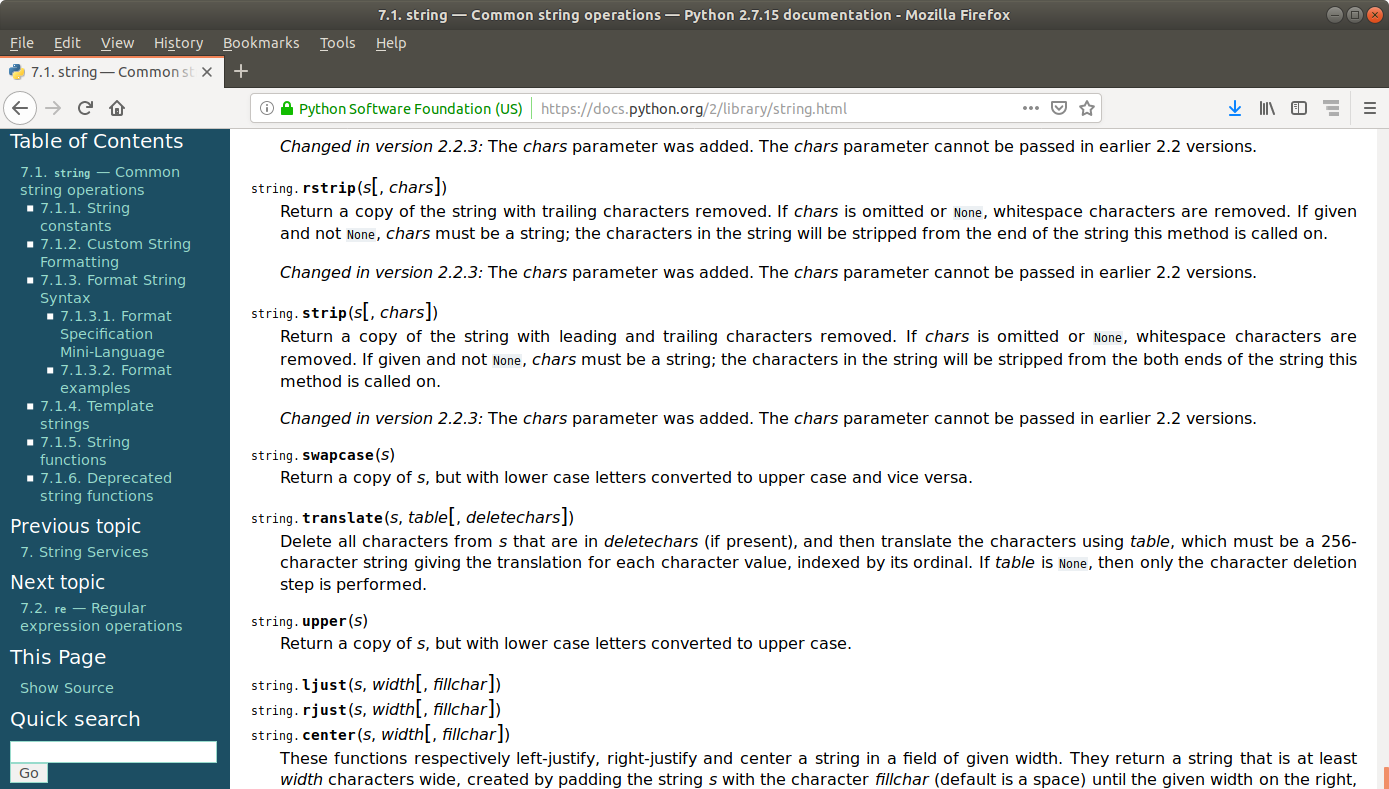
The official documentation for Python 2 says:
string.strip(s[, chars])
Return a copy of the string with leading and trailing characters removed. If chars is omitted or None, whitespace characters are removed. If given and not None, chars must be a string; the characters in the string will be stripped from the both ends of the string this method is called on.
Changed in version 2.2.3: The chars parameter was added. The chars parameter cannot be passed in earlier 2.2 versions.
A white space is a white space. Is not an Enter.
But strip() without parameters will remove white spaces (space), and Enter \n and Tabs \t.
Probably you will not realize that unless you read from a file that has empty lines at the end for a reason, and you use strip().
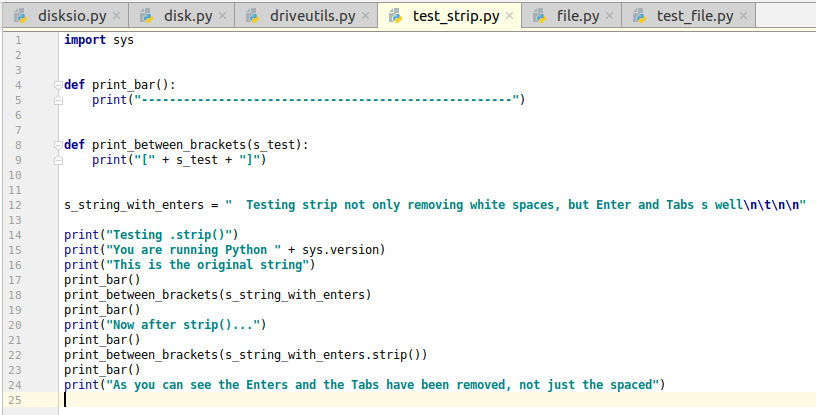
You can see a demonstration following this small program, that runs the same for Python2 and Python3.
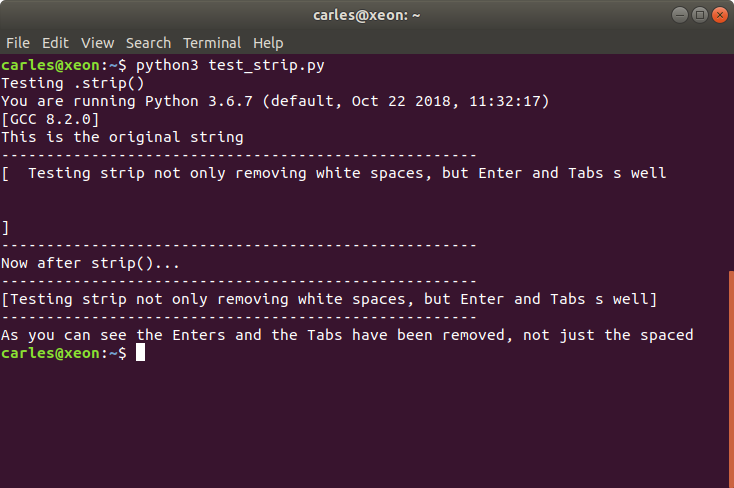
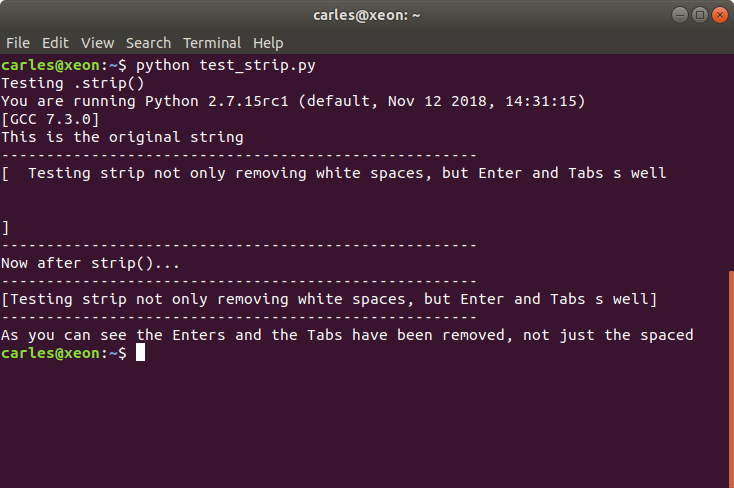
And the corresponding output for python2 and python3:
The [ ] characters where added to show that there are no hidden tabs or similar after.
Here I paste the code so you can try yourself:
import sys


def print_bar():
    print("-----------------------------------------------------")


def print_between_brackets(s_test):
    print("[" + s_test + "]")


s_string_with_enters = "  Testing strip not only removing white spaces, but Enter and Tabs s well\n\t\n\n"

print("Testing .strip()")
print("You are running Python " + sys.version)
print("This is the original string")
print_bar()
print_between_brackets(s_string_with_enters)
print_bar()
print("Now after strip()...")
print_bar()
print_between_brackets(s_string_with_enters.strip())
print_bar()
print("As you can see the Enters and the Tabs have been removed, not just the spaced")
I think this should be disambiguate so I decided to take action. Is very easy to blame and never contribute. Not me. I went to Python to fix that and I located a bug reporting this issue:
The issue was registed and made specially interesting contributions by Dimitri Papadopoulos Orfanos.
The thread is really interesting to read. I recommend it.
At a glance:
“Python heavily relies on isspace() to detect “whitespace” characters.”
* Lib/string.py near line 23:
  whitespace = ' \t\n\r\v\f'
So all those characters will be stripped in Python2.7 if you use just string.strip()
The ticket was opened the 2015-10-18 12:15. So it’s a shame the documentation has not been updated yet, more than 3 years later. Those are the kind of things, lack of care, that I can’t understand. Not looking for the excellence.
Please, do note that Python3 supports Unicode natively and things are always a bit different than with Python2 and AscII.
Ok, so I lend one of my Servers to two of my colleagues in The States, that required to prepare some test for a customer. I always try to be nice and to stimulate sales across the organizations I help, so if they need a Server for a PoC and demo to a customer, they know they can count on me.
It is important to remark that the Servers I was using had two motherboards, with their CPU and RAM, and Dual Port SAS drives. We had those Servers so we can implement High Availability. The Dual Port SAS allow two different computers or IO controllers to access the same drive at the same time.
I work with Declustered RAID, DRAID, and ZFS.
The Server was a 4U90, so a 4U Server with 90 SAS3 spinning drives and 4 SSD. Drives are Dual Ported, and two Controllers (motherboard + CPU + RAM) have access simultaneously to the drives for HA.
After their tests my colleagues, returned me the Server, and I needed to use it and my surprise was when I tried to provision with ZFS and I encountered problems. Not much in the logs. Please note I was using only one node (or controller), and the other was not in use but they ask me to keep the OS and the data (in 2xMD drive). I shutdown the node A after the Engineers in San Jose powered the Server off, so only my node was working.
After doing this for all I try to provision and… surprise! does not work. /dev/md127 has respawned like in the old times from Doom video game.
I check the mdmonitor service and even disable it.
systemctl disable mdmonitor
I repeat the process.
And /dev/md127 appears again, using another device.
At this point, just in case, I check the other controller, which should be powered off.
Ok, it was on. With different Ip, so it was not answering to ping, but I still had access to BMC//IPMI. After confirming with my colleagues that I can shutdown that node (they did not turn it on apparently) I launch the poweroff command, and repeat, same!.
I see that the poweroff command on the second Controller is doing a reboot, not poweroff. Is a Firmware issue I find. So I access to the Linux from the management tool and I launch the halt command that makes it not respond to the ping anymore.
I repeat the process, and still the ghost md array appears there, and blocks me from doing my zpool create.
The /etc/mdadm.conf file did not exist (by default is not created).
I try a more aggressive approach:
DRIVES=`cat /proc/partitions | grep 3907018584 | awk '{ print $4; }'`

for DRIVE in $DRIVES; do echo "Trying /dev/${DRIVE}1"; mdadm --examine /dev/${DRIVE}1; done
Ok. And destruction time:
for DRIVE in $DRIVES; do echo "Trying /dev/${DRIVE}"; wipefs -a -f /dev/${DRIVE}; done

for DRIVE in $DRIVES; do echo "Trying /dev/${DRIVE}1"; mdadm --zero-superblock /dev/${DRIVE}1; done
Apparently the system is clean, but still I cannot provision, and /dev/md127 respawns and reappears all the time.
After googling and not finding anything about this problem, and my colleagues no having clue about what is causing this, I just proceed with a simple solution, as I need the Server for my company completing the tests in the next 24 hours.
So I create the file /etc/mdadm.conf with this content:
[root@draid-08 ~]# cat /etc/mdadm.conf
AUTO -all
After that I rebooted the Server and I saw the infamous /dev/md127 is not there and I’m able to provision.
I share the solution as it may help other people.
The most straightforward procedure would had been reinstalling clean the OS, but this operation is very slow when simulating a Virtual CD remotely, so it was worth fixing that as OS level, as I save one day delaying my work.