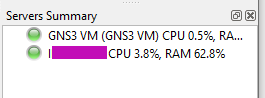
So here I explain how to solve a problem that was happening to a friend.
He uses GNS3 for the university, and after installing the latest version, which in this case is 2.2.29, it stopped working.
He had it configured to use the local Server and VirtualBox in Windows 10.
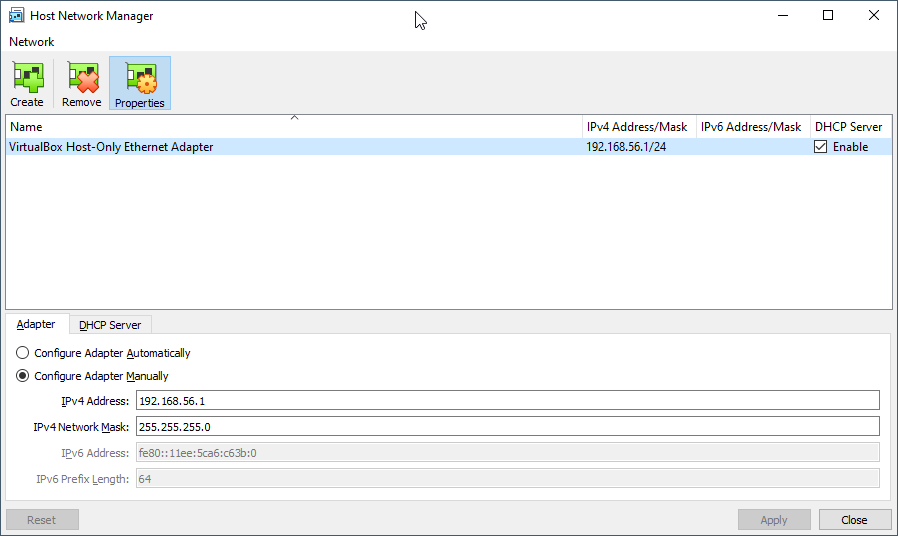
The first thing to check and to fix is the Ip address for Host Only.
If you use Linux or Mac, only certain Ip ranges can be used, or you’ll have to edit a config file inside /etc/vbox
So the first thing is to set an Ip Address in VirtualBox VM that will make you worry free.
So start VirtualBox VM directly, and when the VM boots, use the text menu application to Configure to a valid Ip from the range defined for Host Only.
You can check this in VirtualBox in File > Host Network Manager
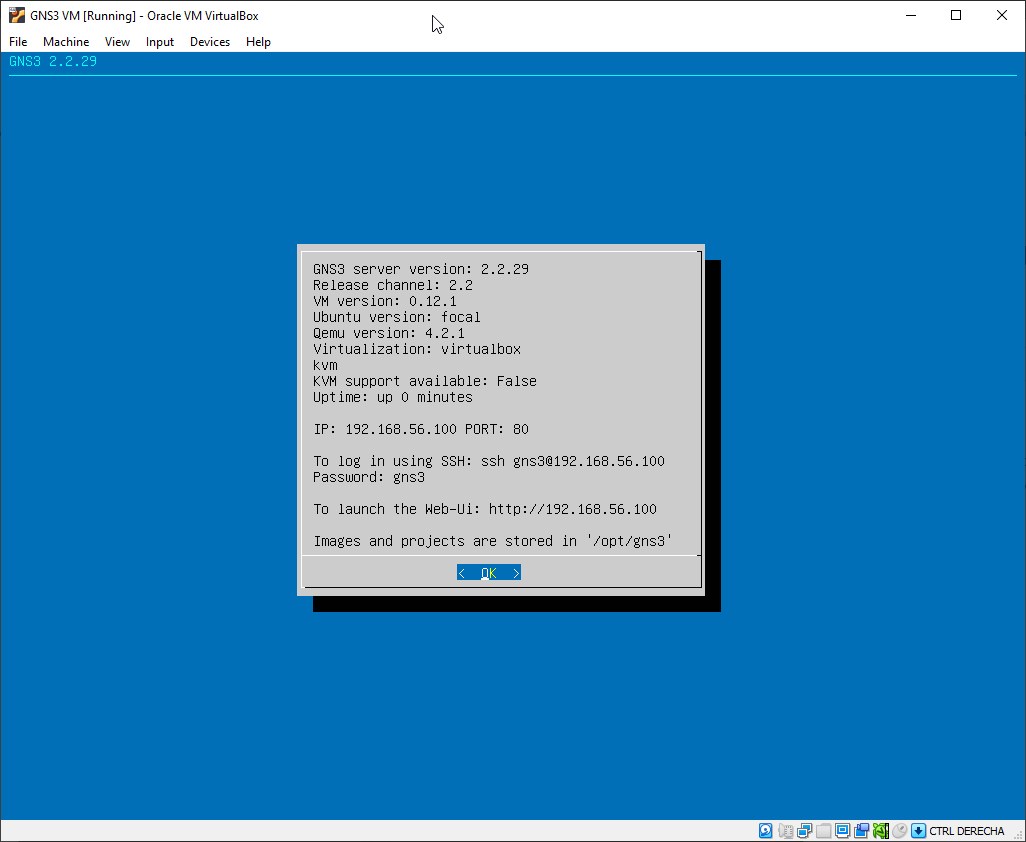
In my initial test I picket this Ip for the VM:
192.168.56.100
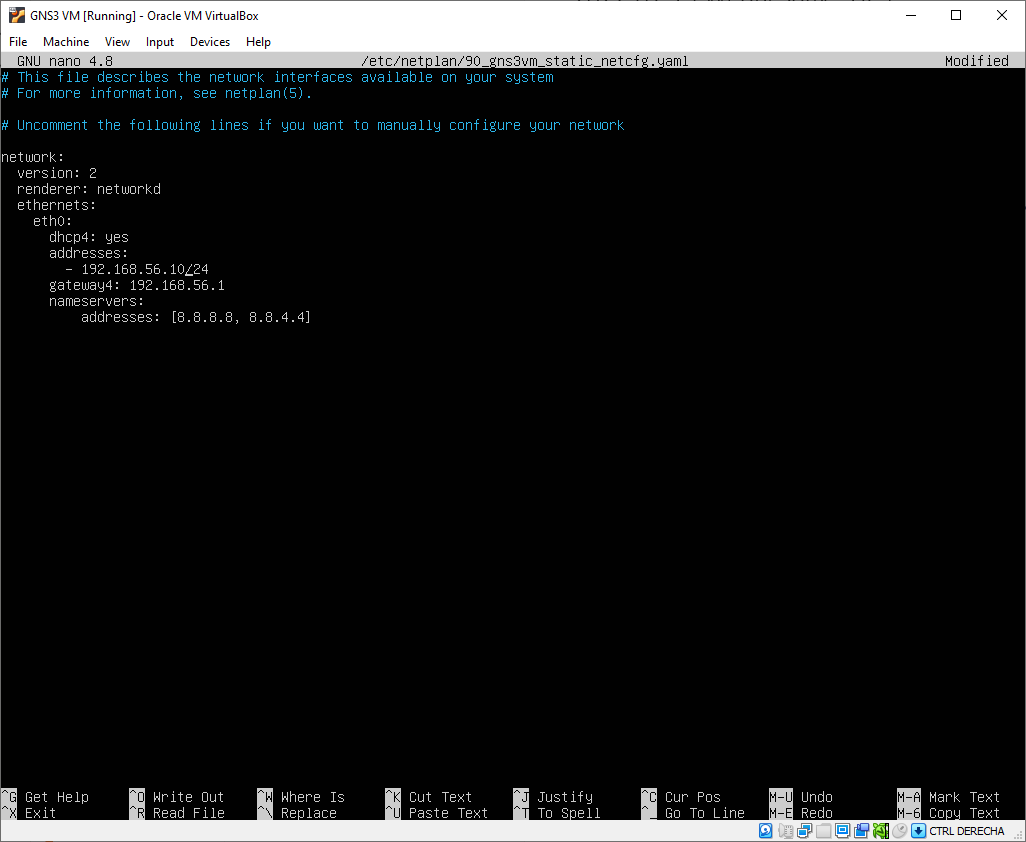
But using 192.168.56.100 can bring problems as the default DHCP Server is defined with this Ip, so I switched to:
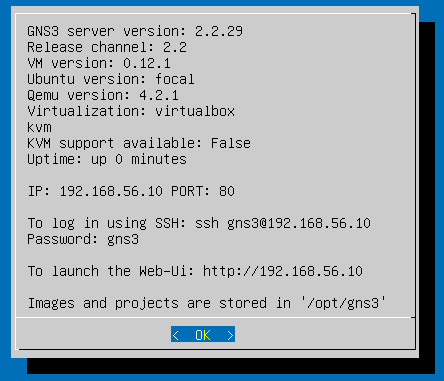
192.168.56.10
Press CTRL + X to save and exit.
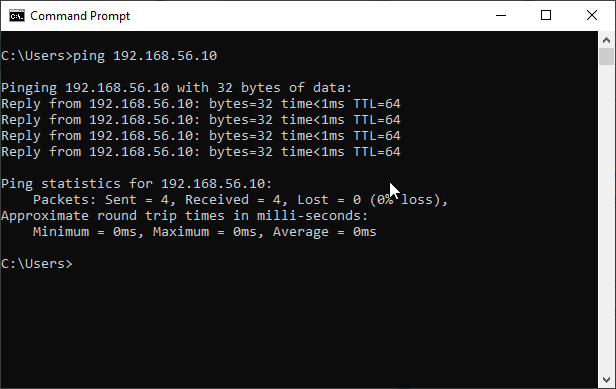
The VM will reboot automatically. Wait until it has booted and ping 192.168.56.10 from the Command Prompt.
Now, open a Windows Command Prompt or a Linux/Mac Terminal in you computer and ping the Ip:
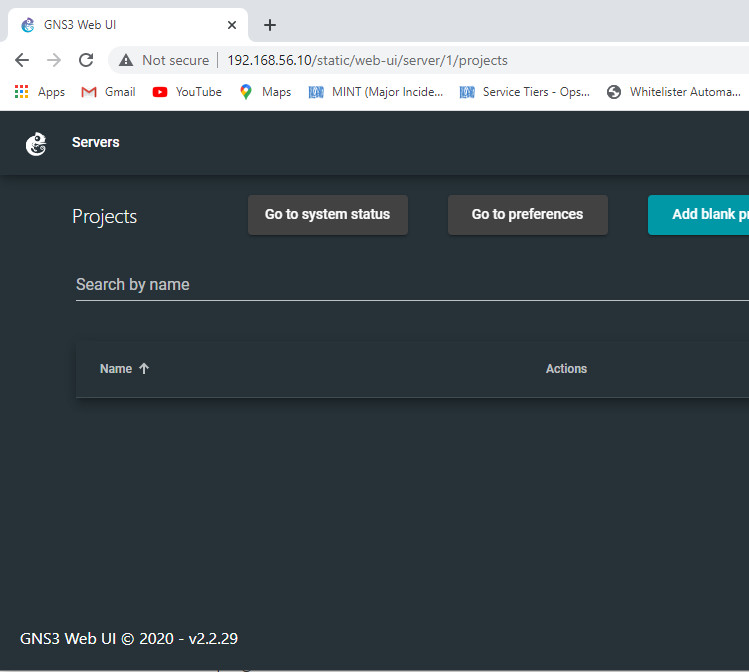
You should also be able to see the web interface going to:
http://192.168.56.10
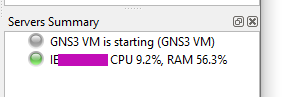
If it works then power off the VM, as we will start it automatically when running GNS3 main program (not from VirtualBox).
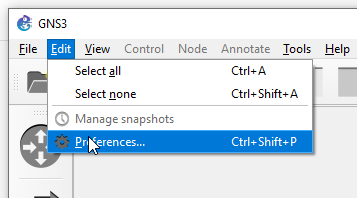
Now launch GNS3 program. Wait 30 seconds until it initializes and go to Edit > Preferences
Make sure you have the configuration like this:
Pay special attention to the Port for the GNS3 VM.
It seems like the main problem of my friend was that he was using a previous version, and he updated, and the settings from the previous version were kept. In his previous version he had configured the port 3080, but the new GNS 3 Server version 2.2.29 in the VM was using port 80, as you saw in my previous screenshots. So GNS3 was unable to connect to the VM.
After fixing this, restart GNS3, stop the VM if was not automatically stopped, and start GNS3 again.
After one minute approx connecting, you’ll see it working fine.
I’m not talking about the wonderful things, like how big can the Integers be, but about the bizarre things that may ruin your day.
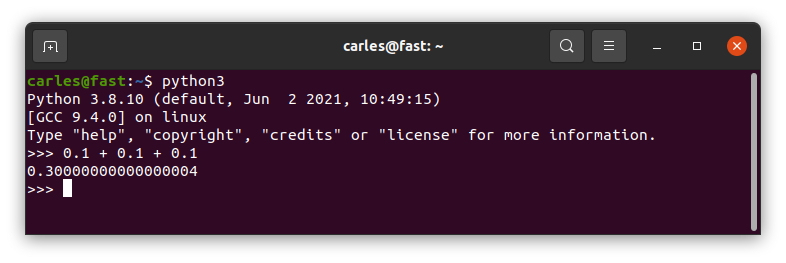
What sums 0.1 + 0.1 + 0.1 in Python?
0.3?
Wrong answer.
A bit of humor
Well, to be honest the computer was wrong. They way programming languages handle the Floats tend to be less than ideal.
Floats
Maybe you know JavaScript and its famous NaN (Not a number).
You are probably sure that Python is much more exact than that…
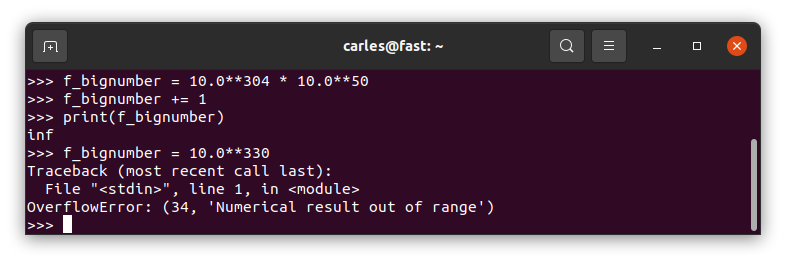
…well, until you do a big operation with Floats, like:
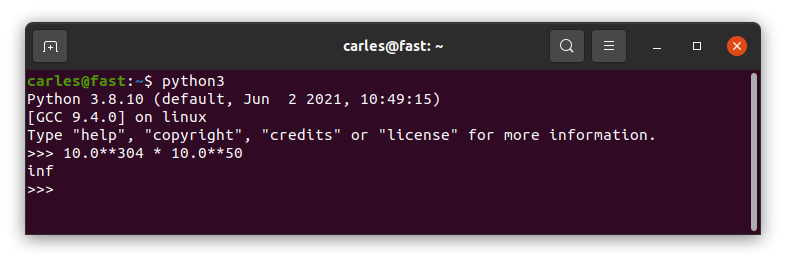
10.0**304 * 10.0**50
and
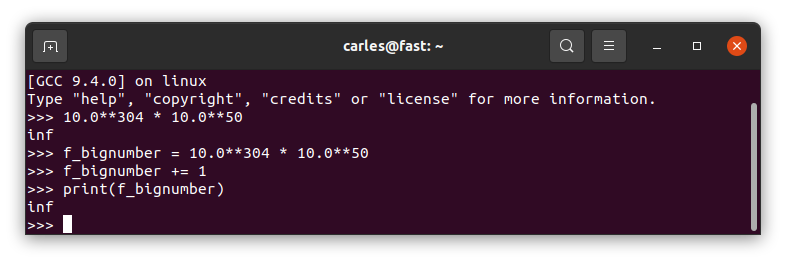
It returns infinite
I see your infinite and I add one :)
However If we try to define a number too big directly it will return OverflowError:
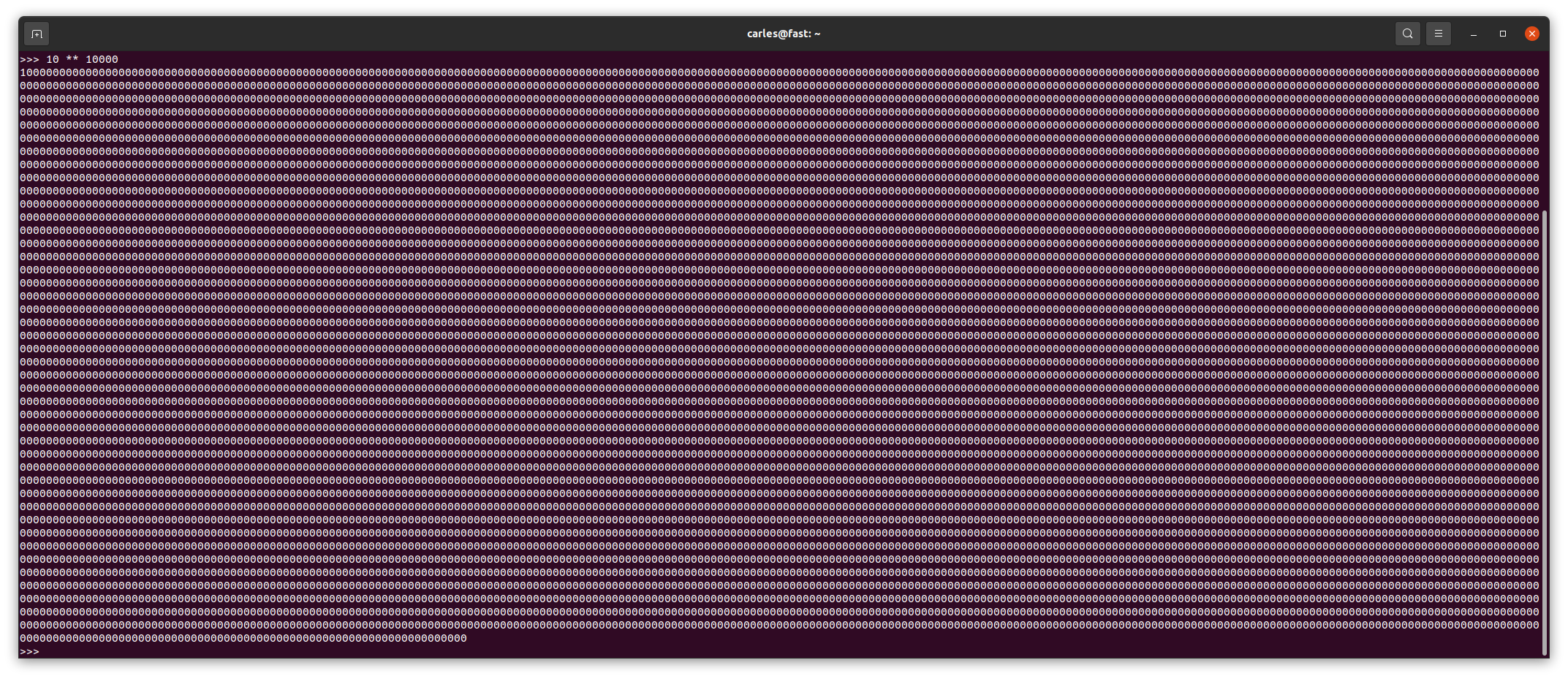
Please note Integers are handled in a much more robust cooler way:
Negative floats
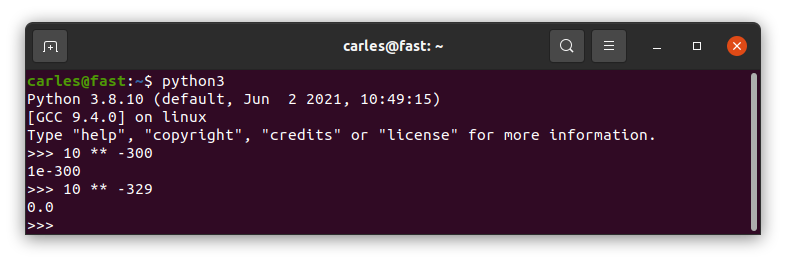
Ok. What happens if we define a number with a negative power, like 10 ** -300 ?
And if we go somewhere a bit more far? Like 10 ** -329
It returns 0.0
Ups!
I mention in my books why is better to work with Integers, and in fact most of the eCommerces, banks and APIs work with Integers. For example, if the amount in USD 10.00 they send multiplied by 100, so they will send 1000. All the actor know that they have to divide by 2.
Breaking the language innocently
I mentioned always that I use the MT Notation, the prefix notation I invented, inspired by the Hungarian Notation and by an amazing C++ programmer I worked with in Volkswagen and in la caixa (now caixabank), that passed away many years ago.
Well, that system of prefixes will name a variable with a prefix for its type.
It’s very useful and also prevents the next weird thing from Python.
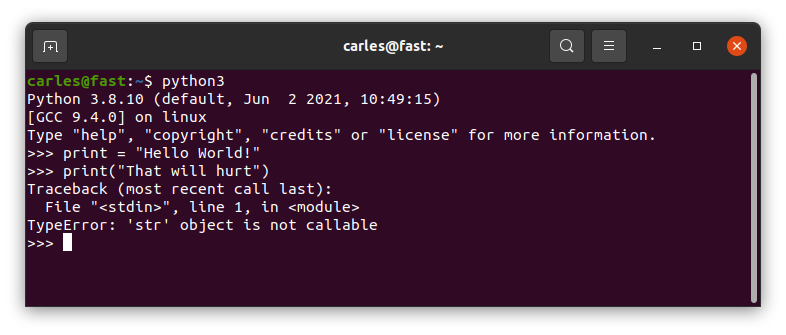
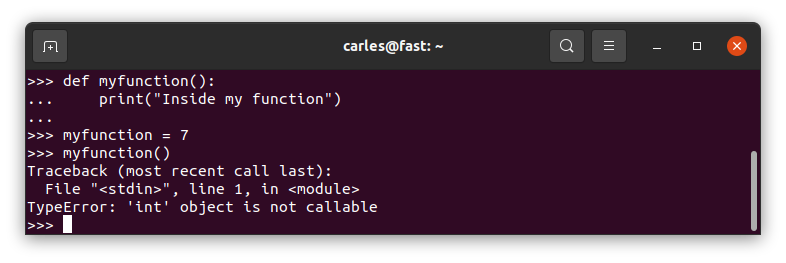
Imagine a Junior wants to print a String and they put in a variable. And unfortunately they call this variable print. Well…
print = "Hello World!"
print("That will hurt")
Observe the output of this and try not to scream:
Variables and Functions named equally
Well, most of languages are able to differentiate a function, with its parenthesis, from a variable.
The way Python does it hurts my coder heart:
Another good reason to use MT Notation for the variables, and for taking seriously doing Unit Testing and giving a chance to using getters and setters and class Constructor for implementing limits and sanitation.
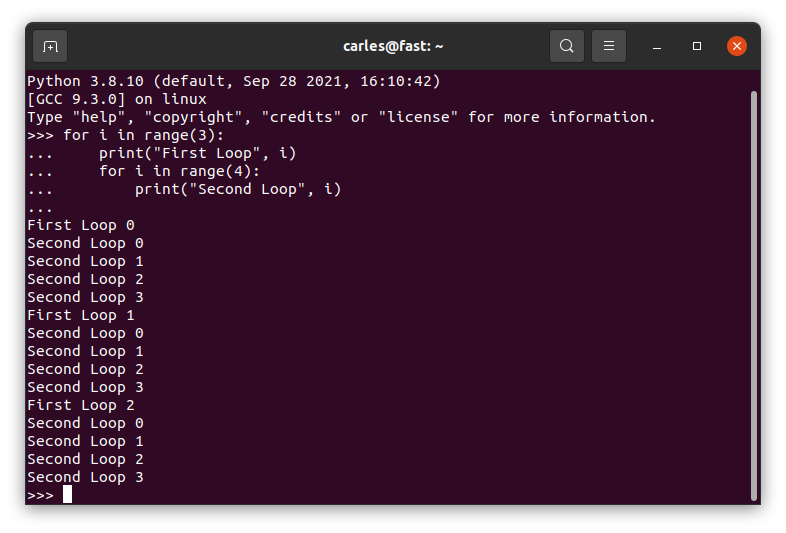
Nested Loops
This will work in Python, it doesn’t work in other languages (but please never do it).
for i in range(3):
    print("First Loop", i)
    for i in range(4):
        print("Second Loop", i)
The code will not crash by overwriting i used in the first loop, but the new i will mask the first variable.
And please, name variables properly.
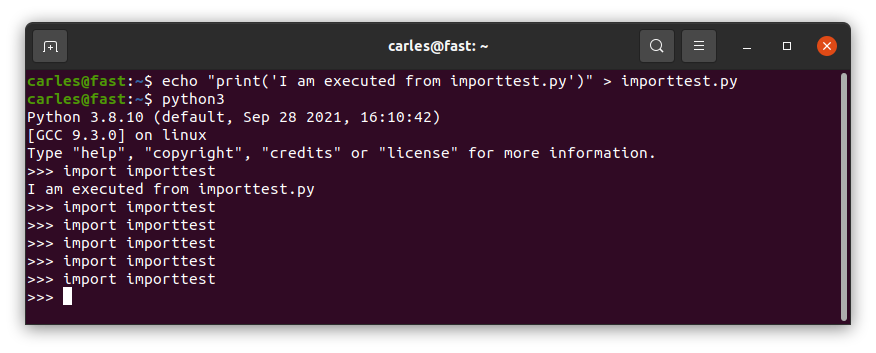
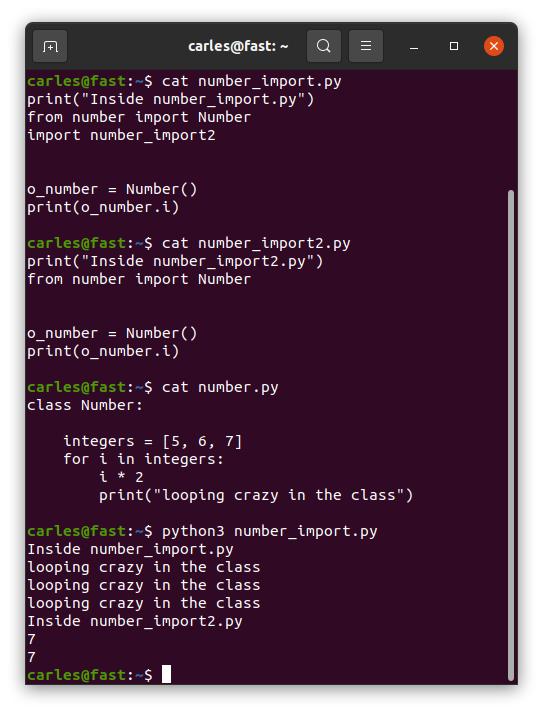
Import… once?
Imports are imported only once. Even if different files imported do import the same file.
So don’t have code in the middle of them, outside functions/classes, unless you’re really know what you’re doing.
Define functions first, and execute code after if __name__ == “__main__”:
Take a look at this code:
def first_function():
    print("Inside first function")
    second_function()

first_function()

def second_function():
    print("Inside second function")
Well, this will crash as Python executes the code from top to bottom, and when it gets to first_function() it will attempt to call second_function() which has not been read by Python yet. This example will throw an error.
You’ll get an error like:
Inside first function
Traceback (most recent call last):
  File "/home/carles/Desktop/code/carles/python_combat_guide/src/structure_dont_do_this.py", line 14, in <module>
    first_function()
  File "/home/carles/Desktop/code/carles/python_combat_guide/src/structure_dont_do_this.py", line 12, in first_function
    second_function()
NameError: name 'second_function' is not defined

Process finished with exit code 1
Add your code at the bottom always, under:
if __name__ == "__main__":
    first_function()
The code inside this if will only be executed if you directly call this code as main file, but will not be executed if you import this file from another one.
You don’t have this problem with classes in Python, as they are defined first, completely read, and then you instantiate or use them. To avoid messing and creating bugs, have the imports always on the top of your file.
…Ellipsis
Today is Halloween and one of my colleagues asked me help to improve his Automation project.
I found something weird in his code.
He had something like that.
class Router:

    def router_get_info(self):
        ...

    def get_help_command(self):
        return "help"
So I asked why you use … (dot dot dot) on that empty method?.
He told me that when he don’t want to implement code he just put that.
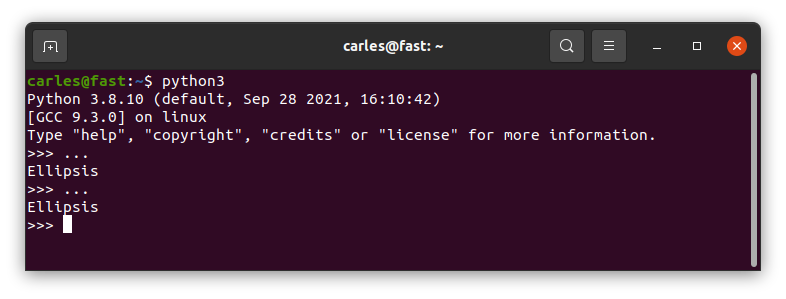
Well, dot dot dot is Ellipsis.
And what is Ellipsis?.
Ellipsis is an object that may appear in slice notation.
In Python all the methods, functions, if, while …. require to have an instruction at least.
So the instruction my colleague was looking for is pass.
Just a variable?
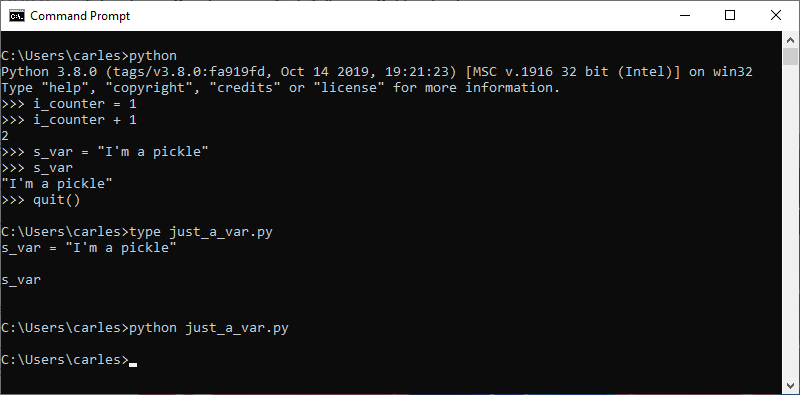
In Python you can have just a var, without anything else, like no operation with it, no call, nothing.
This makes it easy to commit an error and not detecting it.
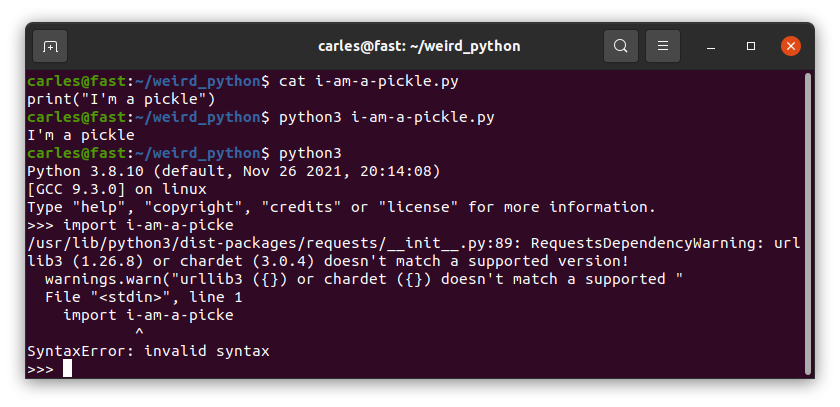
As you see we can have just s_var variable in a line, which is a String, and this does not raises an error.
If we do from python interpreter interactively, it will print the String “I’m a pickle” (famous phrase from Rick and Morty).
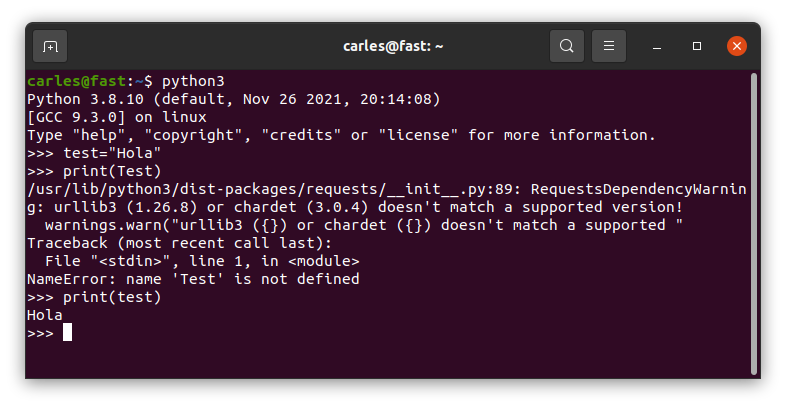
Variables are case sensitive
So you can define true false none … as they are different from True False None
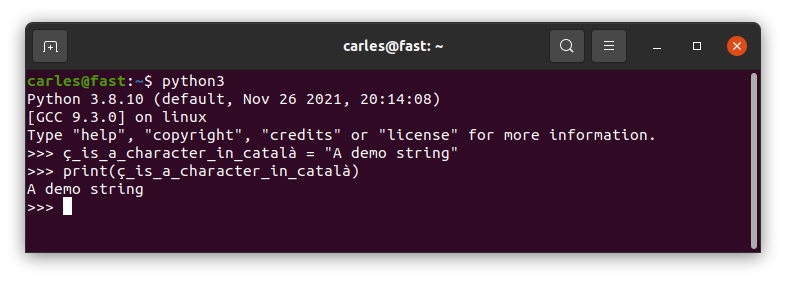
Variables in Unicode
Python3 accepts variables in Unicode.
I would completely discourage you to use variables with accents or other characters different from a-z 0-9 and _
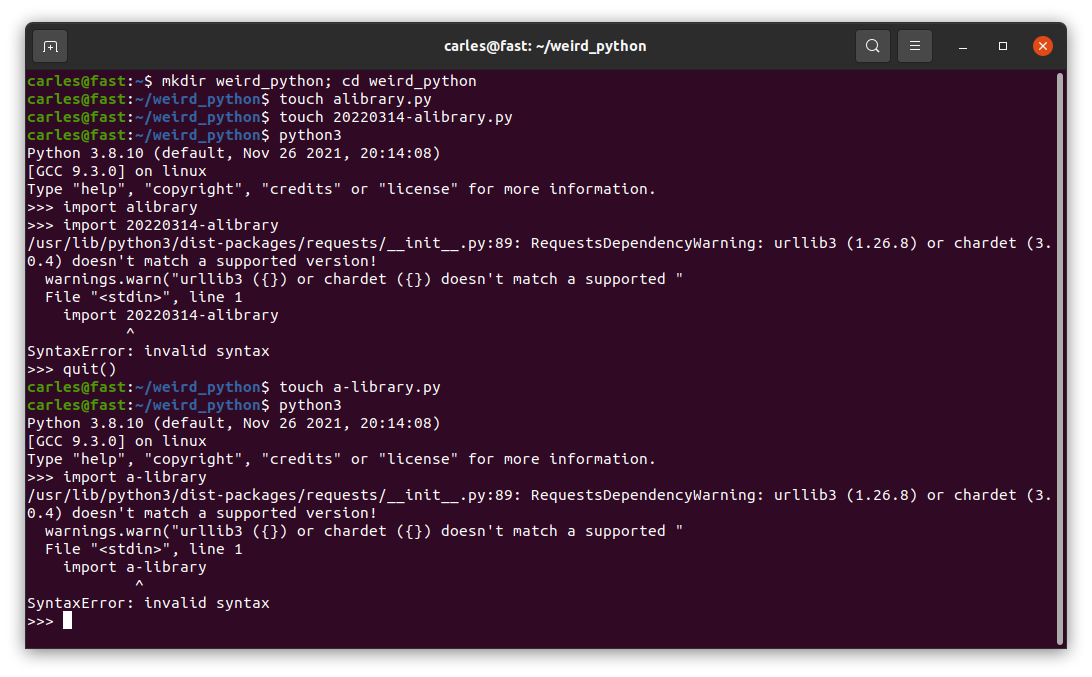
Python files with these names yes, but kaboom if you import them
So you can create Python files with dash or beginning with numbers, like 20220314_programming_class.py and execute them, but you cannot import them.
RYYFTK RODRIGUEZ,LEELA,FRY, FUTURAMA, 1999
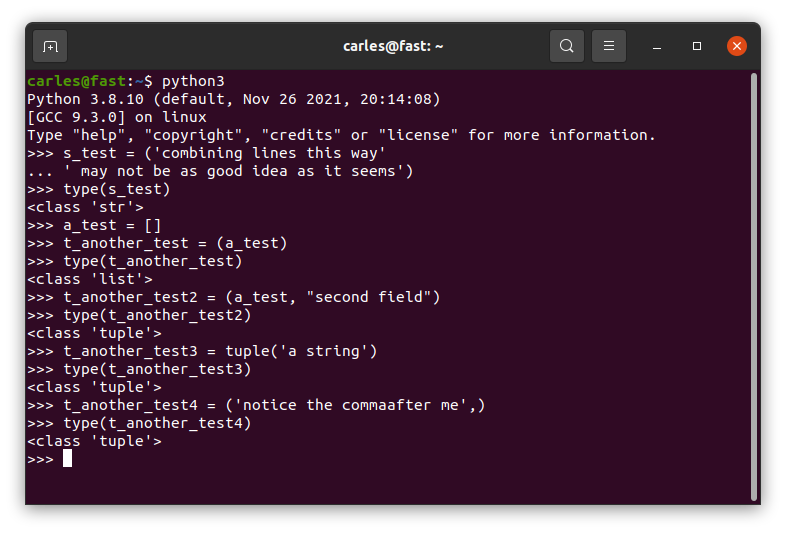
A Tuple of a String is not a Tuple, it’s a String
This can be very messy and confusing. Normally you define a tuple with parenthesis, although you can use tuple() too.
Parenthesis are the way we normally build tuples. But if we do:
print(type('this is a String'))
You get that this is a String, I mean
<class 'str'>
If you want to get a tuple of a String you can add a comma after the first String, which is weird. You can also do tuple("this is a String")
I think the definition of a tuple should be consistent and idempotent, no matter if you use one or more parameters. Probably as parenthesis are used for other tasks, like invoking functions or methods, or separating arithmetic operations, that reuse of the signs () for multiple purposes is what caused a different behavior depending on if there is one or more parameters the mayhem IMO.
See some example cases.
Python simplifies the jump of line \n platform independent and some times it’s messy
If you come from a C background you will expect text file in different platforms: Linux, Mac OS X (changes from old to new versions), Windows… to be represented different. In some cases this is an ASCii code 10 (LF), in others 13 (CR), and in other two characters: 13 and immediately after 10.
Python simplifies the Enter character by naming it \n like in C.
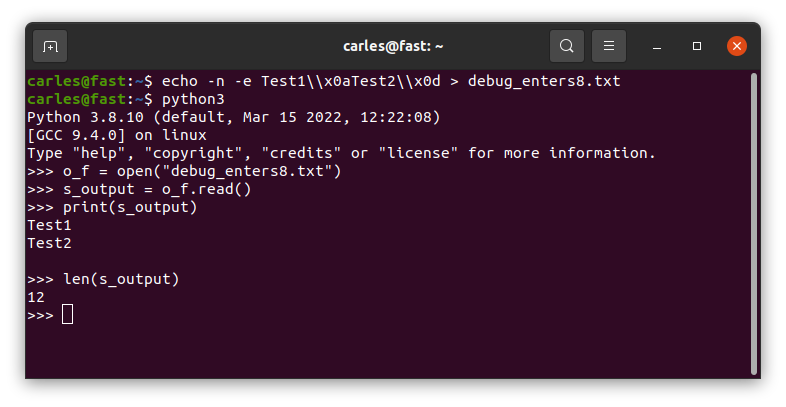
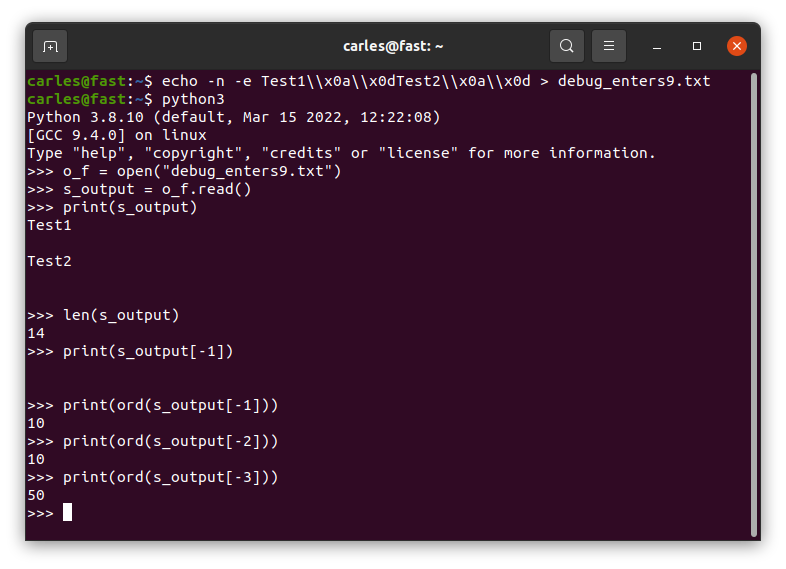
So, platform independent, whenever you read a text file you will get \n for any ASCii 10 [LF] or 13 [CR]. [CR] will be converted to [10] in Linux.
If you read a file in a Linux system, where enters are represented by 10, which was generated in a Windows system, so it has [CR][LF] instead of [LF] at the end of each line, you’ll get a \n too, but two times.
And if you do len(“\n”) to know the len of that String, this returns 1 in all the platform.
To read the [LF] and [CR] (represented by \r) you need to open the file as binary. By default Python opens the files as text.
You can check this by writting [LF] and [CR] in Linux and see how Python seamlessly reads the file as it was [LF].
A file generated by Windows will get \n\n:
Random code when the class is imported
In a procedural file, the code that is outside a function, will be executed when it is imported. But if this file is imported again it will not be re-executed.
Things are more messy if you import a class file. Inside the body of the class, in the space you would reserve for static variables definition, you can have random code. And this code will be only executed on the first import, not on subsequent.
Disclaimer: the pictures from Futurama are from their respective owners.
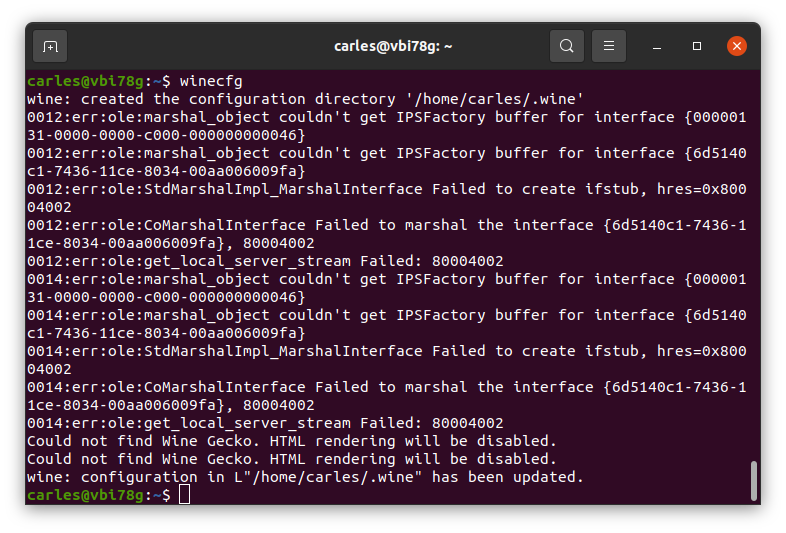
If that fails is very probably that creating a new configuration, for a new user, will make things right.
Update 2022-01-05: Take in count that you will be copying the Windows registry when doing this. I use this trick to clone applications that are no longer downloadable from the Internet. I clone wine to dedicated Virtual Machines. You may need different Virtual Machines for different programs if windows registry is different for them.
Time ago there was a web page that was rendered in blank for certain group of users.
The errors were coming from an Oracle instance. One SysAdmin restarted the instance, but the errors continued.
Often there are problems due to having two different worlds: Development and Production/Operations.
What works in Development, or even in Docker, may not work at Scale in Production.
That query that works with 100,000 products, may not work with 10,000,000.
I have programmed a lot for web, so when I saw a blank page I knew it was an internal error as the headers sent by the Web Server indicated 500. DBAs were seeing elevated number of errors in one of the Servers.
So I went straight to the Oracle’s logs for that Servers.
Just before this error, there was an error with a Query, and the PID matched, so it seemed cleared to me that the query was causing the crash at Oracle level.
Basically in our case, the query that was launched by the BackEnd was using more memory than allowed, which caused Oracle to kill it.
That is a tunnable that you can modify introduced in Oracle 10g.
You can see the current values first:
SQL> select
2 nam.ksppinm NAME,
3 nam.ksppdesc DESCRIPTION,
4 val.KSPPSTVL
5 from
6 x$ksppi nam,
7 x$ksppsv val
8 where nam.indx = val.indx and nam.ksppinm like '%kgl_large_heap_%_threshold%';

NAME                              | DESCRIPTION                       | KSPPSTVL
=============================================================================================
_kgl_large_heap_warning_threshold | maximum heap size before KGL      | 4194304
                                    writes warnings to the alert log
---------------------------------------------------------------------------------------------
_kgl_large_heap_assert_threshold  | maximum heap size before KGL      | 4194304
                                    raises an internal error
So, _kgl_large_heap_warning_threshold is the maximum heap before getting a warning, and _kgl_large_heap_assert_threshold is the maximum heap before getting the error.
Depending in your case the solution can be either:
Breaking your query in several to reduce the memory used
Use paginating or LIMIT
Set a bigger value for those tunnables.
It will work setting 0 for these to variables, although I don’t recommend it to you, as you want your Server to kill queries that are taking more memory than you want.
To increase the value of , you have to update it. Please note it is in bytes, so for 32MB is 32 * 1024 * 1024, so 33,554,432, and using spfile:
SQL> alter system set "_kgl_large_heap_warning_threshold"=33554432scope=spfile ;
SQL> shutdown immediate
SQL> startup
SQL> show parameter _kgl_large_heap_warning_threshold
NAME TYPE VALUE
==================================|=========|===============
_kgl_large_heap_warning_threshold | integer | 33554432
This is a trick I share, as I see many students having problems with this.
Assuming that your Kali distribution is recent (Linux Kernel bigger than Kernel 5.3), the most typical problem student have is that laptops xps from Dell and other brands have a combination of keys to enable or disable the Wifi.
On the Dell xps is on the key PrtScr, so if your Wifi is disabled, you can enable it in Kali Linux press:
CTRL + ALT + Fn + PrtScr
As you can see in the PrtScr the is an icon of Wifi Signal.
The Fn key is on the bottom left, next to Ctrl.
This is a very simple to fix problem, but many people suffer this problem and go crazy trying to update drivers or even having to use an external USB dongle.
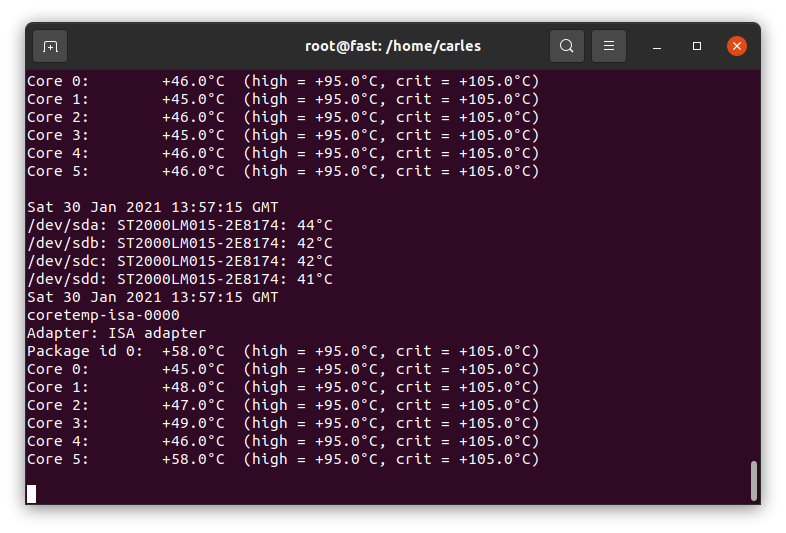
I’ve been helping to troubleshoot the reason one Commodity Server (with no iDrac/Ilo ipmi) is powering off randomly. One of the hypothesis is the temperature.
This is a very simple script that will print the temperature of the HDDs and the CPU and keep to a log file.
First you need to install hddtemp and lm-sensors:
sudo apt install hddtemp lm-sensors
Then this is the one line script, that you should execute as root:
while [ true ]; do date | tee -a /var/log/hddtemp.log; hddtemp /dev/sda /dev/sdb /dev/sdc /dev/sdd | tee -a /var/log/hddtemp.log; date | tee -a /var/log/cputemp.log; sensors | tee -a /var/log/cputemp.log; sleep 2; done
Feel free to change sleep 2 for the number of seconds you want to wait, like sleep 10.
Press CTRL + C to interrupt the script at any time.
You can execute this inside a screen session and leave it running in Background.
Note that I use tee command, so the output is print to the screen and to the log file.
One of my colleagues showed me dstat, a very nice tool for system monitoring, and bandwidth of a drive monitoring. Also ifstat, as complement to iftop is very cool for Network too. This functionality is also available in CTOP.py
As I shared in the past news of the blog, I’m resuming my contributions to ZFS Community.
Long time ago I created some ZFS tools that I want to share soon as Open Source.
I equipped myself with the proper Hardware to test on SAS and SATA:
12G Internal PCI-E SAS/SATA HBA RAID Controller Card, Broadcom’s SAS 3008, compatible for SAS 9300-8I. This is just an HDA (Host Data Adapter), it doesn’t support RAID. Only connects up to 8 drives or 1024 through expander, to my computer. It has a bandwidth of 9,600 MB/s which guarantees me that I’ll be able to add 12 SAS SSD Enterprise grade at almost the max speed of the drives. Those drives perform at 900 MB/s so if I’m using all of them at the same time, like if I have a pool of 8 + 3 and I rebuild a broken drive or I just push Data, I would be using 12×900 = 10,800 MB/s. Close. Fair enough.
VANDESAIL Mini-SAS Cables, 1m Internal Mini-SAS to 4x SAS SATA Forward Breakout Cable Hard Drive Data Transfer Cable (SAS Cable).
SilverStone SST-FS212B – Aluminium Trayless Hot Swap Mobile Rack Backplane / Internal Hard Drive Enclosure for 12x 2.5 Inch SAS/SATA HDD or SSD, fit in any 3x 5.25 Inch Drive Bay, with Fan and Lock, black
Terminator is here. I ordered this T-800 head a while ago and finally arrived.
Finally I will have my empty USB keys located and protected. ;)
This small script will count repeated patterns in the Logs.
Ideal for checking if there are errors that you’re missing while developing.
#!/usr/bin/env bash
# count_repeated_pattern_in_logs.sh
# By Carles Mateo
# Helps to find repeated lines in Logs
LOGFILE_MESSAGES="/var/log/messages"
LOGFILE_SYSLOG="/var/log/syslog"
if [[ -f "${LOGFILE_MESSAGES}" ]]; then
    LOGFILE=${LOGFILE_MESSAGES}
else
    LOGFILE=${LOGFILE_SYSLOG}
    if [[ ! -f "${LOGFILE_SYSLOG}" ]]; then
        echo "${LOGFILE_MESSAGES} and ${LOGFILE_SYSLOG} do not exist. Exitting"
        exit 1
    fi
fi
echo "Using Logfile: ${LOGFILE}"
CMD_OUTPUT=`cat ${LOGFILE} | awk '{ $1=$2=$3=$4=""; print $0 }' | sort | uniq --count | sort --ignore-case --reverse --numeric-sort`
echo -e "$CMD_OUTPUT"
Basically it takes out the non relevant fields that can prevent from detecting repetition, like the time, and prints the rest. Then you will launch it like this:
count_repeated_pattern_in_logs.sh | head -n20
If you are checking a machine with Ubuntu UFW (Firewall) and want to skip those likes:
./count_repeated_pattern_in_logs.sh | grep -v "UFW BLOCK" | head -n20
You can also run the same against the output of dmesg -T for counting over the messages in the Kernel this year:
You do df -h or ls / and the terminal freezes and not even CTRL + C works, you have a lock.
Normally this is due to a lock of the system trying to perform an IO.
Could be a physical spinning disk failing, but the most probably nowadays is that you have a network mount point and it is timing out.
If you execute mount and you get a timeout, and when you finally see the list you see a NFS, iSCSI or another kind of Network mount (you will see an Ip Address), check for errors.
To do this in CentOS/RHEL you can do as root:
dmesg | grep -i "timed"
or depending on the System
cat /var/log/messages | grep -i "timed"
You’ll get something like this:
[root@compute01 carles]# dmesg -T | grep timed | head -n5
[Fri Mar 20 02:27:44 2020] nfs: server storage07 not responding, timed out
[Fri Mar 20 02:27:44 2020] nfs: server storage07 not responding, timed out
[Fri Mar 20 02:27:44 2020] nfs: server storage07 not responding, timed out
[Fri Mar 20 02:27:44 2020] nfs: server storage07 not responding, timed out
[Fri Mar 20 02:27:45 2020] nfs: server storage07 not responding, timed out
Please note I use dmesg -T in order to have human readable date instead of Unix Epoch.