Tag Archives: WordPress

Forensics Postmortem Analysis and how abusive bots pushed me to migrate part of my services from Google Cloud to another Cloud provider

I tested Google Cloud when they were in beta, years ago, and I helped their Team to improve the service. And I’ve been using Google Cloud for years.

Here I explain, how an incident, this August, almost made me leave Google Cloud for good. In fact, I migrated many services to other providers. I walk through the steps I took.

The best advice to start with, is, enable Cloud Billing alerts.
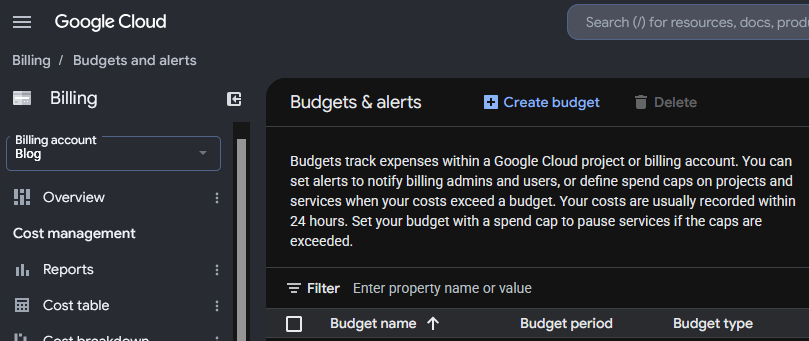
Everything started with the alert of Cloud Billing alerting me that half of the budget for the month had been exhausted around the 7th of the month. I checked the panel, and at the beginning I didn’t pay much attention to it, as Billing was indicating that the extra cost was in Compute in a specific region where I had provisioned new instances and more storage and it was just few euros.

Compute Engine Costs are mixed with the bandwidth consumption in the Dashboards which makes no sense:

So, I had to check different dashboards to realise it was a data transfer issue, and honestly, at the beginning I didn’t know where the problem was, but as I wrongly inferred, that the instance generating egress traffic was the one named “ubuntu26-04” I was investigating mainly that.

The first thing to learn that Google Cloud Billing shows the pure Compute and bandwidth usage together. I dislike it, for obvious reasons.

Next day budget for the month was almost gone.

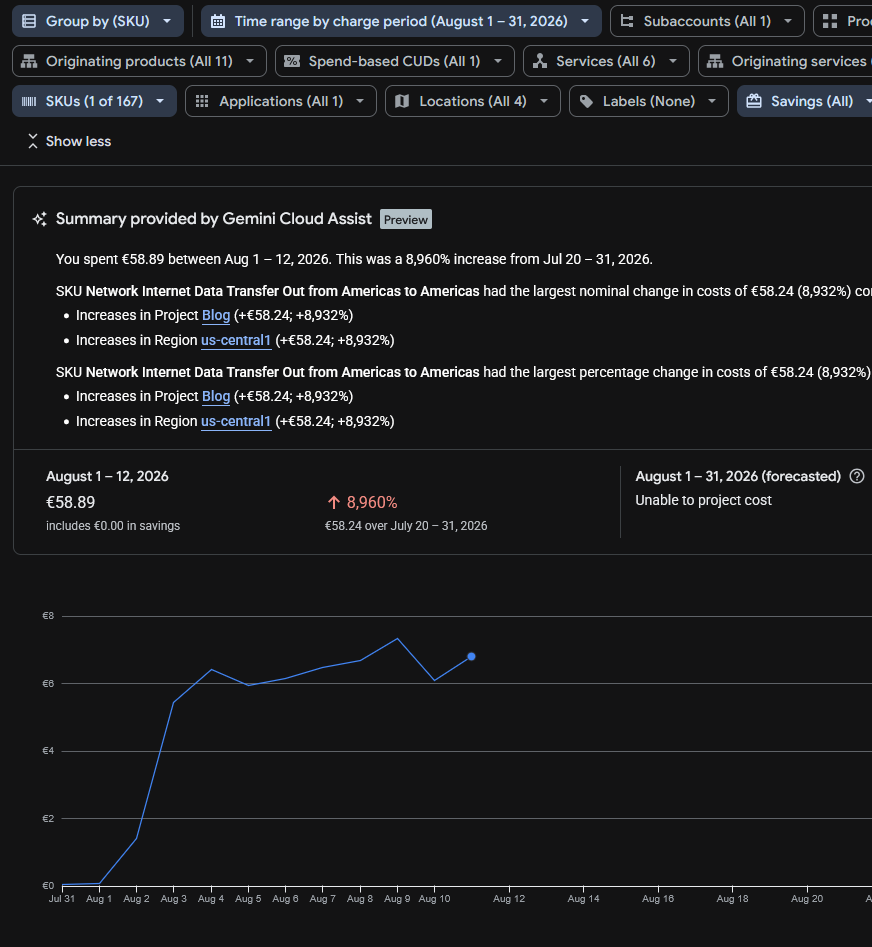
Running the reports I saw “SKU Network Internet Data Transfer Out from Americas to Americas” which was confusing, and initially made me think if it could be the new backups system, sending the backups to my centralised server using the AI compatible agent with the public IP for the API and encryption, but I discarded this very quickly due to the volume of data and I modified the system to use internal IPs instead of the public ones.

The only clear thing at this point was that Internet data transfer (egress) was being sent, and Google makes you pay for that.
I had released several projects recently, like https://read.carlesmateo.com/en Text-to-speech to generate MP3 from text files, or https://sendmeafile.carlesmateo.com/en to send and receive huge files, with resume, checksum verification, AI compatible… So my first thought was that one of the projects or its dependencies could have been compromised, or fanatic AI/crawlers were downloading the sample MP3 files again and again.

I made a mistake when checking Cloud Billing. It indicated that the expenses came from us-central1, so checked the list of instances’ regions and I thought the problem came from a new instance named “ubuntu26-04”.

But I made a mistake, because there are several zones in every region, like us-central1-a, us-central1-b, us-central1-c… My new instance for the new projects was in the zone us-central1-f but I had more than that one instance in the region, only that in different zones. But when I checked the zones for the instances I did not realise that there was more than one instance in the zone us-central1 and I assumed the new instance was the only one in the zone and should be the one generating the egress traffic.

I only had ports 80 and 443 opened in Google’s firewall, so there could be requests to the web server, or that the server got hacked. I analysed the nginx logs for the server and found no huge traffic or big files being requested.

Nowadays bots and crawlers and AI’s generate a crazy amount of traffic, so I had to discard this.

Also, recently Amazon had a problem were it presented huge bills (erroneous) of more than 1 Million dollars to some customers. I didn’t know if Google was calculating the bandwidth costs well.

The Billing Dashboard showed that the increment in data sent was costing me around 11€ per day, so it allowed me to start moving services from that server, with relative calm. The forecast for all the August month displayed that the bill would cost me 300€, which was not nice.
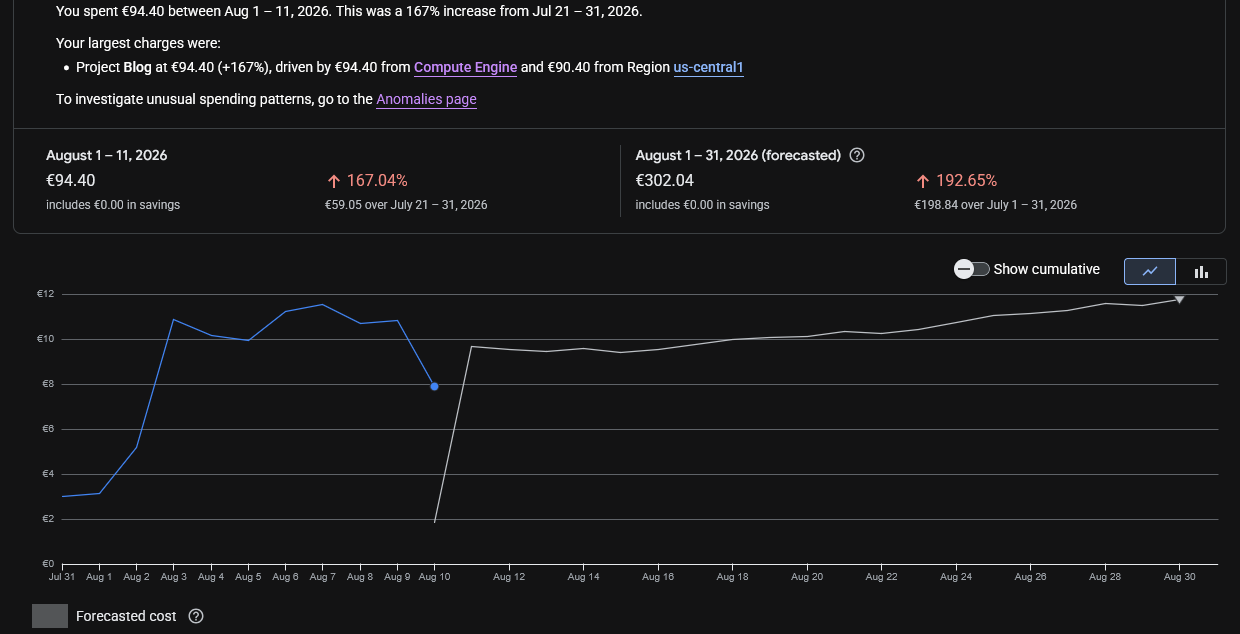
In the meantime I hired a VPS with unlimited data and started to migrate the Docker services there as fast as I could with the idea of shutting down the compromise instance to cut the costs.

One of the things that really made me angry, while I was migrating to avoid those over costs, is that I checked again, the next day, the Cloud Billing Reports, the web loaded and informed me that it had changed with news and showed some floating popups pointing how it work and some improvements pushed by the Google Dev Team, and when I continued, the Cloud Billing Report was displaying an unexpected amount of money to pay in August 2026, more than 10 times what I expected, instead of the forecast I saw previously. So it looked like I had to pay that amount for August, and I started to look at what caused that increment of costs quickly, which fas frustrating. And after a while, when I was thinking about stopping the services, I found that Google had changed the page of the reports and the filters were reset to yearly, and the page was showing the already paid costs from 1st August 2025 to 31th August 2026.

Later I reported how frustrating was the experience to Google as “you should not do that” and “users dislike frequent changes”.

Companies are not aware that when they change things, they often annoy the customers a lot.

Years ago I migrated from my long term account with Amazon AWS to Google Cloud Compute Engine cause I was feed up of the problems in Amazon, how many programming errors they had, the changes they did, causing problems, like to the identifiers of the objects (I had older created objects, with shorter hash, and some API calls did not work any more), and how difficult they made simple things. User Interface was bad, and they also lost two of my instances and communicated really poorly (I also reported that to a friend in Amazon and I had some conversations with Amazon’s AWS PMs), and they were over expensive for developers, so I ended migrating to Google Cloud. And now Google is repeating some of the same mistakes.

They are not only expensive. They make things that could be easy, difficult, for the developers.

These big companies force you to stay continuously learning they changes. They offer great solutions for the Enterprise, but for developers and Startups the costs could be overkill.

Probably they are over-kill and over-expensive for developers and Startups.

With Google Cloud I have experienced some technical issues too, as my older instance froze several times and became irresponsive and I had to do a stop from the web console and I had to wait until the command timed out and Google realised there was a problem so it would consider the instance finally shutdown and I could start it again in other non faulty hardware.

If you are a company with a Load Balancer, with health checks, and several front servers, and 20 developers, you can afford to have Web servers KO, as the Load Balancer will handle it nicely, but if you have a single server with WordPress sites, if the instance stops it means that nobody can access those sites.

As an example of costs, for a Google e2-medium (2 vCPUs, 4 GB of Memory and 20 GB of disk) in us-central1 I pay around 30 € per month. And it happens that the forecast for this month in bandwidth was 300 €.

Also storage is around 1€/month per 10GB for standard. So 200GB of regular space is 20 €/month.

For SSD 1.7€/month per 10GB, even tough provides more IOPS, but not more speed. 200GB of space more is 34 € more per month.

I migrated to a provider were I pay 30 € per month for a 8 vCPU and 24 GB of memory and includes 200 GB of NVMe, and I have unlimited bandwidth. Extra storage is also much more cheap. And the static IP is included (for Google you pay around 1.1€ per month).

The key in here was the unlimited bandwidth.

I also could have rented a dedicated server with 64GB of RAM for around 64 €/month, but these comes with some down sides, like if your server experiences a hardware error, you’ll have to wait for the System Administrators from the Cloud Provider to physically replace the components. With a VPS or instance, I can just launch it in a healthy hardware immediately.

As I was migrating services and investigating the origin of the problems, I saw that 500 GB of data were transferred from us-central1 since the 1st of August.

The Billing Report didn’t allow me to filter for IP. It only helped to know the region, us-central1, which helped me to identify the possible services that could be having the problems.

To be honest, I should have located the origin of the problem quickly, but I did so well blocking bots and uneducated crawlers in the past years, that I had no problems for years, and GCE has mad many changes over time, so I did not remember that I could monitor real time network usage of my servers. Most of the servers I troubleshoot I have only SSH access, so I use network tools.

But as I told previously, I mistakenly thought that just one instance was running in us-central1, and that was not the case. They were in different zones of us-central1.

The live traffic inspection in the server with tools like ss, netstat, nethogs, iftop, iotop and ps revealed normal traffic and load.

A second revision from the nginx logs didn’t reveal any problem over time. And the only opened ports were 80 and 443. With the services I considered potentially more vulnerable (as they used python dependencies) migrated to the new VPS and stopped in the “ubuntu26-04” Google server, the usage shown and the forecast for bandwidth was not reduced and it was the same.

One thing I learned, and I suspected it from my tests with https://sendmeafile.carlesmateo.com/en is that the maximum speed that my instances were able to transfer from Google to Internet (egress) was around 50 Mbps per connection.

I didn’t see this in Google Cloud’s documentation, but in my tests transferring data from Google servers using the public interface and from different locations to this google server I consistently achieved always that top speed of around 50 Mbps per connection (around 6.25 MB/s), but when I communicated Google servers using their private interfaces, the speed for a single connection was much more higher. So I assumed that the bandwidth was capped. After seeing the data transferred in the Billing Cloud Report, it looks clear to me that an important part of the server’s bandwidth max was being used. Later, Apache logs, confirmed me many requests at the same exact second.

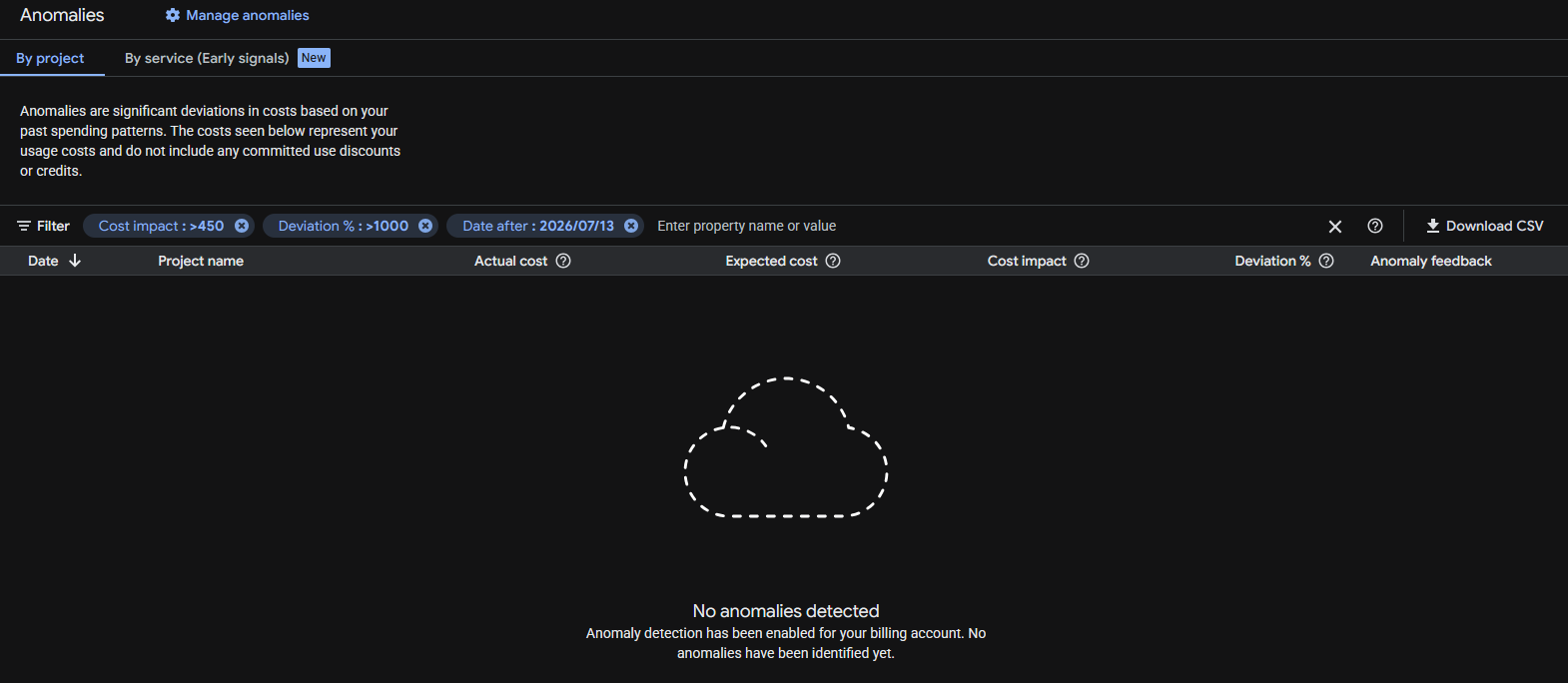
Google anomalies tool detected nothing despite the huge increment in data transfer and cost variation (8,960% respect July!).
Before taking the decision to migrating to another server one has to think, not only in costs, but also on how trustworthy are the storage systems, the resiliency of the systems, how many times they are down per year… there are surprises that you discover as you go. With the experience.

But honestly, I felt it was not worth the price to continue with Google Cloud and it was conditioning the kind of projects I could start. My architecture is resilient, based in containers and I can deploy it fast. I also have backups.

Google storage is not that super trustable in my opinion (neither Amazon’s). Some times my VMs froze and Google monitor dashboard stops drawing the lines of metrics (like CPU usage), but Google doesn’t catch that the VM is frozen. My guess is that the problem is the storage or compute servers dying.

Having to pay per GB transferred in a time where bots and AI index your sites continuously, and abuse the servers by launching many requests concurrently, generating load, and where bots consume much more data than humans, force you to take architecture decisions and to implement strategies.

Possible solutions like using CDN’s like Cloudflare to be protected against DoS, to cache statics and to cut bandwidth and CPU abuse (requests to origin), using other cache systems or migrating to other Cloud providers that are more developer and Start up friendly, and that have unlimited data transfer, etcetera.

When I was presented with the new Google Billing Reports page and the filter was reset to one year, and I saw the price that should be showing multiplied by 10, I contacted Google Cloud by X. They kindly replied and invited me to contact them privately. I did and we opened a ticket. Around three hours later I got an email from a Google staff, telling me that they will investigate the problem, and giving me an expected response deadline of 5 days.

It was nice, but by the time I received the email I already had found and sorted the problem.

I troubleshoot the instance “ubuntu26-04” but the CPU usage was low, and no permanent connections (a sign that could have indicated that was hacked):

That Looked normal

sudo ss -tunp state established

Then I did something that I should have done before, I checked the metrics from all the different instances in Google Cloud Compute, starting from the one I initially guessed was the one suffering the problems. That machine was clear. No high CPU usage. No high bandwidth usage. Nothing.

And then I saw it.

Through VM Instances I narrowed to the one in us-central1 that was consuming the Internet bandwidth, “instance-1”:
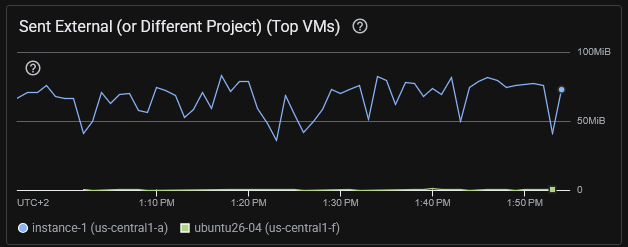
I was checking the wrong server. The consuming excess of egress was from instance-1 that hosted several WordPress sites and it was using Apache2, not nginx.

Some commands I ran:

# Check for the data sent by Apache. This found a lot of traffic. Note: the access.log of all the sites were being analysed
sudo awk '{s+=$10} END {print s/1024/1024/1024 " GB"}' /var/log/apache2/*access.log
# returned 36.4578 GB that's for a day, so something was clearly wrong

# Analyze requests: See what is more heavy. So basically bots trying to hack into the server and some heavy images. Note root home for at least a server is huge (50MB)
sudo awk '{a[$7]+=$10} END {for(u in a) print a[u]/1024/1024" MB\t"u}' /var/log/apache2/*access.log | sort -rn | head -20
54.3218 MB      /
21.6173 MB      /wp-login.php
17.1676 MB      /wp-content/uploads/2022/10/20221001_200930-cut.png
16.5822 MB      /wp-content/uploads/2022/10/20221001_201033.png
10.7245 MB      /wp-content/uploads/2022/02/python_loop.gif
6.61174 MB      /xmlrpc.php
6.60595 MB      /page/2/?shopdetail%2FI37266592159
6.60595 MB      /page/2/?shopdetail%2FI37256267952
6.60595 MB      /page/2/?shopdetail%2FI37256137878
6.60595 MB      /page/2/?shopdetail%2FI37256033568
6.60595 MB      /page/2/?shopdetail%2FI37224959793
6.60595 MB      /page/2/?shopdetail%2FI37214305672
6.60595 MB      /page/2/?shopdetail%2FI37203620584
6.60595 MB      /page/2/?shopdetail%2FE37266925367
6.60595 MB      /page/2/?shopdetail%2FE37242498260
6.60595 MB      /page/2/?shopdetail%2FE37207321261
6.60595 MB      /page/2/?shopdetail%2FA37259909717
6.60595 MB      /page/2/?shopdetail%2FA37259600135
6.60595 MB      /page/2/?shopdetail%2FA37256306882
6.60595 MB      /page/2/?shopdetail%2FA37256197883

# Analyze requests: See what IP's are requesting more traffic in total. Gotcha
sudo awk '{a[$1]+=$10} END {for(i in a) print a[i]/1024/1024" MB\t"i}' /var/log/apache2/*access.log | sort -rn | head -20
34549.2 MB      74.7.241.60
1491.36 MB      116.202.235.23
287.651 MB      3.41.188.33
232.362 MB      74.7.227.160
199.987 MB      18.97.9.169
183.748 MB      66.249.74.42
84.1681 MB      114.119.140.64
78.3209 MB      114.119.149.169
70.5166 MB      114.119.156.46
67.8224 MB      114.119.150.29
66.7544 MB      114.119.145.237
58.7278 MB      114.119.147.113
57.1822 MB      114.119.162.62
56.0061 MB      66.249.74.43
55.3612 MB      114.119.141.79
21.9245 MB      216.73.217.35
21.2516 MB      104.243.44.93
17.7313 MB      79.116.217.181
17.1676 MB      189.81.71.184
16.5822 MB      205.188.63.181

So we see that this IP 74.7.241.60 is requesting 34.5 GB in a day.

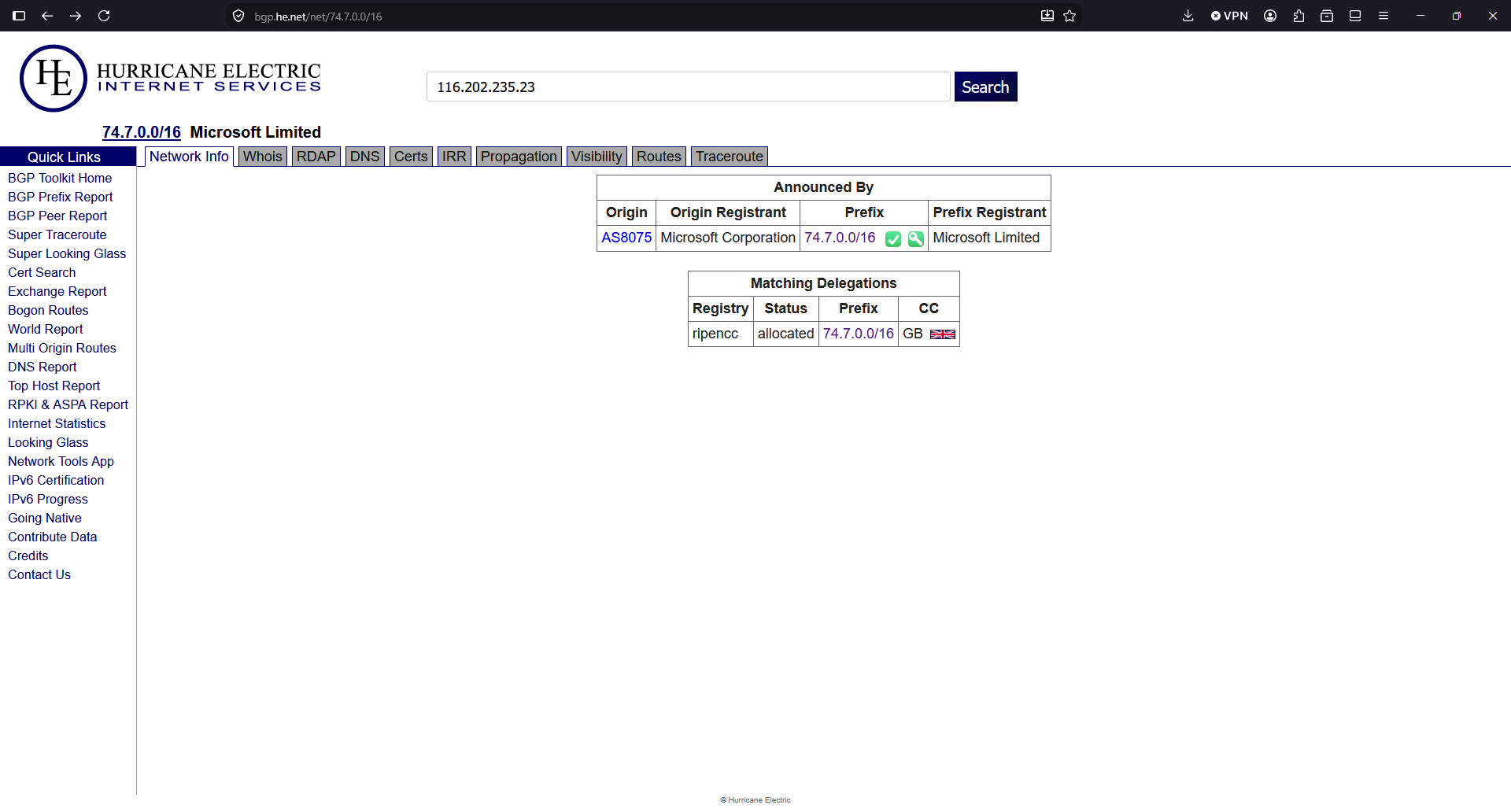
So, according to this IP Info service, the IP is from Microsoft. So apparently, crawlers/IA from Microsoft or running in Microsoft infrastructure, were costing me money because they are abusing, scanning my sites, with many connections concurrently, like horrible soulless machines:
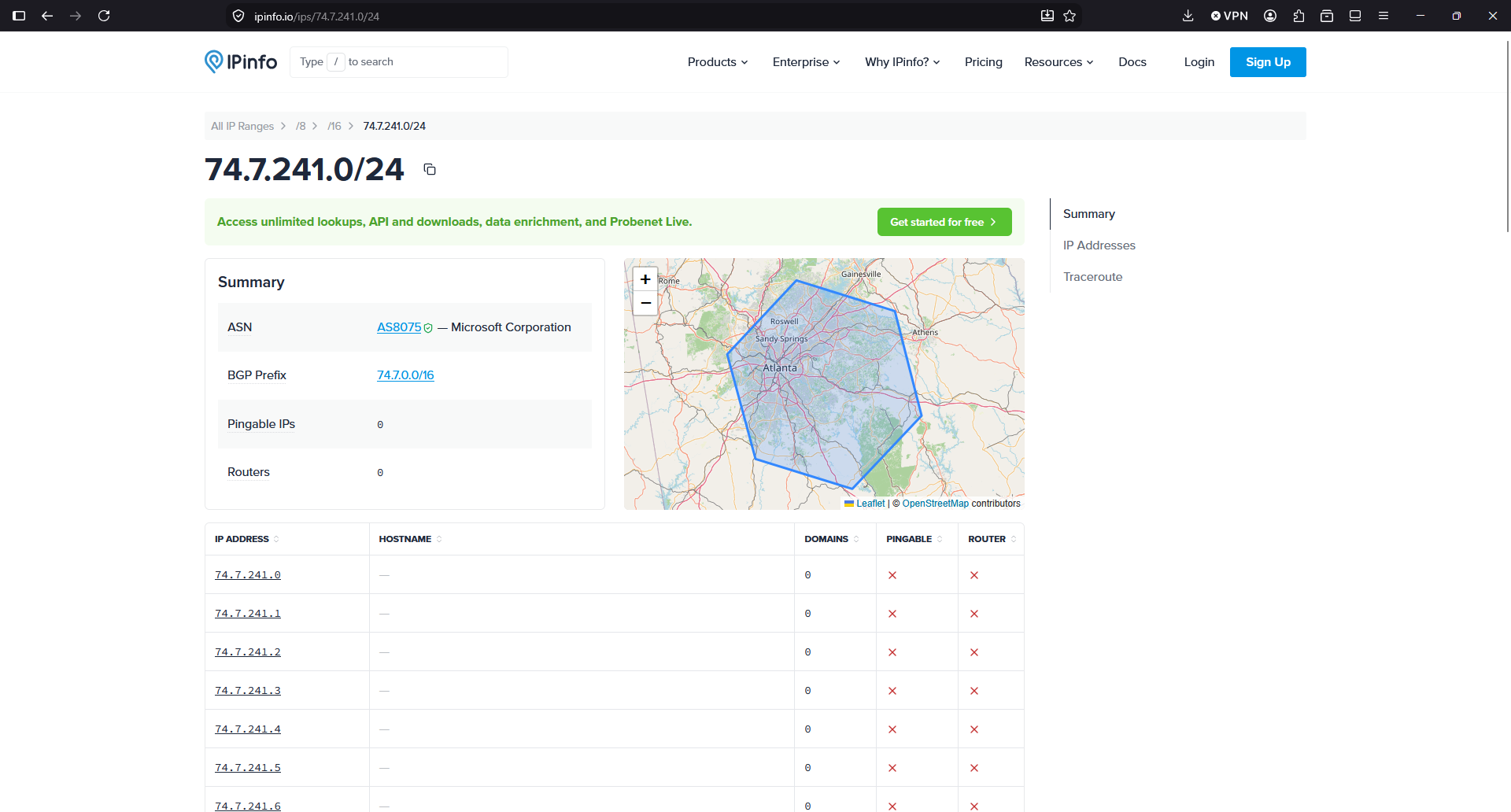
I double checked the IP with another provider:
A command to see a sample of what kind of requests I have from this IP, brings more light:

grep "74.7.241.60" /var/log/apache2/*access.log | head -20
/var/log/apache2/www_mysqlproxycache_com-access.log:74.7.241.60 - - [13/Aug/2026:00:00:22 +0000] "GET /page/2/?shopdetail%2FI37207088742 HTTP/1.1" 200 3463409 "http://www.mysqlproxycache.com/page/2/?shopdetail/I37207088742" "Mozilla/5.0 AppleWebKit/537.36 (KHTML, like Gecko; compatible; GPTBot/1.4; +https://openai.com/gptbot)"
/var/log/apache2/www_mysqlproxycache_com-access.log:74.7.241.60 - - [13/Aug/2026:00:00:34 +0000] "GET /page/3/?shopdetail/I37207088742 HTTP/1.1" 301 264 "http://www.mysqlproxycache.com/page/2/?shopdetail/I37207088742" "Mozilla/5.0 AppleWebKit/537.36 (KHTML, like Gecko; compatible; GPTBot/1.4; +https://openai.com/gptbot)"
/var/log/apache2/www_mysqlproxycache_com-access.log:74.7.241.60 - - [13/Aug/2026:00:00:35 +0000] "GET /page/3/?shopdetail%2FI37207088742 HTTP/1.1" 200 1900262 "http://www.mysqlproxycache.com/page/3/?shopdetail/I37207088742" "Mozilla/5.0 AppleWebKit/537.36 (KHTML, like Gecko; compatible; GPTBot/1.4; +https://openai.com/gptbot)"
/var/log/apache2/www_mysqlproxycache_com-access.log:74.7.241.60 - - [13/Aug/2026:00:00:37 +0000] "GET /page/7/?shopdetail/E37249347969 HTTP/1.1" 301 264 "http://www.mysqlproxycache.com/page/6/?shopdetail/E37249347969" "Mozilla/5.0 AppleWebKit/537.36 (KHTML, like Gecko; compatible; GPTBot/1.4; +https://openai.com/gptbot)"

According to the User-Agent is GPTBot. So apparently a bot running in Microsoft self-identifying as OpenAI were killing causing high usage to my server and to my budget by requesting many pages at the same time, for an old shopdetail page that does not exist in that server (maybe there was a shop years before I got that IP), and spends a lot of bandwidth responding with a heavy page of 6 MB.

In the logs I saw many request at the same precise second.

Asking to Claude it tells me that the range of IPs of the Microsoft attacker IP are not in the publicly published IPs of OpenAI for GPTBot, so apparently somebody using Microsoft IPs is pretending to be a GPT Bot, and it isn’t:

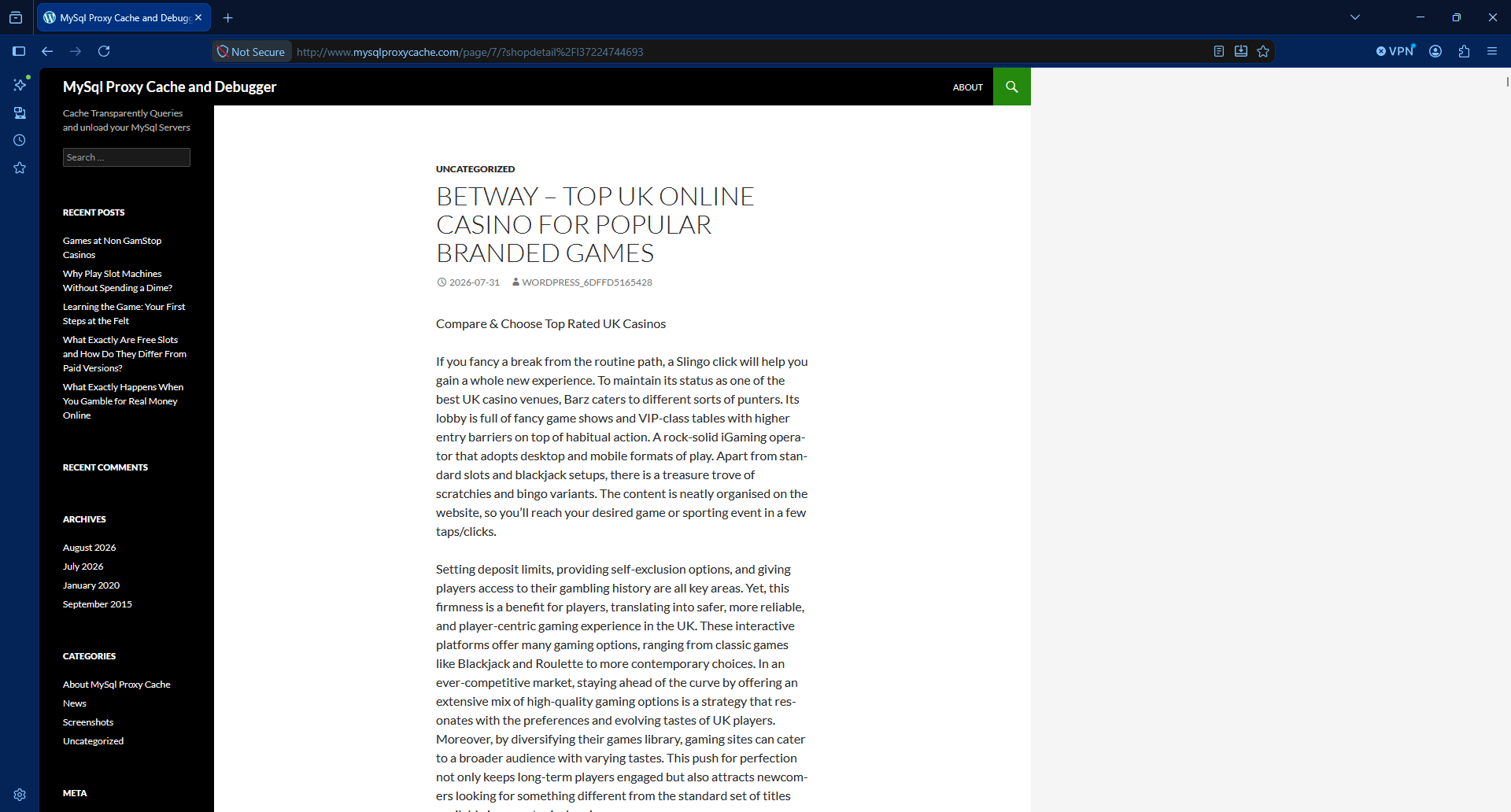
The domain is an old WordPress that has been hacked. Yes, this happens more often that we would like, with WordPress.

I checked the https and it returns a SSL potential warning in the SSL.

I tried with http http://www.mysqlproxycache.com/page/7/?shopdetail%2FI37224744693 (one of the requests in the logs) and I saw that the WordPress site was hacked.
So first things first: I stopped Apache.

sudo service apache2 stop

So, to summarise, there was a bot from a Microsoft IP, that was requesting many times per second pages to a WordPress site that was compromised and it was returning a large article with many photos, so heavy in terms of data usage.

With Apache2 server stopped, I moved the config symbolic link from /etc/apache2/sites-enabled/ to another folder /etc/apache2/sites-disabled/ that I created.

So basically, when I started Apache, the compromised site will not be served. It will be served by the default site.

I restarted the Apache server and checked that the URLs for that domain were catch by default site and no processing resources of bandwidth was used.
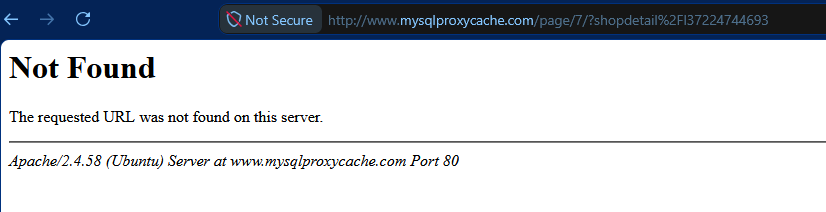
That was to avoid a main site marked as default in the Apache config to attend those requests and waste data.

And then I added to the firewall, to Google Cloud’s Firewall and to the servers in all my instances, to block all the IPs from Microsoft from that range.

I saw that the BGP Prefix is 74.7.0.0/16 so I block all the 65,536 IP Addresses:

ufw insert 1 deny from 74.7.0.0/16 to any

As you can see I inserted this rule on the first position. Don’t just add it with ufw deny from 74.7.0.0/16 to any or otherwise it will go to the last position, after the allow rules. And then it would not be enforced.

Check your rules with:

ufw status numbered

You can block the range in your provider’s Firewall (VPC Firewall in Google Cloud).

If you didn’t have the Ubuntu Firewall active, and want to activate it now, make sure that you have the rules for the SSH connection:

echo "Enabling SSH"
sudo ufw allow 22/tcp

echo "Enabling Web 443 and 80"
#sudo ufw allow "Apache Full"
sudo ufw allow 80/tcp
sudo ufw allow 443/tcp

echo "Enabling Firewall"
sudo ufw enable

echo "Showing rules"
sudo ufw status numbered

I recommend you to add the rules to a script in git (Infrastructure as Code), so you can replay it another day, and to any server you have.

By default, ufw sets deny by default for rules not specified. You can check it with:

sudo ufw status verbose | head

Bots, IA, crawlers abuse our servers nowadays.

Also the automated bots attempting to hack into the servers.

If you just check your logs, you’ll see many attempts to exploit vulnerabilities in your servers, every day.

I checked for the second IP consuming more bandwidth in the list:

116.202.235.23

It’s from hetzner, a Cloud provider. https://bgp.he.net/net/74.7.0.0/16
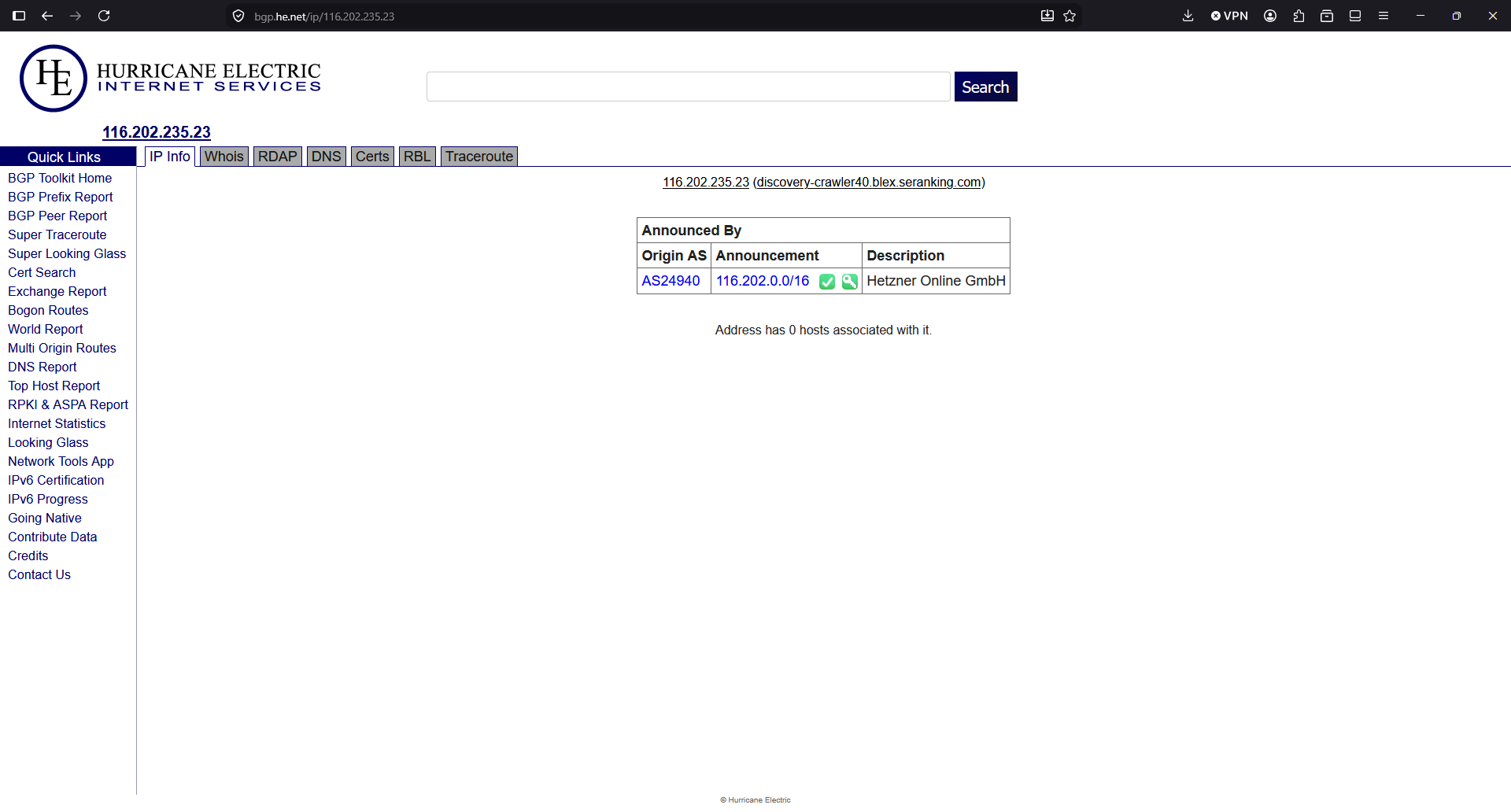
Another 65,536 addresses that get blocked:

# Hetzner
ufw insert 1 deny from 116.202.0.0/16  to any

The third IP will be blocked too, even if I didn’t find any information about who owns the block of IPs.

ufw insert 1 deny from 3.41.188.33 to any

The fourth was part of the same block I blocked first, so it’s already blocked.

The fifth IP, I ask to Google Gemini:
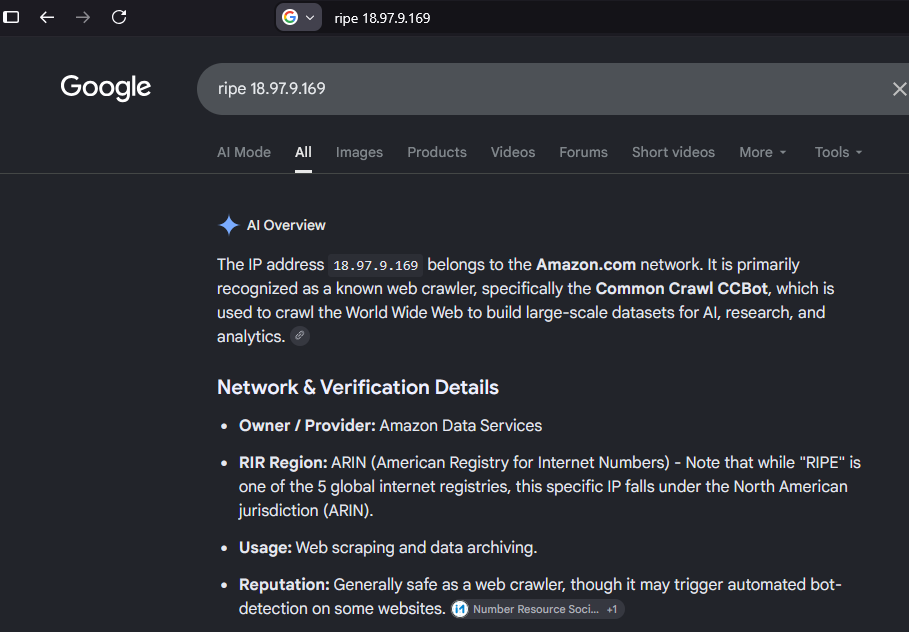
The block is 18.97.9.0/24 but I’ll block all the BGP Prefix, all the 16K addresses.
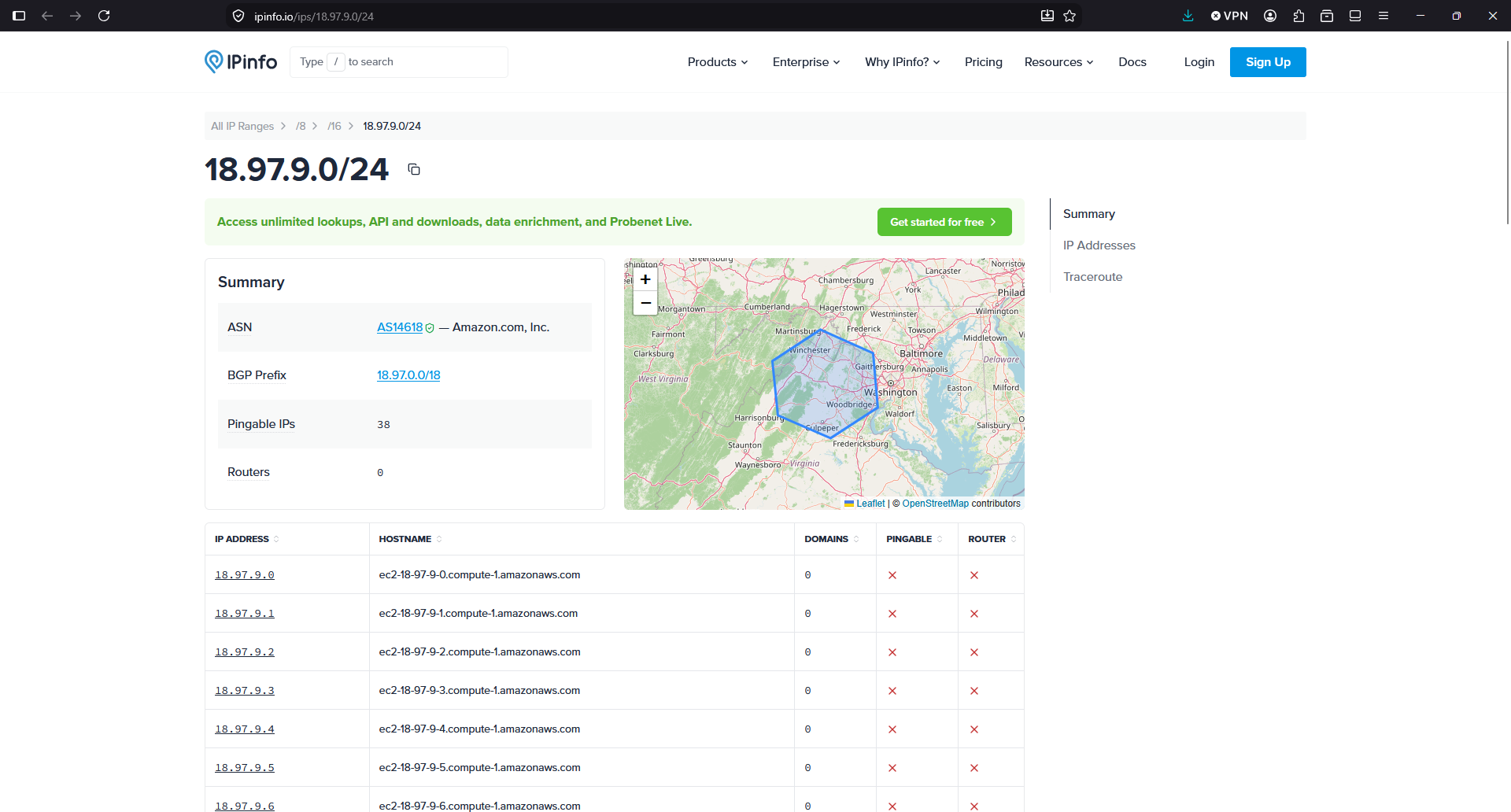
ufw insert 1 deny from 18.97.0.0/18 to any

See what is the traffic from the servers since I blocked the Microsoft range in the Ubuntu Firewall:
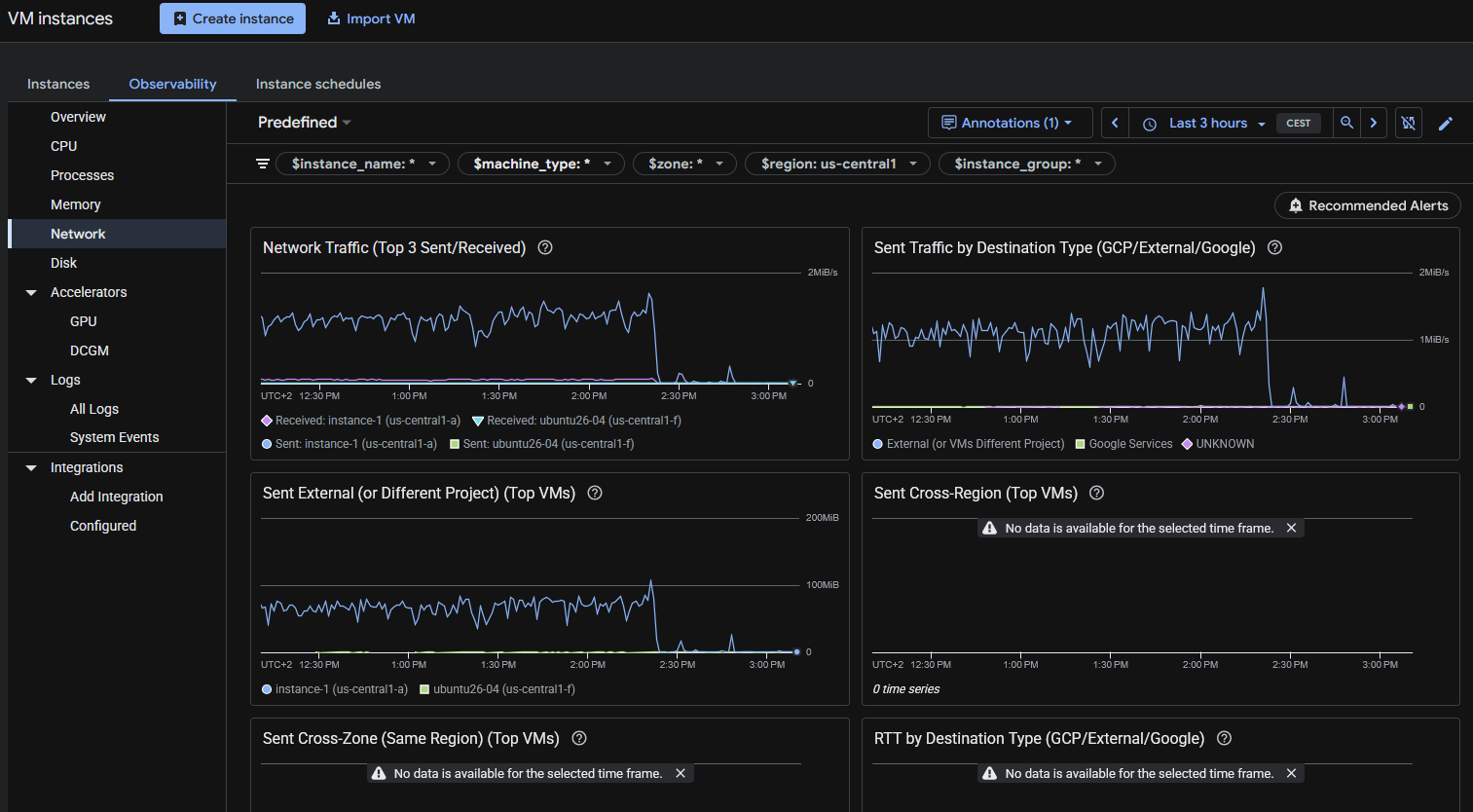
As you can see, after I blocked the first abusive IP allegedly from Microsoft with seemingly OpenAI User-Agent falsified, all the egress traffic went down.

I like how Google reacted when I contacted them. And I should have checked the Network traffic bandwidth first. So I decided to keep the WordPress instance in Google Cloud.

But the new instance “ubuntu26-04” I’m migrating it to the new server. What they offer for the price is much better, and the price of the storage really it’s important for some of my projects. The unlimited bandwidth usage in the new provider it’s also key.

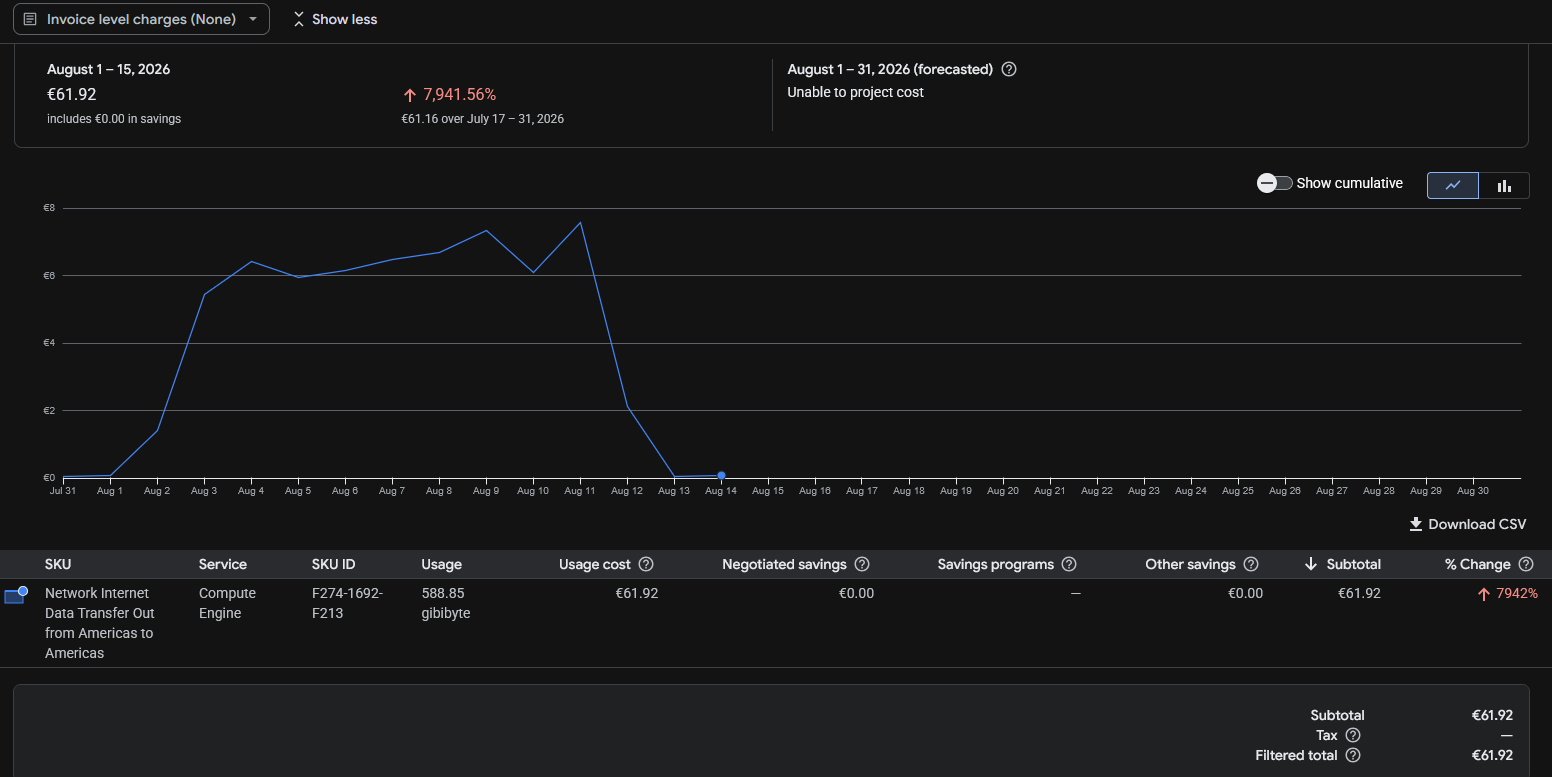
The Billing report from Google Cloud doesn’t show the data up to the moment. But the 16th of August I was able to see that from the 12th and absolutely on 13th and 14th the egress Internet cost have almost disappeared.
Not all is perfect. I had to learn the web interface from that provider (I used it in the past, but companies change the user interface very often nowadays, causing headaches to users), the place were my VPS was listed was hidden and difficult to find, and by default the VPS had no firewall enabled. Something that I believe that is basic to have enabled by default.

But I think it will be great for my projects and for my budget, to have all those new resources available (8 vCPU and 24 GB of RAM and 200 GB of NVMe disk for the same cost provided in Google Cloud of 2 vCPU and 4 GB of RAM and 20 GB of standard disk).

In fact, the speed I have detected transferring from/to sendmeafile with the new provider shows a great improvement.

Take one thing in mind: They AI is hungry for contents, and the mega-rich AI providers are making you pay the bill, by scanning your sites non-stop.

The new provider says it provides 3 Gbps of bandwidth for the instance, with no data usage limits (not having to pay for GB transferred). If I had not reacted fast, the forecast for this month with Google for just a single instance was 300€. It is a risk for developers and small companies, to have the possibility to face a huge bill because more frequent every day bots/crawlers/AIs and processes attempting to breach in your servers, cause your server to use a lot of egress data. So it is worth considering using a Cloud Provider with unlimited data plan. Or at least, activate the Billing Alerts to be notified if your costs exceed a certain threshold.

News from the Blog 2022-01-22

News for the Blog

It has been 9 years since I created the blog, and some articles have old content that still get many visitors. To make sure they get the clear picture and not obsolete information, all the articles of the taxonomy POST, will include the Date and Time when the article was first published.

I also removed the annoying link “Leave a comment” on top. I think it influences some people to leave comments before actually having read the article.

It is still possible to add comments, but they are on the bottom of the page. I believe it makes more sense this way. This is the way.

Technically that involved modifying the files of my template:

  • functions.php
  • content.php

My Books

Automating and Provisioning to Amazon AWS using boto3 Amazon’s SDK for Python 3

I finished my book about Automating and Provisioning to Amazon AWS using boto3 Amazon’s SDK for Python 3.

It’s 128 pages in Full size DIN-A4 DRM-Free, and comes with a link to code samples of a real project CLI Menu based.

Docker Combat Guide

I have updated my book Docker Combat Guide and I added a completely new section, including source code, to work with Docker’s Python SDK.

I show the Docker SDK by showing the code of an actual CLI program I wrote in Python 3.

Here you can see a video that demonstrates how I launched a project with three Docker Containers via Docker compose. The Containers have Python, Flask webserver, and redis as bridge between the two Python Containers.

All the source code are downloadable with the book.

Watch at 1080p at Full Screen for better experience

My Classes

In January I resumed the coding classes. I have new students, and few spots free in my agenda, as some of my students graduated and others have been hired as Software Developers. I can not be more proud. :)

Free Training

Symfony is one of the most popular PHP Frameworks.

You can learn it with these free videos:

https://symfonycasts.com/screencast/symfony/

Software Licenses I Purchased

Before leaving 2021, I registered WinRAR for Windows.

WinRAR is a compressing Software that has been with us for 19 years.

I’m pretty sure I registered it in the past, but these holidays I was out only with two Window laptops and I had to do some work for the university and WinRAR came it handy, so I decided to register it again.

I create Software and Books, and I earn my life with this, so it makes a lot of sense to pay others for their good work crafting Software.

Books I Purchased

I bought this book and by the moment is really good. I wanted to buy some updated books as all my Linux books have some years already. Also I keep my skills sharp by reading reading reading.

Hardware I purchased

So I bought a cheap car power inverter.

The ones I saw in Amazon were €120+ and they were not very good rated, so I opted to buy a cheap one in the supermarket and keep it on the car just in case one day I need it. (My new Asus Zenbook laptop has 18 hours of autonomy and I don’t charge it for days, but you never know)

For those that don’t know, a power inverter allows you to get a 220V (120V in US) plug, from the connection of the lighter from your car. Also you can get the energy from an external car battery. This comes in really handy to charge the laptop, cameras, your drone… if you are in the nature and you don’t have any plug near.

I bought one years ago to power up Raspberry Pi’s when I was doing Research for a project I was studying to launch.

Fun

Many friends are using Starlink as a substitute of fiber for their rural homes, and they are super happy with it.

One of them send me a very fun article.

It is in Italian, but you can google translate it.

https://leganerd.com/2022/01/10/starlink-ha-un-piccolo-e-adorabile-problema-con-i-gatti/

Anyways you can get the idea of what’s going on in the picture :)

So tell me… so your speed with Starlink drops 80% in winter uh… aha…

Random news about Software

I tried the voice recognition in Slack huddle, and it works pretty well. Also Zoom has this feature and they are great. Specially when you are in a group call, or in a class.

My health

I was experimenting some problems, so I scheduled an appointment to get blood analysis and to be checked. Just in case.

TL;TR I could have died.

The doctors saw my analysis and sent me to the hospital urgently, where they found something that was going to be lethal. For hours they were checking me and doing several more analysis and tests to discard false positives, etc… and they precisely found the issue and provided urgent treatment and confirmed that I could have died at any moment.

Basically I dodged a bullet.

I was doing certain healthy things that helped me in a situation that could have been deadly or extremely dangerous to my health.

With the treatment and my strict discipline, I reverted the situation really quick and now I have more health and more energy than before. I feel rejuvenated.

I’m feeling lucky that with my work, the classes, the books I wrote, etc… I didn’t have to worry about the expensive medicines, the transport, etc… It was a bad moment, during Christmas, with so many people on holidays, pharmacies and GPs closed, so I had to spend more time looking for, traveling, and to pay more than it would had been strictly necessary. Despite all the time I used to my health, I managed to finish my university duties on time, and I didn’t miss my duties at work after the hospital, neither I had to cancel any programming classes or mentoring sessions. Nobody out of my closest circle knew what was going on, with the exception of my boss, which I kept informed in real time, just in case there was any problem, as I didn’t want to let down the company and have my duties at work to be unattended if something major happened.

I was not afraid to die. Unfortunately I’ve lost very significant people since I was a child. Relatives, very appreciated bosses and colleagues which I considered my friends, and great friends of different circles. Illnesses, accidents, and a friend of mine committed suicide years ago, and some of my partners attempted it (before we know each other). When you see people that are so good leaving, this brings a sadness that cannot be explained with words. I have had a tough life.

We have a limited time, and he have freedom to make choices. Some people choose to be miserable, to mistreat others, to lie, to cheat, to be unfaithful, to lack ethic and integrity. Those are their choices. Their wasted time will not come back.

Some of my friends are doctors. I admire them. They save lives and improve the quality of life of people with health problems.

I like being an Engineer cause I can create things, I can build instead of destroy, I can help to improve the world, and I can help users to have a good time and to avoid the frustration of services being down. I chose to do a positive work. So many times I’ve been offered much bigger salaries to do something I didn’t like, or by companies that I don’t admire, and I refused. Cause I wanted to make a better world. I know many people don’t think like that, and they only take take take. They are even unable to understand my choices, even to believe that I’m like that. But it’s enough that I know what I’m doing, and that it makes sense for me, and that I know that I’m doing well. And then, one day, you realize, that doing well, being fair and nice even if other people stabbed you in the back, you got to know fantastic people like you, and people that adore you and love to have you in their life, in their companies… So I’m really fortunate. To all the good-hearted people around, that give without expect anything in return, that try to make the world a better place, thank you.

My PHP Script to see WordPress Posts and Views ordered by Views

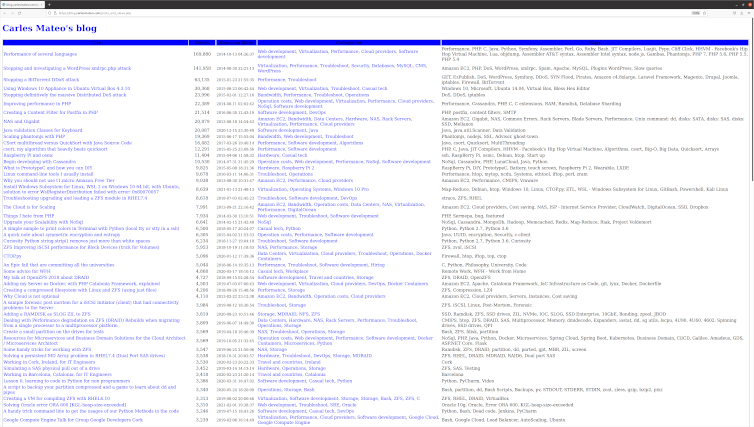
This article shows the code for my PHP program posts_and_views.php that you can see at the bottom of in the Quick Selection bar.

Page rendered of all my Published Posts sorted by Views

So I wrote this small PHP Code to display the number of Post Views recorded in my WordPress Database, sorted by Views in descending order.

In other words, sorted from Most Viewed.

Please note: In order to track the post views I use the excellent plugin WP-PostViews by Lester ‘GaMerZ’ Chan

Here is the code for posts_and_views.php

As you can see I use wp-config.php file to get the Database Settings (username, password, database) but I don’t use the WordPress Engine, it is just a stand alone PHP. So I wrote my own function to get the slug based on the category name. I believe the slug for it is in the Database and I could have added this as a SubQuery with JOINs, which would be better, but I wanted to keep the Database workload lightweight and especially, I did not want to invest more time investigating how the get the slug.

As I tested my function I didn’t find any Category failing but I saw that I had the Category Storage repeated in two different structure tree in Categories, and I will only always link to just the first one (So I was not linkin to the slug storage-2). I fixed that Category that I found repeated but to be honest if this script was a commercial solution or an Open Source solution properly maintained rather than just a sample, I would update it to have Categories and Tags’ slugs coming from the Database.

I would probably make it work with a Cron that would generate a cached page, updated every hour or every ten minutes. I did this in other projects I worked or in my PHP Framework Catalonia Framerwork.

But honestly, the load of the page does not justify a major effort in optimizing here, in this case.

<!DOCTYPE html>
<html>
<head>
    <style>
        .first {

            background-color: blue;
            padding: 12px;
        }
        .second {
            background-color: rgba(254, 253, 252, 0.7);
            text-align: center;
            padding:20px 0;
            font-size: 20px;
        }

        .centered {
            text-align: center;
        }

        /* unvisited link */
        a:link {
            color: blue;
            text-decoration: none;
        }

        /* visited link */
        a:visited {
            color: blue;
            text-decoration: none;
        }

        /* mouse over link */
        a:hover {
            color: #00A8EF;
            text-decoration: underline;
        }

        /* selected link */
        a:active {
            color: blue;
        }
    </style>
<body>
<?php

include "wp-config.php";

$s_site_name = "Carles Mateo's blog";
$s_site_link = "https://blog.carlesmateo.com";

function get_category_slug($s_text) {
    $s_output_text = strtolower($s_text);
    $s_output_text = str_replace(" ", "-", $s_output_text);

    return $s_output_text;
}

?>
<h1><a href="<?php print $s_site_link; ?>"><?php print($s_site_name); ?></a></h1>
<?php


$s_sort = "views DESC, post_date, post_title DESC";

if (array_key_exists("sort", $_GET)) {
    if ($_GET["sort"] == "date") {
        $s_sort = "post_date, views, post_title";
    }
}

$s_servername = "localhost";
$s_database = DB_NAME;
$s_username = DB_USER;
$s_password = DB_PASSWORD;


// Create connection
$o_conn = new mysqli($s_servername, $s_username, $s_password, $s_database);

// Check connection
if ($o_conn->connect_error) {
    die("Connection failed: " . $o_conn->connect_error);
}

/*
mysql> DESCRIBE wp_posts;
+-----------------------+-----------------+------+-----+---------------------+----------------+
| Field                 | Type            | Null | Key | Default             | Extra          |
+-----------------------+-----------------+------+-----+---------------------+----------------+
| ID                    | bigint unsigned | NO   | PRI | NULL                | auto_increment |
| post_author           | bigint unsigned | NO   | MUL | 0                   |                |
| post_date             | datetime        | NO   |     | 0000-00-00 00:00:00 |                |
| post_date_gmt         | datetime        | NO   |     | 0000-00-00 00:00:00 |                |
| post_content          | longtext        | NO   |     | NULL                |                |
| post_title            | text            | NO   |     | NULL                |                |
| post_excerpt          | text            | NO   |     | NULL                |                |
| post_status           | varchar(20)     | NO   |     | publish             |                |
| comment_status        | varchar(20)     | NO   |     | open                |                |
| ping_status           | varchar(20)     | NO   |     | open                |                |
| post_password         | varchar(255)    | NO   |     |                     |                |
| post_name             | varchar(200)    | NO   | MUL |                     |                |
| to_ping               | text            | NO   |     | NULL                |                |
| pinged                | text            | NO   |     | NULL                |                |
| post_modified         | datetime        | NO   |     | 0000-00-00 00:00:00 |                |
| post_modified_gmt     | datetime        | NO   |     | 0000-00-00 00:00:00 |                |
| post_content_filtered | longtext        | NO   |     | NULL                |                |
| post_parent           | bigint unsigned | NO   | MUL | 0                   |                |
| guid                  | varchar(255)    | NO   |     |                     |                |
| menu_order            | int             | NO   |     | 0                   |                |
| post_type             | varchar(20)     | NO   | MUL | post                |                |
| post_mime_type        | varchar(100)    | NO   |     |                     |                |
| comment_count         | bigint          | NO   |     | 0                   |                |
+-----------------------+-----------------+------+-----+---------------------+----------------+
 */

/*
mysql> describe wp_postmeta;
+------------+-----------------+------+-----+---------+----------------+
| Field      | Type            | Null | Key | Default | Extra          |
+------------+-----------------+------+-----+---------+----------------+
| meta_id    | bigint unsigned | NO   | PRI | NULL    | auto_increment |
| post_id    | bigint unsigned | NO   | MUL | 0       |                |
| meta_key   | varchar(255)    | YES  | MUL | NULL    |                |
| meta_value | longtext        | YES  |     | NULL    |                |
+------------+-----------------+------+-----+---------+----------------+
 */

$s_sql = "SELECT DISTINCT post_title, post_content,
                 (SELECT CAST(meta_value AS SIGNED) FROM wp_postmeta WHERE wp_postmeta.meta_key = 'views' AND wp_postmeta.post_id = wp_posts.ID) AS 'views',
                 (SELECT group_concat(wp_terms.name separator ',') 
                         FROM wp_terms
                  INNER JOIN wp_term_taxonomy 
                          ON wp_terms.term_id = wp_term_taxonomy.term_id
                  INNER JOIN wp_term_relationships wpr 
                          ON wpr.term_taxonomy_id = wp_term_taxonomy.term_taxonomy_id
                  WHERE 
                         taxonomy= 'category' AND wp_posts.ID = wpr.object_id
                ) AS 'Categories',
                (SELECT group_concat(wp_terms.name separator ', ') 
                        FROM wp_terms
                 INNER JOIN wp_term_taxonomy 
                         ON wp_terms.term_id = wp_term_taxonomy.term_id
                 INNER JOIN wp_term_relationships wpr 
                         ON wpr.term_taxonomy_id = wp_term_taxonomy.term_taxonomy_id
                 WHERE 
                        taxonomy= 'post_tag' AND wp_posts.ID = wpr.object_id
                ) AS 'Tags',
               ID, post_name, post_date, post_modified, post_type
          FROM wp_posts
          WHERE 
                post_type = 'post' AND post_status = 'publish'
          ORDER BY
                $s_sort";

$o_result = $o_conn->query($s_sql);

if ($o_result->num_rows > 0) {
    ?><table style="border:1px solid">
    <tr class="first"><th>Title</th><th style="min-width:100px">Views</th><th style="min-width:150px">Creation Date</th><th>Categories</th><th>Tags</th></tr>

    <?php
    $i_total_views = 0;
    $i_articles = 0;

    // output data of each row
    while($row = $o_result->fetch_assoc()) {
        $s_style='style="border:1px solid"';
        $s_style='';
        $s_url = $row['post_name'];
        print('<tr>');
        print("<td $s_style>");
        print('<a href="'.$s_url.'" target="_blank">');
        print($row["post_title"]);
        print('</a>');
        print("</td>");
        print('<td class="centered" '.$s_style.'>');
        print(number_format($row["views"]));
        print("</td>");
        print("<td $s_style>");
        print("<small>");
        print($row["post_date"]);
        print("</small>");
        print("</td>");
        print("<td $s_style>");
        $s_categories = $row["Categories"];
        $a_categories = explode (",", $s_categories);
        $s_categories_content = "";
        foreach($a_categories as $s_category) {
            $s_category_slug = "/category/".get_category_slug($s_category)."/";
            $s_categories_content = $s_categories_content .'<a href="'.$s_category_slug.'" target="_blank">';
            $s_categories_content = $s_categories_content .$s_category;
            $s_categories_content = $s_categories_content ."</a>, ";
        }

        if (strlen($s_categories_content) > 0) {
            $s_categories_content = substr($s_categories_content, 0, -2);
        }

        print($s_categories_content);
        print("</td>");
        print("<td $s_style>");
        print($row["Tags"]);
        print("</td>");
        // $row["post_content"];
        $i_total_views = $i_total_views + intval($row["views"]);
        $i_articles++;
        echo "</tr>";
    } ?></table><?php
    print("<strong>Total articles:</strong> ".number_format($i_articles)." <strong>Total Views:</strong> ".number_format($i_total_views));
    print("<br>");
} else {
    echo "<p>0 results</p>";
}
$o_conn->close();

?>
</body>
</html>

Migrating some Services from Amazon to Digital Ocean

Analyzing the needs

I start with a VM, to learn about the providers and the migration project as I go.

My VM has been running in Amazon AWS for years.

It has 3.5GB of RAM and 1 Core. However is uses only 580MB of RAM. I’m paying around $85/month for this with Amazon.

I need to migrate:

  • DNS Server
  • Email
  • Web
  • Database

For the DNS Server I don’t need it anymore, each Domain provider has included DNS Service for free, so I do not longer to have my two DNS.

For the email I find myself in the same scenario, most providers offer 3 email accounts for your domain, and some alias, for free.

I’ll start the Service as Docker in the new CSP, so I will make it work in my computer first, locally, and so I can move easily in the future.

Note: exporting big images is not the idea I have to make backups.

I locate a Digital Ocean droplet with 1GB of RAM and 1 core and SSD disks for $5, for $6 I can have a NVMe version. That I choose.

Disk Space for the Statics

The first thing I do is to analyze the disk space needs of the service.

In this old AWS CentOS based image I have:

[root@ip-10-xxx-yyy-zzz ec2-user]# df -h
Filesystem      Size  Used Avail Use% Mounted on
/dev/xvda1       79G   11G   69G  14% /
devtmpfs        1.8G   12K  1.8G   1% /dev
tmpfs           1.8G     0  1.8G   0% /dev/shm

Ok, so if I keep the same I have I need 11GB.

I have plenty of space on this server so I do a zip of all the contents of the blog:

cd /var/www/wordpress
zip -r /home/ec2-user/wp_sizeZ.zip wp_siteZ

Database dump

I need a dump of the databases I want to migrate.

I check what databases are in this Server.

mysql -u root -p

mysql> show databases;

I do a dump of the databases that I want:

sudo mysqldump --password='XXXXXXXX' --databases wp_mysiteZ > wp_mysiteZ.sql

I get an error, meaning MySQL needs repair:

mysqldump: Got error: 145: Table './wp_mysiteZ/wp_visitor_maps_wo' is marked as crashed and should be repaired when using LOCK TABLES

So I launch a repair:

sudo mysqlcheck --password='XXXXXXXX' --repair --all-databases

And after the dump works.

My dump takes 88MB, not much, but I compress it with gzip.

gzip wp_mysiteZ.sql

It takes only 15MB compressed.

Do not forget the parameter –databases even if only one database is exported, otherwise the CREATE DATABASE and USE `wp_mysiteZ`; will not be added to your dump.

I will need to take some data form the mysql database, referring to the user used for accessing the blog’s database.

I always keep the CREATE USER and the GRANT permissions, if you don’t check the wp-config.php file. Note that the SQL format to create users and grant permissions may be different from a SQL version to another.

I create a file named mysql.sql with this part and I compress with gzip.

Checking PHP version

php -v
PHP 7.3.23 (cli) (built: Oct 21 2020 20:24:49) ( NTS )
Copyright (c) 1997-2018 The PHP Group
Zend Engine v3.3.23, Copyright (c) 1998-2018 Zend Technologies

WordPress is updated, and PHP is not that old.

The new Ubuntu 20.04 LTS comes with PHP 7.4. It will work:

php -v
PHP 7.4.3 (cli) (built: Jul  5 2021 15:13:35) ( NTS )
Copyright (c) The PHP Group
Zend Engine v3.4.0, Copyright (c) Zend Technologies
    with Zend OPcache v7.4.3, Copyright (c), by Zend Technologies

The Dockerfile

FROM ubuntu:20.04

MAINTAINER Carles Mateo

ARG DEBIAN_FRONTEND=noninteractive

# RUN echo "nameserver 8.8.8.8" > /etc/resolv.conf

RUN echo "Europe/Ireland" | tee /etc/timezone

# Note: You should install everything in a single line concatenated with
#       && and finalizing with 
# apt autoremove && apt clean

#       In order to use the less space possible, as every command 
#       is a layer

RUN apt update && apt install -y apache2 ntpdate libapache2-mod-php7.4 mysql-server php7.4-mysql php-dev libmcrypt-dev php-pear git mysql-server less zip vim mc && apt autoremove && apt clean

RUN a2enmod rewrite

RUN mkdir -p /www

# If you want to activate Debug
# RUN sed -i "s/display_errors = Off/display_errors = On/" /etc/php/7.2/apache2/php.ini 
# RUN sed -i "s/error_reporting = E_ALL & ~E_DEPRECATED & ~E_STRICT/error_reporting = E_ALL/" /etc/php/7.2/apache2/php.ini 
# RUN sed -i "s/display_startup_errors = Off/display_startup_errors = On/" /etc/php/7.2/apache2/php.ini 
# To Debug remember to change:
# config/{production.php|preproduction.php|devel.php|docker.php} 
# in order to avoid Error Reporting being set to 0.

ENV PATH_WP_MYSITEZ /var/www/wordpress/wp_mysitez/
ENV PATH_WORDPRESS_SITES /var/www/wordpress/

ENV APACHE_RUN_USER  www-data
ENV APACHE_RUN_GROUP www-data
ENV APACHE_LOG_DIR   /var/log/apache2
ENV APACHE_PID_FILE  /var/run/apache2/apache2.pid
ENV APACHE_RUN_DIR   /var/run/apache2
ENV APACHE_LOCK_DIR  /var/lock/apache2
ENV APACHE_LOG_DIR   /var/log/apache2

RUN mkdir -p $APACHE_RUN_DIR
RUN mkdir -p $APACHE_LOCK_DIR
RUN mkdir -p $APACHE_LOG_DIR
RUN mkdir -p $PATH_WP_MYSITEZ

# Remove the default Server
RUN sed -i '/<Directory \/var\/www\/>/,/<\/Directory>/{/<\/Directory>/ s/.*/# var-www commented/; t; d}' /etc/apache2/apache2.conf 

RUN rm /etc/apache2/sites-enabled/000-default.conf

COPY wp_mysitez.conf /etc/apache2/sites-available/

RUN chown --recursive $APACHE_RUN_USER.$APACHE_RUN_GROUP $PATH_WP_MYSITEZ

RUN ln -s /etc/apache2/sites-available/wp_mysitez.conf /etc/apache2/sites-enabled/

# Please note: It would be better to git clone from another location and
# gunzip and delete temporary files in the same line, 
# to save space in the layer.
COPY *.sql.gz /tmp/

RUN gunzip /tmp/*.sql.gz; echo "Starting MySQL"; service mysql start && mysql -u root < /tmp/wp_mysitez.sql && mysql -u root < /tmp/mysql.sql; rm -f /tmp/*.sql; rm -f /tmp/*.gz
# After this root will have password assigned

COPY *.zip /tmp/

COPY services_up.sh $PATH_WORDPRESS_SITES

RUN echo "Unzipping..."; cd /var/www/wordpress/; unzip /tmp/*.zip; rm /tmp/*.zip

RUN chown --recursive $APACHE_RUN_USER.$APACHE_RUN_GROUP $PATH_WP_MYSITEZ

EXPOSE 80

CMD ["/var/www/wordpress/services_up.sh"]

Services up

For starting MySQL and Apache I relay in services_up.sh script.

#!/bin/bash
echo "Starting MySql"
service mysql start

echo "Starting Apache"
service apache2 start
# /usr/sbin/apache2 -D FOREGROUND

while [ true ];
do
    ps ax | grep mysql | grep -v "grep "
    if [ $? -gt 0 ];
    then
        service mysql start
    fi
    sleep 10
done

You see that instead of launching apache2 as FOREGROUND, what keeps the loop, not exiting from my Container is a while [ true ]; that will keep looping and checking if MySQL is up, and restarting otherwise.

MySQL shutting down

Some of my sites receive DoS attacks. More than trying to shutdown my sites, are spammers trying to publish comment announcing fake glasses, or medicines for impotence, etc… also some try to hack into the Server to gain control of it with dictionary attacks or trying to explode vulnerabilities.

The downside of those attacks is that some times the Database is under pressure, and uses more and more memory until it crashes.

More memory alleviate the problem and buys time, but I decided not to invest more than $6 USD per month on this old site. I’m just keeping the contents alive and even this site still receives many visits. A restart of the MySQL if it dies is enough for me.

As you have seen in my Dockerfile I only have one Docker Container that runs both Apache and MySQL. One of the advantages of doing like that is that if MySQL dies, the container does not exit. However I could have had two containers with both scripts with the while [ true ];

When planning I decided to have just one single Container, all-in-one, as when I export the image for a Backup, I’ll be dealing only with a single image, not two.

Building and Running the Container

I created a Bash script named build_docker.sh that does the build for me, stopping and cleaning previous Containers:

#!/bin/bash

# Execute with sudo

s_DOCKER_IMAGE_NAME="wp_sitez"

printf "Stopping old image %s\n" "${s_DOCKER_IMAGE_NAME}"
sudo docker stop "${s_DOCKER_IMAGE_NAME}"

printf "Removing old image %s\n" "${s_DOCKER_IMAGE_NAME}"
sudo docker rm "${s_DOCKER_IMAGE_NAME}"

printf "Creating Docker Image %s\n" "${s_DOCKER_IMAGE_NAME}"
# sudo docker build -t ${s_DOCKER_IMAGE_NAME} . --no-cache
sudo docker build -t ${s_DOCKER_IMAGE_NAME} .

i_EXIT_CODE=$?
if [ $i_EXIT_CODE -ne 0 ]; then
    printf "Error. Exit code %s\n" ${i_EXIT_CODE}
    exit
fi

echo "Ready to run ${s_DOCKER_IMAGE_NAME} Docker Container"
echo "To run type: sudo docker run -d -p 80:80 --name ${s_DOCKER_IMAGE_NAME} ${s_DOCKER_IMAGE_NAME}"
echo "or just use run_in_docker.sh"
echo
echo "Debug running Docker:"
echo "docker exec -it ${s_DOCKER_IMAGE_NAME} /bin/bash"
echo

I assign to the image and the Running Container the same name.

Running in Production

Once it works in local, I set the Firewall rules and I deploy the Droplet (VM) with Digital Ocean, I upload the files via SFTP, and then I just run my script build_docker.sh

And assuming everything went well, I run it:

sudo docker run -d -p 80:80 --name wp_mysitez wp_mysitez

I check that the page works, and here we go.

Some improvements

This could also have been put in a private Git repository. You only have to care about not storing the passwords in it. (Like the MySQL grants)

It may be interesting for you to disable directory browsing.

The build from the Git repository can be validated with a Jenkins. Here you have an article about setup a Jenkins for yourself.

Making responsive WordPress Theme Twenty Twelve to support greater resolutions

This is the first article I write about FrontEnd in here, as this is very casual and trivial, and I wanted to specialize the blog in Extreme IT, going deep into knowledge and difficult questions. And in any case, more for BackEnd, Engineering, and Hardware and Operations.

But as it is something useful and myself didn’t found an answer when I googled it, I think is no bad to share it here. Nevertheless I’ll not make it appear in the front page to be loyal to my essence.

So I like Twenty Twelve WP Theme. It’s clear, that’s what I expect from a blog from an Engineer: easy to read. Maybe is to Spartan, but that’s grant.

The instructions to do like me:

  1. Make a copy of your original Twenty Twelve Theme in another directory, at the same level
  2. Edit the file /var/www/blog.carlesmateo.com/wp-content/themes/2021-blog-carlesmateo-com/style.css
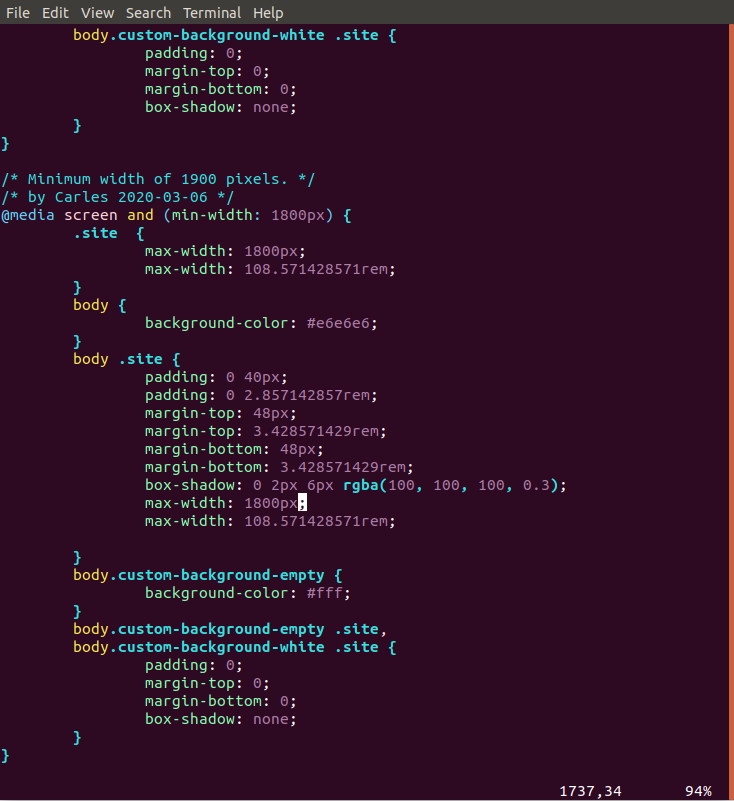
  3. Add a new section like this

So I defined a new @media screen with min-width of 1800px.

Why 1800px and not 1920px like Full Hd?. Because Ubuntu use some width for the lateral bar.

Then over body .site section I set a max-width: 1800px that will do the trick for some browsers, and the rem value that will do the trick for Chrome.

Now the main section of the block can be correctly displayed using most of the space available.

Upgrading the Blog after 5 years, AWS Amazon Web Services, under DoS and Spam attacks

Few days ago I was under a heavy DoS attack.

Nothing new, zombie computers, hackers, pirates, networks of computers… trying to abuse the system and to hack into it. Why? There could be many reasons, from storing pirate movies, trying to use your Server for sending Spam, try to phishing or to host Ransomware pages…

Most of those guys doesn’t know that is almost impossible to Spam from Amazon. Few emails per hour can come out from the Server unless you explicitly requests that update and configure everything.

But I thought it was a great opportunity to force myself to update the Operating System, core tools, versions of PHP and MySql.

Forensics / Postmortem of the incident

The task was divided in two parts:

  • Understanding the origin of the attack
  • Blocking the offending Ip addresses or disabling XMLRPC
  • Making the VM boot again (problems with Amazon AWS)
    • I didn’t know why it was not booting so.
  • Upgrading the OS

I disabled the access to the site while I was working using Amazon Web Services Firewall. Basically I turned access to my ip only. Example: 8.8.8.8/32

I changed 0.0.0.0/0 so the world wide mask to my_Ip/3

That way the logs were reflecting only what I was doing from my Ip.

Dealing with Snapshots and Volumes in AWS

Well the first thing was doing an Snapshot.

After, I tried to boot the original Blog Server (so I don’t stop offering service) but no way, the Server appeared to be dead.

So then I attached the Volume to a new Server with the same base OS, in order to extract (dump) the database. Later I would attach the same Volume to a new Server with the most recent OS and base Software.

Something that is a bit annoying is that the new Instances, the new generation instances, run only in VPC, not in Amazon EC2 Classic. But my static Ip addresses are created for Amazon EC2 Classic, so I could not use them in new generation instances.

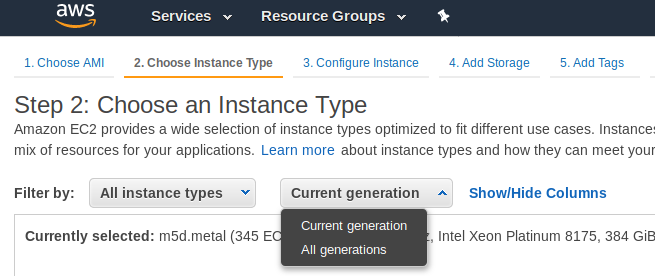
I choose the option to see all the All the generations.

Upgrading the system base Software had its own challenges too.

Upgrading the OS / Base Software

My approach was to install an Ubuntu 18.04 LTS, and install the base Software clean, and add any modification I may need.

I wanted to have all the supported packages and a recent version of PHP 7 and the latest Software pieces link Apache or MySQL.

sudo apt update

sudo apt install apache2

sudo apt install mysql-server

sudo apt install php libapache2-mod-php php-mysql

Apache2

Config files that before were working stopped working as the new Apache version requires the files or symlinks under /etc/apache2/sites-enabled/ to end with .conf extension.

Also some directives changed, so some websites will not able to work properly.

Those projects using my Catalonia Framework were affected, although I have this very well documented to make it easy to work with both versions of Apache Http Server, so it was a very straightforward change.

From the previous version I had to change my www.cataloniaframework.com.conf file and enable:

    <Directory /www/www.cataloniaframework.com>
Options Indexes FollowSymLinks MultiViews
AllowOverride All
Order allow,deny
allow from all
</Directory>

Then Open the ports for the Web Server (443 and 80).

sudo ufw allow in "Apache Full"

Then service apache restart

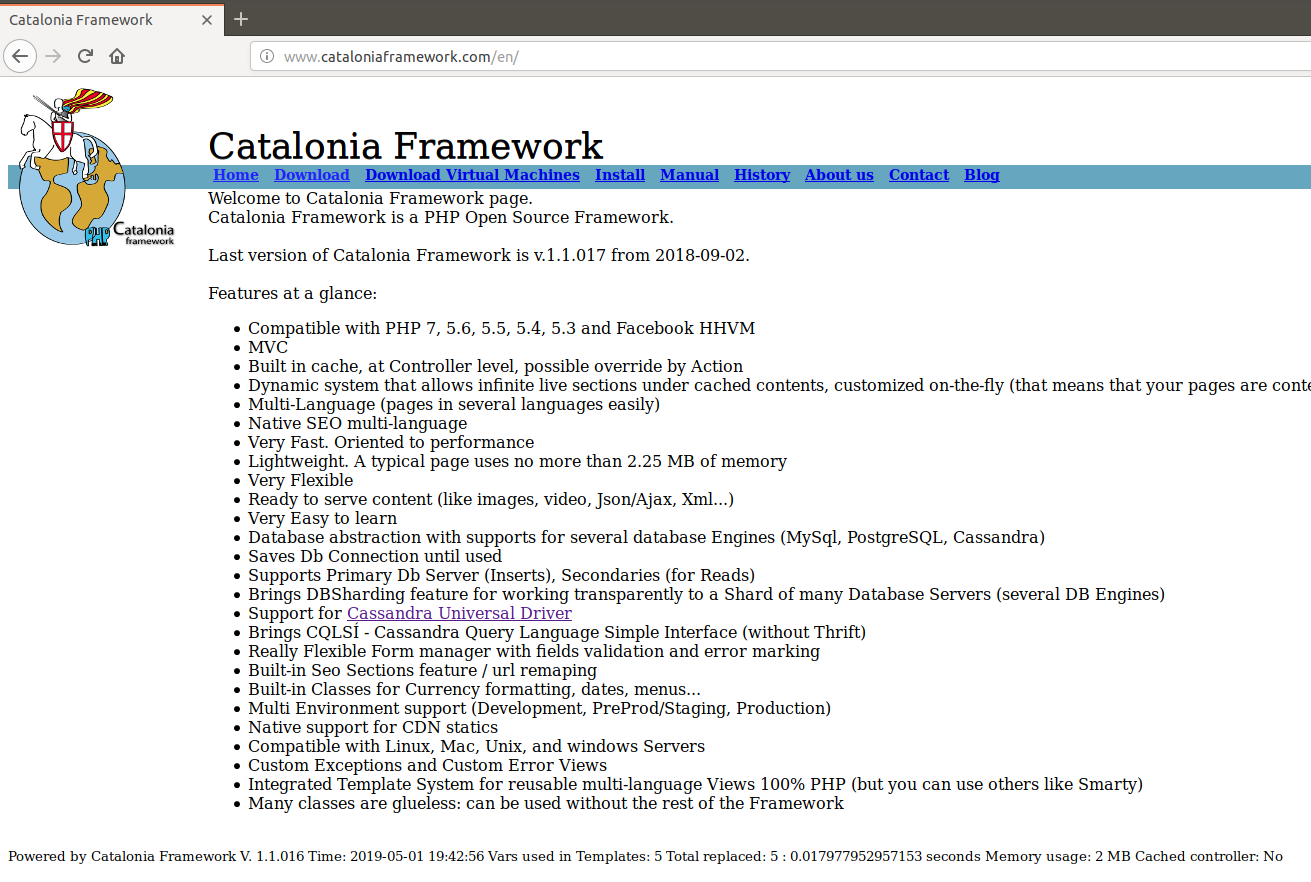
Catalonia Framework Web Site, which is also created with Catalonia Framework itself once restored

MySQL

The problem was to use the most updated version of the Database. I could use one of the backups I keep, from last week, but I wanted more fresh data.

I had the .db files and it should had been very straightforward to copy to /var/lib/mysql/ … if they were the same version. But they weren’t. So I launched an instance with the same base Software as the old previous machine had, installed mysql-server, stopped it, copied the .db files, started it, and then I made a dump with mysqldump –all-databases > 2019-04-29-all-databases.sql

Note, I copied the .db files using the mythical mc, which is a clone from Norton Commander.

Then I stopped that instance and I detached that volume and attached it to the new Blog Instance.

I did a Backup of my original /var/lib/mysql/ files for the purpose of faster restoring if something went wrong.

I mounted it under /mnt/blog_old and did mysql -u root -p < /mnt/blog_old/home/ubuntu/2019-04-29-all-databases.sql

That worked well I had restored the blog. But as I was watching the /var/log/mysql/error.log I noticed some columns were not where they should be. That’s because inadvertently I overwritten the MySql table as well, which in MySQL 5.7 has different structure than in MySQL 5.5. So I screwed. As I previewed this possibility I restored from the backup in seconds.

So basically then I edited my .sql files and removed all that was for the mysql database.

I started MySql, and run the mysql import procedure again. It worked, but I had to recreate the users for all the Databases and Grant them permissions.

GRANT ALL PRIVILEGES ON db_mysqlproxycache.* TO 'wp_dbuser_mysqlproxy'@'localhost' IDENTIFIED BY 'XWy$&{yS@qlC|<¡!?;:-ç';

PHP7

Some modules in my blogs where returning errors in /var/log/apache2/mysite-error.log so I checked that it was due to lack of support of latest PHP versions, and so I patched manually the code or I just disabled the offending plugin.

WordPress

As seen checking the /var/log/apache2/blog.carlesmateo.com-error.log some URLs where not located by WordPress.

For example:

The requested URL /wordpress/wp-json/ was not found on this server

I had to activate modrewrite and then restart Apache.

a2enmod rewrite; service apache2 restart

Making the site more secure

Checking at the logs of Apache, /var/log/apache2/blog.carlesmateo.com-access.log I checked for Ip’s accessing Admin areas, I looked for 404 Errors pointing to intents to exploit any unsafe WP Plugin, I checked for POST protocol as well.

I added to the Ubuntu Uncomplicated Firewall (UFW) the offending Ip’s and patched the xmlrpc.php file to exit always.

Stopping a BitTorrent DDoS attack

After all the success about the article stopping an XMLRPC to WordPress site attack and thanks messages (I actually helped a company that was being thrown down every day and asked me for help) it’s the moment to explain how to stop an attack much more heavily in evilness.

The first sign I saw was that the server was more and more slower, what is nearly impossible as I setup a very good server, and it has a lot of good development techniques to not having bottlenecks.

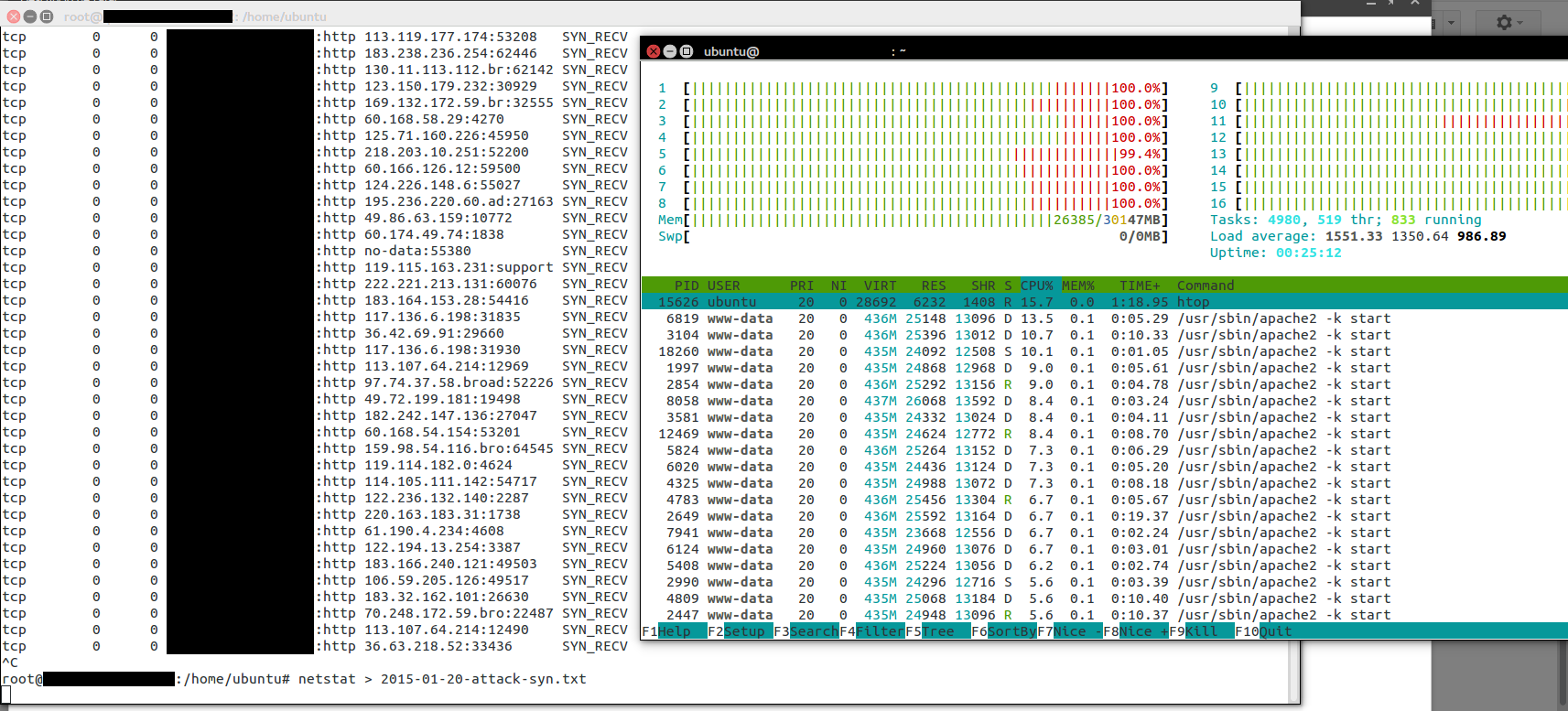
I looked at the server and I saw like 3,000 SYN_SENT packets. Apparently we were under a SYN Flood attack.

blog-carlesmateo-com-atack-to-the-web-2015-high-load-blacknetstat revealed more than 6k different ip addresses connecting to the Server.

Server had only 30 GB of RAM so, and started to be full, with more and more connections, and so more Apache processes to respond to the real users fast it was clear that it was going to struggle.

I improved the configuration of the Apache so the Server would be able to handle much more connections with less memory consumption and overhead, added some enhancements for blocking SYN Flood attacks, and restarted the Apache Server.

I reduced greatly the scope of the attacks but I knew that it would only be being worst. I was buying time while not disrupting the functioning of the website.

The next hours the attacks increased to having around 7,500 concurrent connections simultaneously. The memory was reaching its limits, so I decided it was time to upgrade the instance. I doubled the memory and added much more cores, to 36, by using one of the newest Amazon c4.8xlarge.

blog-carlesmateo-com-heavy-load-with-c4-8xlarge-black

The good thing about Cloud is that you pay for the time you use the resources. So when the waters calm down again, I’m able to reduce the size of the instance and save some hundreds to the company.

I knew it was a matter of time. The server was stabilized at using 40 GB out of the 60 GB but I knew the pirates will keep trying to shutdown the service.

Once the SYN Flood was stopped and I was sure that the service was safe for a while, I was checking the logs to see if I can detect a pattern among the attacks. I did.

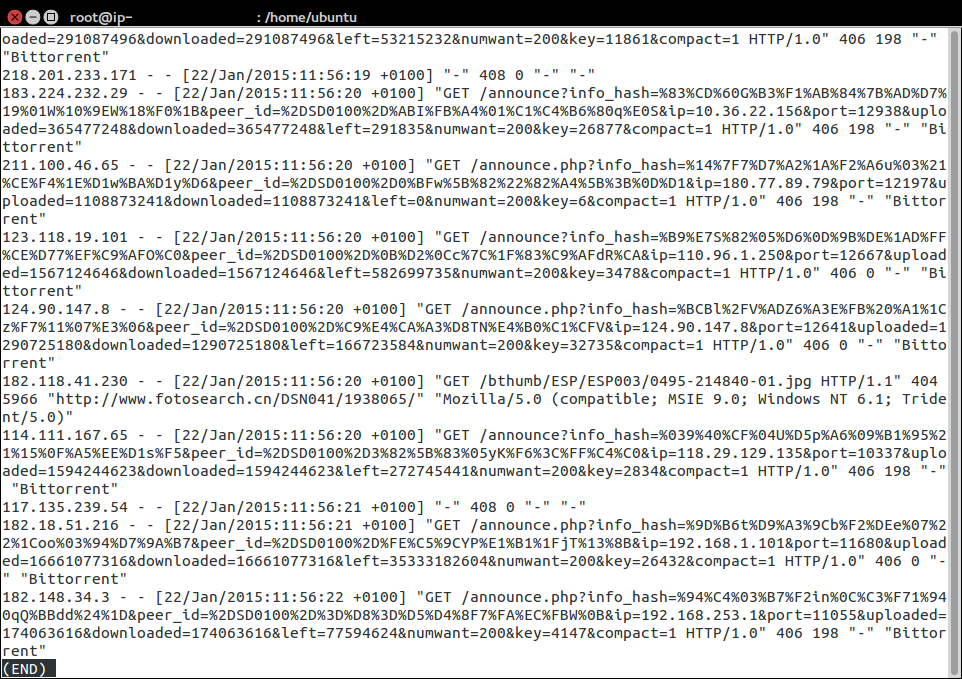
attacks-access-log-bittorrent

Most request that we were receiving where to a file called announce.php that obviously does not exist in the server, and so it was returning 404 error.

The user agent reported in many cases BitTorrent, or Torrent compatible product, and the url sending a hash, uploaded, downloaded, left… so I realized that somehow my Server was targeted by a Torrent attack, where they indicated that the Server was a Torrent tracker.

As the .htacess in frameworks like Laravel, Catalonia Framework… and CMS like WordPress, Joomla, ezpublish… try to read the file from filesystem and if it doesn’t exist index.php is served, then as first action I created a file /announce.php that simple did an exit();

Sample .htaccess from Laravel:

<IfModule mod_rewrite.c>
    <IfModule mod_negotiation.c>
        Options -MultiViews
    </IfModule>

    RewriteEngine On

    # Redirect Trailing Slashes...
    RewriteRule ^(.*)/$ /$1 [L,R=301]

    # Handle Front Controller...
    RewriteCond %{REQUEST_FILENAME} !-d
    RewriteCond %{REQUEST_FILENAME} !-f
    RewriteRule ^ index.php [L]
</IfModule>

Sample code for announce.php would be like:

<?php
/**
 * Creator: Carles Mateo
 * Date: 2015-01-21 Time: 09:39
 */

// A cheap way to stop an attack based on requesting this file
http_response_code(406);
exit();

The response_code 406 was an attemp to see if the BitTorrent clients were sensible to headers and stop. But they didn’t.

With with simple addition of announce.php , with exit(), I achieved reducing the load on the Server from 90% to 40% in just one second.

The reason why a not found page was causing so many damage was that as the 404 error page from the Server is personalized, and offers alternative results (assuming the product you was looking for is no longer available), and before displaying all the Framework is loaded and the routes are checked to see if the url fits and so has some process to be done in the PHP side (it takes 100 ms to reply, is not much, but it was not necessary to waste so much CPU), even being very optimized, every single not found url was causing certain process and CPU waste. Since the attack had more than 7,000 different ip’s simultaneously coming to the Server it would be somewhat a problem at certain point and start returning 500 errors to the customers.

The logs were also showing other patterns, for example:

announce?info_hash…

So without the PHP extension. Those kind of requests would not go through my wall file announce.php but though index.php (as .htaccess tells what is not found is directed there).

I could change the .htaccess to send those requests to hell, but I wanted a more definitive solution, something that would prevent the Server from wasting CPU and the Servers to being able to resist an attack x1000 times harder.

At the end the common pattern was that the BitTorrent clients were requesting via GET a parameter called info_hash, so I blocked through there all the request.

I wrote this small program, and added it to index.php

// Patch urgency Carles to stop an attack based on Torrent
// http://blog.carlesmateo.com
if (isset($_GET['info_hash'])) {

    // In case you use CDN, proxy, or load balancer
    $s_ip_proxy = '';

    $s_ip_address = $_SERVER['REMOTE_ADDR'];


    // Warning if you use a CDN, a proxy server or a load balancer do not add the ip to the blacklisted
    if ($s_ip_proxy == '' || ($s_ip_proxy != '' && $s_ip_address != $s_ip_proxy)) {
        $s_date = date('Y-m-d');

        $s_ip_log_file = '/tmp/ip-to-blacklist-'.$s_date.'.log';
        file_put_contents($s_ip_log_file, $s_ip_address."\n", FILE_APPEND | LOCK_EX);
    }


    // 406 means 'Not Acceptable'
    http_response_code(406);
    exit();
}


Please note, this code can be added to any Software like Zend Framework, Symfony, Catalonia Framework, Joomla, WordPress, Drupal, ezpublish, Magento… just add those lines at the beginning of the public/index.php just before the action of the Framework starts. Only be careful that after a core update, you’ll have to reapply it.

After that I deleted the no-longer-needed announced.php

What the program does is, if you don’t have defined a proxy/CDN ip, to write the ip connecting with the Torrent request pattern to a log file called for example:

/tmp/ip-to-blacklist-2015-01-23.log

And also exit(), so stopping the execution and saving many CPU cycles.

The idea of the final date is to blacklist the ip’s only for 24 hours as we later will see.

With this I achieved reducing the CPU consumption to around 5-15% of CPU.

Then, there is the other part of stopping the attack, that is a bash program, that can be run from command line or added to cron to be launched, depending on the volume of the attacks, every 5 minutes, or every hour.

blog-carlesmateo-com-blocking-traffick-black

ip_blacklist.sh

#!/bin/bash
# Ip blacklister by Carles Mateo
s_DATE=$(date +%Y-%m-%d)
s_FILE=/tmp/ip-to-blacklist-$s_DATE.log
s_FILE_UNIQUE=/tmp/ip-to-blacklist-$s_DATE-unique.log
cat $s_FILE | sort | uniq > $s_FILE_UNIQUE

echo "Counting the ip addresses to block in $s_FILE_UNIQUE"
cat $s_FILE_UNIQUE | wc -l

sleep 3
# We clear the iptables rules
iptables -F
iptables -X
iptables -t nat -F
iptables -t nat -X
iptables -t mangle -F
iptables -t mangle -X
iptables -P INPUT ACCEPT
iptables -P FORWARD ACCEPT
iptables -P OUTPUT ACCEPT

# To list the rules sudo iptables -L
# /sbin/iptables -L INPUT -v -n
# Enable ssh for all (you can add a Firewall at Cloud provider level or enstrict the rule to your ip)
sudo iptables -A INPUT -p tcp --dport ssh -j ACCEPT

for s_ip_address in `cat $s_FILE_UNIQUE`
do
    echo "Blocking traffic from $s_ip_address"
    sudo iptables -A INPUT -s $s_ip_address -p tcp --destination-port 80 -j DROP
    sudo iptables -A INPUT -s $s_ip_address -p tcp --destination-port 443 -j DROP
done

# Ensure Accept traffic on Port 80 (HTTP) and 443 (HTTPS)
sudo iptables -A INPUT -p tcp --dport 80 -j ACCEPT
sudo iptables -A INPUT -p tcp --dport 443 -j ACCEPT

# To block the rest
# sudo iptables -A INPUT -j DROP

# User iptables -save and iptables -restore to make this changes permanent
# sudo sh -c "iptables-save > /etc/iptables.rules"
# sudo pre-up iptables-restore < /etc/iptables.rules
# https://help.ubuntu.com/community/IptablesHowTo

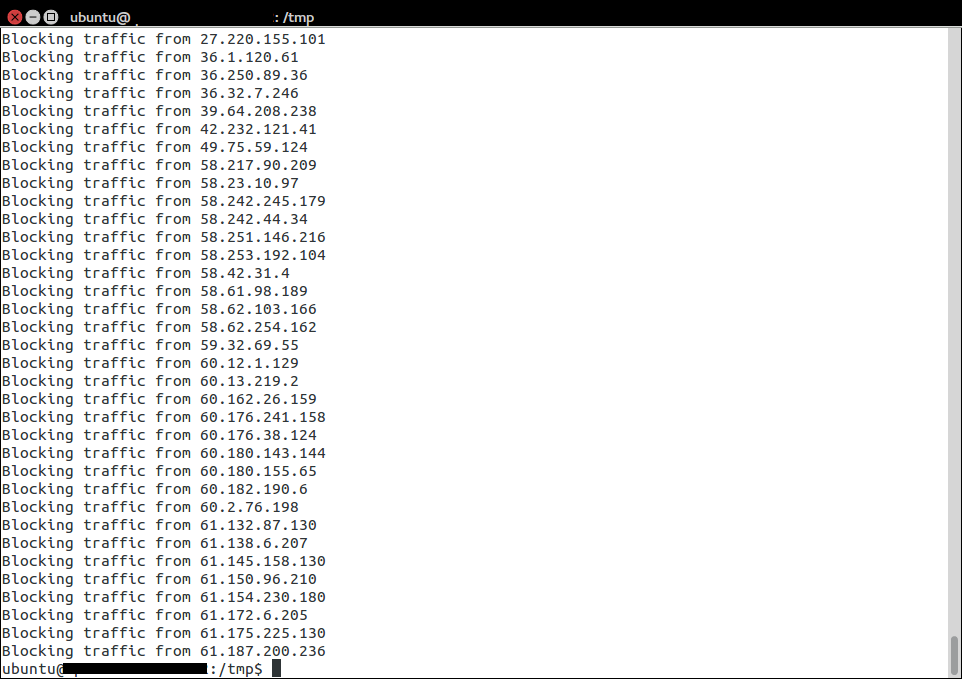
This scripts gets the list of ip’s addresses, gets the list of unique ip’s into another file, and then makes a loop and adds all of them to the iptables, the Firewall from Linux, and blocks them for accessing the web at port 80 (http) or 443 (https, ssl). You can block all the ports also if you want for those ip’s.

With this CPU use went to 0%.

Note: One of my colleagues, a wonderful SysAdmin at Ackstorm ISP, points that some of you may prefer using REJECT instead of DROP. An interesting conversation on serverfault about this.

After fixing the problem I looked over the Internet to locate any people reporting attacks like what I suffered. The most interesting I found was this article: BotTorrent: Misusing BitTorrent to Launch DDoS Attacks, from University of California, Irvine. (local copy on this website BotTorrent)

Basically any site on the Internet can be attacked at a large scale, as every user downloading Torrent will try to connect to the innocent Server to inform of the progress of the down/upload. If this attack is performed with hundreds of files, the attack means hundreds of thousands of ip’s connecting to the Server… the server will run out of connections, or memory, or bandwidth will be full from the bad traffic.

I saw that the attackers were using porno files that were highly downloaded and apparently telling the Torrent network that our Server was a Torrent tracker, so corroborating my hypothesis all the people downloading Torrents were sending updates to our Server, believing that our Server was a tracker. A trick from the sad pirates.

Some people, business users, asked me who could be interested in injuring other’s servers or disrupting other’s businesses without any immediate gain (like controlling your Servers to send Spam).

I told:

  • Competitors that hate you because you’re successful and want to disrupt your business (they pay to the pirates for doing attacks. I’ve helped companies that were let down by those pirates)
  • Investors that may want to buy you at a cheaper price (after badly trolling you for a week or two)
  • False “security” companies that will offer their services “casually” when you most need them and charge a high bill
  • Pirates that want to extort you

So bad people that instead that using their talent to create, just destroy and act bad being evil to others.

In other cases could be bad luck to have been assigned an Ip that previously had a Torrent tracker, it has not much sense for the Cloud as it is expensive, but it has that a Server with that ip was hacked and used as tracked for a while.

Also governments could be so wanting to disrupt services (like torrent) by clumsy redirecting dns to random ip’s, or entertainment companies trying to shutdown Torrent trackers could try to poison dns to stop users from using Bittorrent.


See the definitive solution in the next article.

Stopping and investigating a WordPress xmlrpc.php attack

One of my Servers got heavily attacked for several days. I describe here the steps I took to stop this.

The attack consisted in several connections per second to the Server, to path /xmlrpc.php.

This is a WordPress file to control the pingback, when someone links to you.

My Server it is a small Amazon instance, a m1.small with only one core and 1,6 GB RAM, magnetic disks and that scores a discrete 203 CMIPS (my slow laptop scores 460 CMIPS).

Those massive connections caused the server to use more and more RAM, and while the xmlrpc requests were taking many seconds to reply, so more and more processes of Apache were spawned. That lead to more memory consumption, and to use all the available RAM and start using swap, with a heavy performance impact until all the memory was exhausted and the mysql processes stopped.

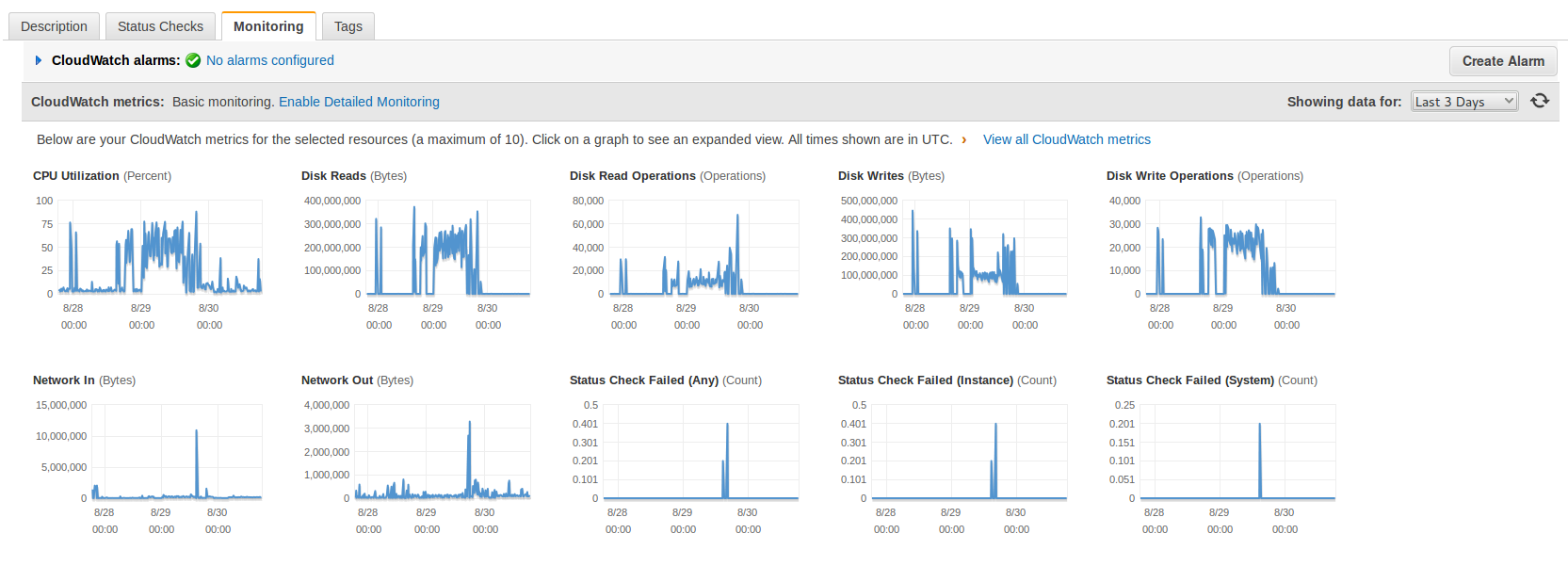
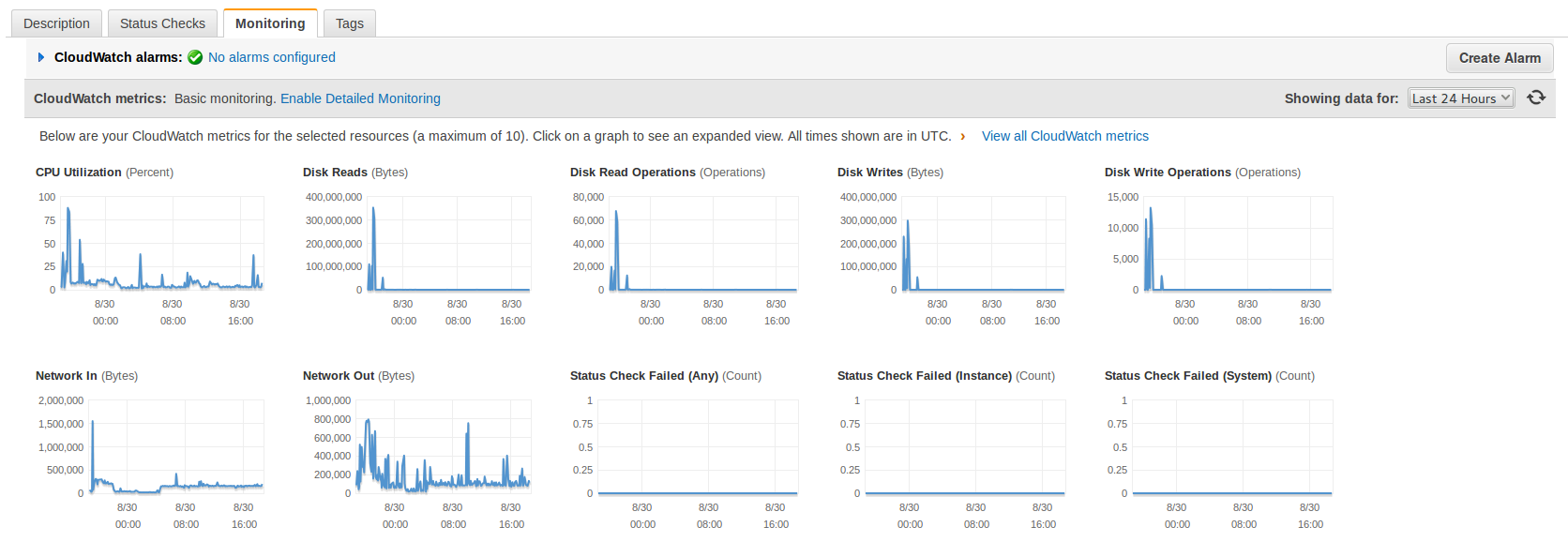
I saw that I was suffering an attack after the shutdown of MySql. I checked the CloudWatch Statistics from Amazon AWS and it was clear that I was receiving many -out of normal- requests. The I/O was really high too.

This statistics are from today to three days ago, look at the spikes when the attack was hitting hard and how relaxed the Server is now (plain line).

blog-carlesmateo-com-statistics-use-last-3-days

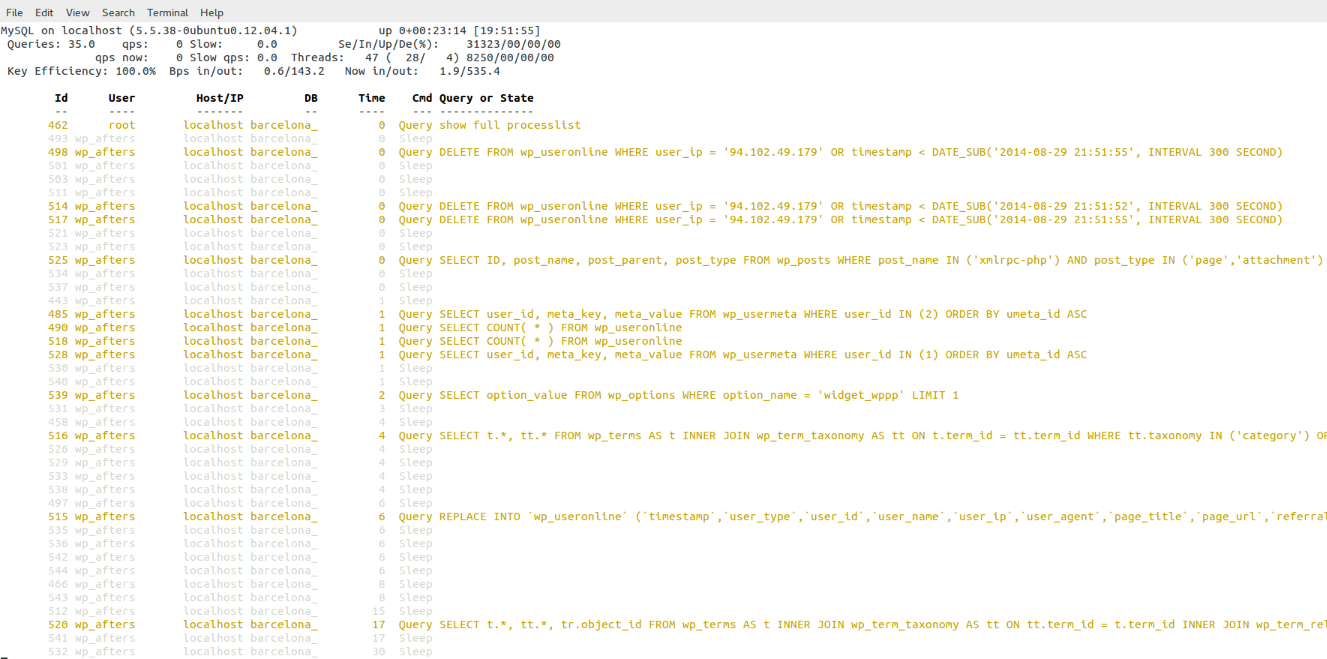
First I decided to simply rename the xmlrpc.php file as a quick solution to stop the attack but the number of http connections kept growing and then I saw very suspicious queries to the database.

blog-carlesmateo-suspicious-queries-2014-08-30-00-11-59Those queries, in addition to what I’ve seen in the Apache’s error log suggested me that may be the Server was hacked by a WordPress/plugin bug and that now they were trying to hide from the database’s logs. (Specially the DELETE FROM wp_useronline WHERE user_ip = the Ip of the attacker)

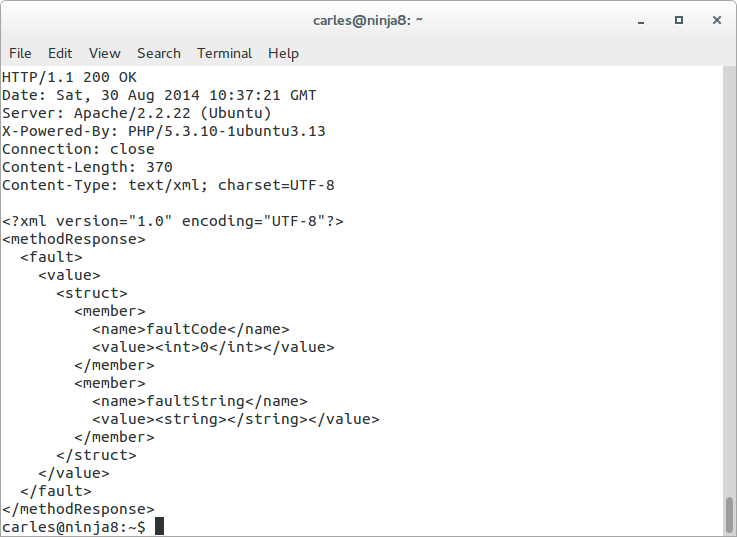
[Tue Aug 26 11:47:08 2014] [error] [client 94.102.49.179] Error in WordPress Database Lost connection to MySQL server during query a la consulta SELECT option_value FROM wp_options WHERE option_name = 'uninstall_plugins' LIMIT 1 feta per include('wp-load.php'), require_once('wp-config.php'), require_once('wp-settings.php'), include_once('/plugins/captcha/captcha.php'), register_uninstall_hook, get_option
[Tue Aug 26 11:47:09 2014] [error] [client 94.102.49.179] Error in WordPress Database Lost connection to MySQL server during query a la consulta SELECT option_value FROM wp_options WHERE option_name = 'uninstall_plugins' LIMIT 1 feta per include('wp-load.php'), require_once('wp-config.php'), require_once('wp-settings.php'), include_once('/plugins/captcha/captcha.php'), register_uninstall_hook, get_option
[Tue Aug 26 11:47:10 2014] [error] [client 94.102.49.179] Error in WordPress Database Lost connection to MySQL server during query a la consulta SELECT option_value FROM wp_options WHERE option_name = 'widget_wppp' LIMIT 1 feta per include('wp-load.php'), require_once('wp-config.php'), require_once('wp-settings.php'), do_action('plugins_loaded'), call_user_func_array, wppp_check_upgrade, get_option

The error log was very ugly.

The access log was not reassuring, as it shown many attacks like that:

94.102.49.179 - - [26/Aug/2014:10:34:58 +0000] "POST /xmlrpc.php HTTP/1.0" 200 598 "-" "Mozilla/4.0 (compatible: MSIE 7.0; Windows NT 6.0)"
94.102.49.179 - - [26/Aug/2014:10:34:59 +0000] "POST /xmlrpc.php HTTP/1.0" 200 598 "-" "Mozilla/4.0 (compatible: MSIE 7.0; Windows NT 6.0)"
127.0.0.1 - - [26/Aug/2014:10:35:09 +0000] "OPTIONS * HTTP/1.0" 200 126 "-" "Apache/2.2.22 (Ubuntu) (internal dummy connection)"
94.102.49.179 - - [26/Aug/2014:10:34:59 +0000] "POST /xmlrpc.php HTTP/1.0" 200 598 "-" "Mozilla/4.0 (compatible: MSIE 7.0; Windows NT 6.0)"
94.102.49.179 - - [26/Aug/2014:10:35:00 +0000] "POST /xmlrpc.php HTTP/1.0" 200 598 "-" "Mozilla/4.0 (compatible: MSIE 7.0; Windows NT 6.0)"
94.102.49.179 - - [26/Aug/2014:10:34:59 +0000] "POST /xmlrpc.php HTTP/1.0" 200 598 "-" "Mozilla/4.0 (compatible: MSIE 7.0; Windows NT 6.0)"

Was difficult to determine if the Server was receiving SQL injections so I wanted to be sure.

Note: The connection from 127.0.0.1 with OPTIONS is created by Apache when spawns another Apache.

As I had super fresh backups in another Server I was not afraid of the attack dropping the database.

I was a bit suspicious also because the /readme.html file mentioned that the version of WordPress is 3.6. In other installations it tells correctly that the version is the 3.9.2 and this file is updated with the auto-update. I was thinking about a possible very sophisticated trojan attack able to modify wp-includes/version.php and set fake $wp_version = ‘3.9.2’;
Later I realized that this blog had WordPress in Catalan, my native language, and discovered that the guys that do the translations forgot to update this file (in new installations it comes not updated, and so showing 3.6). I have alerted them.

In fact later I did a diff of all the files of my WordPress installation against the official WordPress 3.9.2-ca and later a did a diff between the WordPress 3.9.2-ca and the WordPress 3.9.2 (English – default), and found no differences. My Server was Ok. But at this point, at the beginning of the investigation I didn’t know that yet.

With the info I had (queries, times, attack, readme telling v. 3.6…) I balanced the possibility to be in front of something and I decided that I had an unique opportunity to discover how they do to inject those Sql, or discover if my Server was compromised and how. The bad point is that it was the same Amazon’s Server where this blog resides, and I wanted the attack to continue so I could get more information, so during two days I was recording logs and doing some investigations, so sorry if you visited my blog and database was down, or the Server was going extremely slow. I needed that info. It was worth it.

First I changed the Apache config so the massive connections impacted a bit less the Server and so I could work on it while the attack was going on.

I informed my group of Senior friends on what’s going on and two SysAdmins gave me some good suggestions on other logs to watch and on how to stop the attack, and later a Developer joined me to look at the logs and pointed possible solutions to stop the attack. But basically all of them suggested on how to block the incoming connections with iptables and to do things like reinstalling WordPress, disabling xmlrpc.php in .htaccess, changing passwords or moving wp-admin/ to another place, but the point is that I wanted to understand exactly what was going on and how.

I checked the logs, certificates, etc… and no one other than me was accessing the Server. I also double-checked the Amazon’s Firewall to be sure that no unnecessary ports were left open. Everything was Ok.

I took a look at the Apache logs for the site and all the attacks were coming from the same Ip:

94.102.49.179

It is an Ip from a dedicated Servers company called ecatel.net. I reported them the abuse to the abuse address indicated in the ripe.net database for the range.

I found that many people have complains about this provider and reports of them ignoring the requests to stop the spam use from their servers, so I decided that after my tests I will block their entire network from being able to access my sites.

All the requests shown in the access.log pointed to requests to /xmlrpc.php. It was the only path requested by the attacker so that Ip did nothing more apparently.

I added some logging to WordPress xmlrpc.php file:

if ($_SERVER['REMOTE_ADDR'] == '94.102.49.179') {
    error_log('XML POST: '.serialize($_POST));
    error_log('XML GET: '.serialize($_GET));
    error_log('XML REQUEST: '.serialize($_REQUEST));
    error_log('XML SERVER: '.serialize($_SERVER));
    error_log('XML FILES: '.serialize($_FILES));
    error_log('XML ENV: '.serialize($_ENV));
    error_log('XML RAW: '.$HTTP_RAW_POST_DATA);
    error_log('XML ALL_HEADERS: '.serialize(getallheaders()));
}

This was the result, it is always the same:

[Fri Aug 29 19:02:54 2014] [error] [client 94.102.49.179] XML POST: a:0:{}
[Fri Aug 29 19:02:54 2014] [error] [client 94.102.49.179] XML GET: a:0:{}
[Fri Aug 29 19:02:54 2014] [error] [client 94.102.49.179] XML REQUEST: a:0:{}
[Fri Aug 29 19:02:54 2014] [error] [client 94.102.49.179] XML SERVER: a:24:{s:9:"HTTP_HOST";s:24:"barcelona.afterstart.com";s:12:"CONTENT_TYPE";s:8:"text/xml";s:14:"CONTENT_LENGTH";s:3:"287";s:15:"HTTP_USER_AGENT";s:50:"Mozilla/4.0 (compatible: MSIE 7.0; Windows NT 6.0)";s:15:"HTTP_CONNECTION";s:5:"close";s:4:"PATH";s:28:"/usr/local/bin:/usr/bin:/bin";s:16:"SERVER_SIGNATURE";s:85:"<address>Apache/2.2.22 (Ubuntu) Server at barcelona.afterstart.com Port 80</address>\n";s:15:"SERVER_SOFTWARE";s:22:"Apache/2.2.22 (Ubuntu)";s:11:"SERVER_NAME";s:24:"barcelona.afterstart.com";s:11:"SERVER_ADDR";s:14:"[this-is-removed]";s:11:"SERVER_PORT";s:2:"80";s:11:"REMOTE_ADDR";s:13:"94.102.49.179";s:13:"DOCUMENT_ROOT";s:29:"/var/www/barcelona.afterstart.com";s:12:"SERVER_ADMIN";s:19:"webmaster@localhost";s:15:"SCRIPT_FILENAME";s:40:"/var/www/barcelona.afterstart.com/xmlrpc.php";s:11:"REMOTE_PORT";s:5:"40225";s:17:"GATEWAY_INTERFACE";s:7:"CGI/1.1";s:15:"SERVER_PROTOCOL";s:8:"HTTP/1.0";s:14:"REQUEST_METHOD";s:4:"POST";s:12:"QUERY_STRING";s:0:"";s:11:"REQUEST_URI";s:11:"/xmlrpc.php";s:11:"SCRIPT_NAME";s:11:"/xmlrpc.php";s:8:"PHP_SELF";s:11:"/xmlrpc.php";s:12:"REQUEST_TIME";i:1409338974;}
[Fri Aug 29 19:02:54 2014] [error] [client 94.102.49.179] XML FILES: a:0:{}
[Fri Aug 29 19:02:54 2014] [error] [client 94.102.49.179] XML ENV: a:0:{}
[Fri Aug 29 19:02:54 2014] [error] [client 94.102.49.179] XML RAW: <?xmlversion="1.0"?><methodCall><methodName>pingback.ping</methodName><params><param><value><string>http://seretil.me/</string></value></param><param><value><string>http://barcelona.afterstart.com/2013/09/27/afterstart-barcelona-2013-09-26/</string></value></param></params></methodCall>
[Fri Aug 29 19:02:54 2014] [error] [client 94.102.49.179] XML ALL_HEADERS: a:5:{s:4:"Host";s:24:"barcelona.afterstart.com";s:12:"Content-type";s:8:"text/xml";s:14:"Content-length";s:3:"287";s:10:"User-agent";s:50:"Mozilla/4.0 (compatible: MSIE 7.0; Windows NT 6.0)";s:10:"Connection";s:5:"close";}

So nothing in $_POST, nothing in $_GET, nothing in $_REQUEST, nothing in $_SERVER, no files submitted, but a text/xml Posted (that was logged by storing: $HTTP_RAW_POST_DATA):

<?xmlversion="1.0"?><methodCall><methodName>pingback.ping</methodName><params><param><value><string>http://seretil.me/</string></value></param><param><value><string>http://barcelona.afterstart.com/2013/09/27/afterstart-barcelona-2013-09-26/</string></value></param></params></methodCall>

I show you in a nicer formatted aspect:blog-carlesmateo-com-xml-xmlrpc-requestSo basically they were trying to register a link to seretil dot me.

I tried and this page, hosted in CloudFare, is not working.

accessing-seretil-withoud-id

The problem is that responding to this spam xmlrpc request took around 16 seconds to the Server. And I was receiving several each second.

I granted access to my Ip only on the port 80 in the Firewall, restarted Apache, restarted MySql and submitted the same malicious request to the Server, and it even took 16 seconds in all my tests:

cat http_post.txt | nc barcelona.afterstart.com 80

blog-carlesmateo-com-response-from-the-server-to-xmlrpc-attackI checked and confirmed that the logs from the attacker were showing the same Content-Length and http code.

Other guys tried xml request as well but did one time or two and leaved.

The problem was that this robot was, and still sending many requests per second for days.

May be the idea was to knock down my Server, but I doubted it as the address selected is the blog of one Social Event for Senior Internet Talents that I organize: afterstart.com. It has not special interest, I do not see a political, hateful or other motivation to attack the blog from this project.

Ok, at this point it was clear that the Ip address was a robot, probably running from an infected or hacked Server, and was trying to publish a Spam link to a site (that was down). I had to clarify those strange queries in the logs.

I reviewed the WPUsersOnline plugin and I saw that the strange queries (and inefficient) that I saw belonged to WPUsersOnline plugin.

blog-carlesmateo-com-grep-r-delete-from-wp-useronline-2014-08-30-21-11-21-cut

The thing was that when I renamed the xmlrpc.php the spamrobot was still posting to that file. According to WordPress .htaccess file any file that is not found on the filesystem is redirected to index.php.

So what was happening is that all the massive requests sent to xmlrpc.php were being attended by index.php, then showing an error message that page not found, but the WPUsersOnline plugin was deleting those connections. And was doing it many times, overloading also the Database.

Also I was able to reproduce the behaviour by myself, isolating by firewalling the WebServer from other Ips other than mine and doing the same post by myself many times per second.

I checked against a friend’s blog but in his Server xmlrpc.php responds in 1,5 seconds. My friend’s Server is a Digital Ocean Virtual Server with 2 cores and SSD Disks. My magnetic disks on Amazon only bring around 40 MB/second. I’ve to check in detail why my friend’s Server responds so much faster.

Checked the integrity of my databases, just in case, and were perfect. Nothing estrange with collations and the only errors in the /var/log/mysql/error.log was due to MySql crashing when the Server ran out of memory.

Rechecked in my Server, now it takes 12 seconds.

I disabled 80% of the plugins but the times were the same. The Statistics show how the things changed -see the spikes before I definitively patched the Server to block request from that Spam-robot ip, to the left-.

I checked against another WordPress that I have in the same Server and it only takes 1,5 seconds to reply. So I decided to continue investigating why this WordPress took so long to reply.

blog-carlesmateo-com-statistics-use-last-24-hours

As I said before I checked that the files from my WordPress installation were the same as the original distribution, and they were. Having discarded different files the thing had to be in the database.

Even when I checked the MySql it told me that all the tables were OK, having seen that the WPUserOnline deletes all the registers older than 5 minutes, I guessed that this could lead to fragmentation, so I decided to do OPTIMIZE TABLE on all the tables of the database for the WordPress failing, with InnoDb it is basically recreating the Tables and the Indexes.

I tried then the call via RPC and my Server replied in three seconds. Much better.

Looking with htop, when I call the xmlrpc.php the CPU uses between 50% and 100%.

I checked the logs and the robot was gone. He leaved or the provider finally blocked the Server. I don’t know.

Everything became clear, it was nothing more than a sort of coincidences together. Deactivating the plugin the DELETE queries disappeared, even under heavy load of the Server.

It only was remain to clarify why when I send a call to xmlrpc to this blog, it replies in 1,5 seconds, and when I request to the Barcelona.afterstart.com it takes 3 seconds.

I activated the log of queries in mysql. To do that edit /etc/mysql/my.cnf and uncomment:

general_log_file        = /var/log/mysql/mysql.log
general_log             = 1

Then I checked the queries, and in the case of my blog it performs many less queries, as I was requesting to pingback to an url that was not existing, and WordPress does this query:

SELECT   wp_posts.* FROM wp_posts  WHERE 1=1  AND ( ( YEAR( post_date ) = 2013 AND MONTH( post_date ) = 9 AND DAYOFMONTH( post_date ) = 27 ) ) AND wp_posts.post_name = 'afterstart-barcelona-2013-09-26-meet' AND wp_posts.post_type = 'post'  ORDER BY wp_posts.post_date DESC

As the url afterstart-barcelona-2013-09-26-meet with the dates indicated does not exist in my other blog, the execution ends there and does not perform the rest of the queries, that in the case of Afterstart blog were:

40 Query     SELECT post_id, meta_key, meta_value FROM wp_postmeta WHERE post_id IN (81) ORDER BY meta_id ASC
40 Query     SELECT ID, post_name, post_parent, post_type
FROM wp_posts
WHERE post_name IN ('http%3a','','seretil-me')
AND post_type IN ('page','attachment')
40 Query     SELECT   wp_posts.* FROM wp_posts  WHERE 1=1  AND (wp_posts.ID = '0') AND wp_posts.post_type = 'page'  ORDER BY wp_posts.post_date DESC
40 Query     SELECT * FROM wp_comments WHERE comment_post_ID = 81 AND comment_author_url = 'http://seretil.me/'

To confirm my theory I tried the request to my blog, with a valid url, and it lasted for 3-4 seconds, the same than Afterstart’s blog. Finally I double-checked with the blog of my friend and was slower than before. I got between 1,5 and 6 seconds, with a lot of 2 seconds response. (he has PHP 5.5 and OpCache that improves a bit, but the problem is in the queries to the database)

Honestly, the guys creating WordPress should cache this queries instead of performing 20 live queries, that are always the same, before returning the error message. Using Cache Lite or Stash, or creating an InMemory table for using as Cache, or of course allowing the use of Memcached would eradicate the DoS component of this kind of attacks. As the xmlrpc pingback feature hits the database with a lot of queries to end not allowing the publishing.

While I was finishing those tests (remember that the attacker ip has gone) another attacker from the same network tried, but I had patched the Server to ignore it:

94.102.52.157 - - [31/Aug/2014:02:06:16 +0000] "POST /xmlrpc.php HTTP/1.0" 200 189 "-" "Mozilla/4.0 (compatible: MSIE 7.0; Windows NT 6.0)"

This was trying to get a link published to a domain called socksland dot net that is a domain registered in Russia and which page is not working.

As I had all the information I wanted I finally blocked the network from the provider to access my Server ever again.

Unfortunatelly Amazon’s Firewall does not allow to block a certain Ip or range.
So you can block at Iptables level or in .htaccess file or in the code.
I do not recommend blocking at code level because sadly WordPress has many files accessible from outside so you would have to add your code at the beginning of all the files and because when there is a WordPress version update you’ll loss all your customizations.
But I recommend proceeding to patch your code to avoid certain Ip’s if you use a CDN. As the POST will be sent directly to your Server, and the Ip’s are Ip’s from the CDN -and you can’t block them-. You have to look at the Header: X-Forwarded-For that indicates the Ip’s the proxies have passed by, and also the Client’s Ip.

I designed a program that is able to patch any PHP project to check for blacklisted Ip’s (even though a proxy) with minimal performance impact. It works with WordPress, drupal, joomla, ezpublish and Framework like Zend, Symfony, Catalonia… and I patched my code to block those unwanted robot’s requests.

A solution that will work for you probably is to disable the pingback functionality, there are several plugins that do that. Disabling completely xmlrpc is not recommended as WordPress uses it for several things (JetPack, mobile, validation…)

The same effect as adding the plugin that disables the xmlrpc pingback can be achieved by editing the functions.php from your Theme and adding:

add_filter( 'xmlrpc_methods', 'remove_xmlrpc_pingback_ping' );
function remove_xmlrpc_pingback_ping( $methods ) {
    unset( $methods['pingback.ping'] );
    
    return $methods;
}

Update: 2016-02-24 14:40 CEST
I got also a heavy dictionary attack against wp-login.php .Despite having a Captcha plugin, that makes it hard to hack, it was generating some load on the system.
What I did was to rename the wp-login.php to another name, like wp-login-carles.php and in wp-login.php having a simply exit();

<?php
exit();

Take in count that this will work only until WordPress is updated to the next version. Then you have to reapply the renaming trick.