| Quick Access to my selection Last Update: 2022-10-24 09:36:42 Ireland Time / 2022-10-24 01:36:42 PDT-0700 Unix epoch: 1666600602 | ||||||||||||||||||||||||||||||||||||||||||||||||||||||
|
Media Player in my Raspberry Pi 4

Just installed a media player in my Raspberry Pi 4
So I mentioned it was one of my pending tasks, to do while I’m confined here, at home, to help the Irish government to stop the quick spread of the coronavirus.
I’m happy that the situation in Ireland has stabilized, unlikely in Spain, where that historical lack of discipline and selfishness and super ego to believe Madrid the capital of the world, and so deciding not to close it for quarantine, will cause a lot of pain. I hope the closing of frontiers in Catalonia works.
Well, what I do you’re probably asking yourself, so I installed LibreELEC https://libreelec.tv/.
They have a very nice SD image writer for Linux, Mac and Windows, that will install the proper image on the micro-SD for your ARM device.
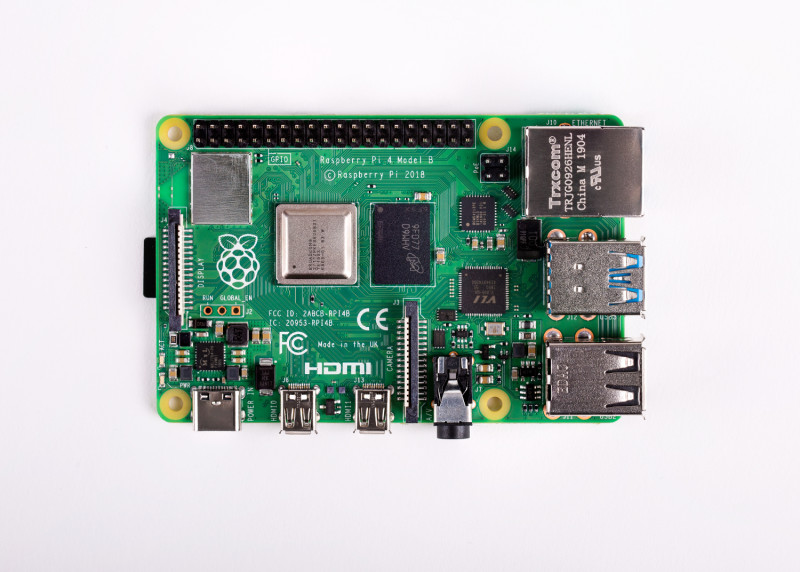
This Raspberry Pi 4 comes with Wifi integrated and a Gigabit Ethernet network port.
When I was in Barcelona, I had Kodi with Raspberry pi 2 and version 3.
This model v. 4 is much more cooler. I bought the 4GB version, and has 2xHDMI 4K.
So it is great to connect to any modern TV.
In Barcelona, I have Linux tower as NFS Server sharing my files with the Pi. Work good, even for the 100Mbit NIC of the version 3, but at that time I was only playing Full HD as the Pi didn’t supported greater resolution, and I only had that resolution on my displays too.
For now, I’m going to explore how is reading from a USB 3.0. Let’s see if it’s able to play smoothly.
The cool thing also is that I have SSH access, and so I can use the Pi for many more things. :)
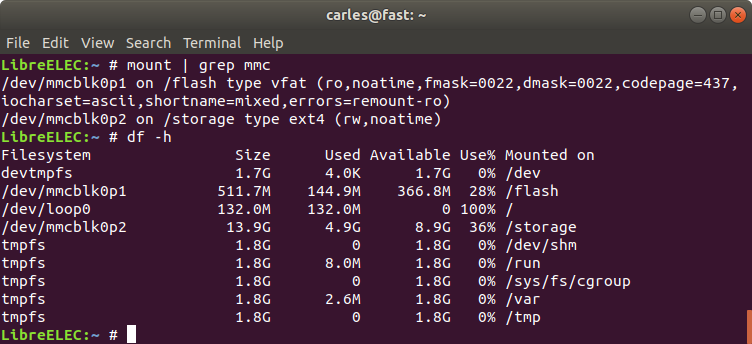
I have my first update, I noticed that copying to that USB was not the best for me, as I tried to copy a .MKV file of 4.9GB and I encountered the limit of 4GB of FAT32. I could format the USB as ext4, but what I did is, SSH into the box, I see that I have two partitions on the SD for booting the Pi, the second one is a ext4 called storage. So I copied to the SD, through the network, using sftp the file I wanted.

The Gigabit connection was fast, but when the buffer fulled it started to show the real speed of the SD which is 15MB/s for writing.
Ext4 has no problem in holding a file 4.9GB so I’m watching my movie now. Will think about setting a NFS for the Pi as it will be very convenient. :)
I have an external, remote, keyboard logitech, but it happens that LibreELEC recognizes my Sony command, from the television. I don’t need the keyboard/mouse. Nice.
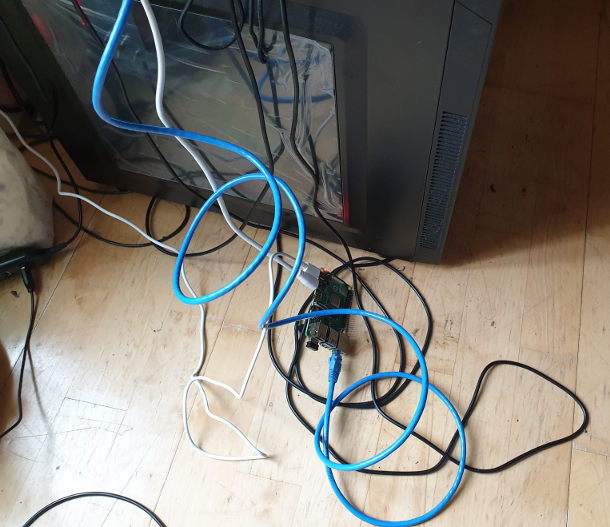
Here you can see my Raspberry Pi 4, connected to TV, in “combat mode”, naked, as PoC, before setting in its definitive place behind the TV.

Playing from the external USB 3.0 stick was also fluid, allowing 4K perfectly.
The only problem I has was when I was pushing movies to the USB through the network, and playing at the same time from the SD. It seems like the Raspberry reached its limits doing this and playing stuck frequently.
Remote working is here
So remote working is here.
After years in which many Engineers requested to the companies to be able to Remote Work, with most of answers No, now it happens that not only is good for the company, is the only way to ensure continuity of business, of many businesses.
One of my colleagues from Denmark, which government has shutdown the country by sending all the public servants to home, in order to prevent the spread of the coronavirus, told me:
“Yes, remote working is here, but has been necessary the four horsemen of the apocalypse”
It is curious, how Remote Working has arrived, no thanks to that was obvious, but due to external emergencies. And I’m glad that my company was prepared for business continuity.
I’ll be staying home, working remotely, in order to contribute to non-spreading the virus, specially among old people. I’m perfectly healthy but that’s a use case, many people will not develop the symptoms and still be able to spread to others.
So I have some plans related to technology to do at home, including few improvements to the blog. What are your plans?.
Update: 2020-03-13 23:16 UTC I’m thinking in all those business which are forces to close, and all the employees that will not get a salary, or will be fired, or will get a salary and the business owner maybe ends in bankrupt as is paying the salaries and no income is being generated.
Update: 2020-03-19 10:58 UTC Some of my friends, even in Human Resources/Recruiting, are starting to remote work for first time. So here is some advice:
I would recommend to get an external monitor, at least 22″, so you neck is not forcing position looking low and your eyes don’t suffer, good light (don’t in dark), a nespresso can be a good friend in the morning, and to have your hands and arms aligned correctly so you don’t suffer from a bad position. Watch the position of the wrists, your arms should be comfortably at the same level than the table, similar in an L, and your eyes be aligned to the top of your monitor. Finally I would recommend to follow a routine, like if you were going to work, so dress like you would do. Don’t stay at home all day in pijamas! ;)
News for the blog, upwards and onwards
2020-03-06 Heya, I’m doing a set of improvements to the blog.
One, you can already see. I added a new section to the CSS @media, so now screens bigger than 1,800 px in width, will use that width for rendering the page. The original WordPress theme at 960x was too small for our current screens. I will add a new CSS @media for 4K screens promptly.
Other is about the organization of the content. I want to separate a bit the contents, now articles are sequential and is difficult to discover nice contents if they have 2 or more articles more recent, so I will group articles by content and provide a small index on the top page. Also I will provide more areas for Operations, SRE, where it will be easy to locate code, scripts, tricks… things that are useful to our day to day. I also want to make visible the articles about living in different cities, for IT Engineers, with useful tricks and tips. And keep the more complex and more interesting Engineering matters in the main page.
Updates
2020-03-13 15:49 Added SSL to the blog
With more delay I wanted, I bought a SSL certificate, configured Apache, and after few changes to the blog has been set. One very annoying is that WordPress linked the images statically pointing to http://blog.carlesmateo.com so I changed the latest article’s images to point to relative path so they will work nice with http or https.
My reflection is that everything negative can have its positive output. With this coronavirus thing, I decided to focus into improving things. And so I’m doing. :)
CTOP.py
For updated information visit the main page for CTOP.py
Current stable version is v.0.8.9 updated on 2022-07-03.
Current branch under development is v.0.8.10 updated on 2022-07-03.

Version 0.8.0 added compatibility with Python 2, for older Systems.

Find the source code in: https://gitlab.com/carles.mateo/ctop
Clone it with:
git clone https://gitlab.com/carles.mateo/ctop.git
ctop.py is an Open Source tool for Linux System Administration that I’ve written in Python3. It uses only the System (/proc), and not third party libraries, in order to get all the information required.
I use only this modules, so it’s ideal to run in all the farm of Servers and Dockers:
- os
- sys
- time
- shutil (for getting the Terminal width and height)
The purpose of this tool is to help to troubleshot and to identify problems with a single view to a single tool that has all the typical indicators.
It provides in a single view information that is typically provided by many programs:
- top, htop for the CPU usage, process list, memory usage
- meminfo
- cpuinfo
- hostname
- uptime
- df to see the free space in / and the free inodes
- iftop to see real-time bandwidth usage
- ip addr list to see the main Ip for the interfaces
- netstat or lsof to see the list of listening TCP Ports
- uname -a to see the Kernel version

Other cool things it does is:
- Identifying if you’re inside an Amazon VM, Google GCP, OpenStack VMs, Virtual Box VMs, Docker Containers or lxc.
- Compatible with Raspberry Pi (tested on 3 and 4, on Raspbian and Ubuntu 20.04LTS)
- Uses colors, and marks in yellow the warnings and in red the errors, problems like few disk space reaming or high CPU usage according to the available cores and CPUs.
- Redraws the screen and adjust to the size of the Terminal, bigger terminal displays more information
- It doesn’t use external libraries, and does not escape to shell. It reads everything from /proc /sys or /etc files.
- Identifies the Linux distribution
- Supports Plugins loaded on demand.
- Shows the most repeated binaries, so you can identify DDoS attacks (like having 5,000 apache instances where you have normally 500 or many instances of Python)
- Indicates if an interface has the cable connected or disconnected
- Shows the Speed of the Network Connection (useful for Mellanox cards than can operate and 200Gbit/sec, 100, 50, 40, 25, 10…)
- It displays the local time and the Linux Epoch Time, which is universal (very useful for logs and to detect when there was an issue, for example if your system restarted, your SSH Session would keep latest Epoch captured)
- No root required
- Displays recent errors like NFS Timed outs or Memory Read Errors.
- You can enforce the output to be in a determined number of columns and rows, for data scrapping.
- You can specify the number of loops (1 for scrapping, by default is infinite)
- You can specify the time between screen refreshes, for long placed SSH sessions
- You can specify to see the output in b/w or in color (default)
Plugins allow you to extend the functionality effortlessly, without having to learn all the code. I provide a Plugin sample for starting lights on a Raspberry Pi, depending on the CPU Load, and playing a message “The system is healthy” or “Warning. The CPU is at 80%”.
Limitations:
- It only works for Linux, not for Mac or for Windows. Although the idea is to help with Server’s Linux Administration and Troubleshot, and Mac and Windows do not have /proc
- The list of process of the System is read every 30 seconds, to avoid adding much overhead on the System, other info every second
- It does not run in Python 2.x, requires Python 3 (tested on 3.5, 3.6, 3.7, 3.8, 3.9)
I decided to code name the version 0.7 as “Catalan Republic” to support the dreams and hopes and democratic requests of the Catalan people, to become and independent republic.

I created this tool as Open Source and if you want to help I need people to test under different versions of:
- Atypical Linux distributions
If you are a Cloud Provider and want me to implement the detection of your VMs, so the tool knows that is a instance of the Amazon, Google, Azure, Cloudsigma, Digital Ocean… contact me through my LinkedIn.

Some of the features I’m working on are parsing the logs checking for errors, kernel panics, processed killed due to lack of memory, iscsi disconnects, nfs errors, checking the logs of mysql and Oracle databases to locate errors
Resources for Microservices and Business Domain Solutions for the Cloud Architect / Microservices Architect
First you have to understand that Python, Java and PHP are worlds completely different.
In Python you’ll probably use Flask, and listen to the port you want, inside Docker Container.
In PHP you’ll use a Frameworks like Laravel, or Symfony, or Catalonia Framework (my Framework) :) and a repo or many (as the idea is that the change in one microservice cannot break another it is recommended to have one git repo per Service) and split the requests with the API Gateway and Filters (so /billing/ goes to the right path in the right Server, is like rewriting URLs). You’ll rely in Software to split your microservices. Usually you’ll use Docker, but you have to add a Web Server and any other tools, as the source code is not packet with a Web Server and other Dependencies like it is in Java Spring Boot.
In Java you’ll use Spring Cloud and Spring Boot, and every Service will be auto-contained in its own JAR file, that includes Apache Tomcat and all other Dependencies and normally running inside a Docker. Tcp/Ip listening port will be set at start via command line, or through environment. You’ll have many git repositories, one per each Service.
Using many repos, one per Service, also allows to deploy only that repository and to have better security, with independent deployment tokens.
It is not unlikely that you’ll use one language for some of your Services and another for other, as well as a Database or another, as each Service is owner of their data.
In any case, you will be using CI/CD and your pipeline will be something like this:
- Pull the latest code for the Service from the git repository
- Compile the code (if needed)
- Run the Unit and Integration Tests
- Compile the service to an executable artifact (f.e. Java JAR with Tomcat server and other dependencies)
- Generate a Machine image with your JAR deployed (for Java. Look at Spotify Docker Plugin to Docker build from Maven), or with Apache, PHP, other dependencies, and the code. Normally will be a Docker image. This image will be immutable. You will probably use Dockerhub.
- Machine image will be started. Platform test are run.
- If platform tests pass, the service is promoted to the next environment (for example Dev -> Test -> PreProd -> Prod), the exact same machine is started in the next environment and platform tests are repeated.
- Before deploying to Production the new Service, I recommend running special Application Tests / Behavior-driven. By this I mean, to conduct tests that really test the functionality of everything, using a real browser and emulating the acts of a user (for example with BeHat, Cucumber or with JMeter).
I recommend this specially because Microservices are end-points, independent of the implementation, but normally they are API that serve to a whole application. In an Application there are several components, often a change in the Front End can break the application. Imagine a change in Javascript Front End, that results in a call a bit different, for example, with an space before a name. Imagine that the Unit Tests for the Service do not test that, and that was not causing a problem in the old version of the Service and so it will crash when the new Service is deployed. Or another example, imagine that our Service for paying with Visa cards generates IDs for the Payment Gateway, and as a result of the new implementation the IDs generated are returned. With the mocked objects everything works, but when we deploy for real is when we are going to use the actual Bank Payment. This is also why is a good idea to have a PreProduction environment, with PreProduction versions of the actual Services we use (all banks or the GDS for flights/hotel reservation like Galileo or Amadeus have a Test, exactly like Production, Gateway)
If you work with Microsoft .NET, you’ll probably use Azure DevOps.
We IT Engineers, CTOs and Architects, serve the Business. We have to develop the most flexible approaches and enabling the business to release as fast as their need.
Take in count that Microservices is a tool, a pattern. We will use it to bring more flexibility and speed developing, resilience of the services, and speed and independence deploying. However this comes at a cost of complexity.
Microservices is more related to giving flexibility to the Business, and developing according to the Business Domains. Normally oriented to suite an API. If you have an API that is consumed by third party you will have things like independence of Services (if one is down the others will still function), gradual degradation, being able to scale the Services that have more load only, being able to deploy a new version of a Service which is independent of the rest of the Services, etc… the complexity in the technical solution comes from all this resilience, and flexibility.
If your Dev Team is up to 10 Developers or you are writing just a CRUD Web Application, a PoC, or you are an Startup with a critical Time to Market you probably you will not want to use Microservices approach. Is like killing flies with laser cannons. You can use typical Web services approach, do everything in one single Https request, have transactions, a single Database, etc…
But if your team is 100 Developer, like a big eCommerce, you’ll have multiple Teams between 5 and 10 Developers per Business Domain, and you need independence of each Service, having less interdependence. Each Service will own their own Data. That is normally around 5 to 7 tables. Each Service will serve a Business Domain. You’ll benefit from having different technologies for the different needs, however be careful to avoid having Teams with different knowledge that can have hardly rotation and difficult to continue projects when the only 2 or 3 Devs that know that technology leave. Typical benefit scenarios can be having MySql for the Billing Services, but having NoSQL Database for the image catalog, or to store logs of account activity. With Microservices, some services will be calling other Services, often asynchronously, using Queues or Streams, you’ll have Callbacks, Databases for reading, you’ll probably want to have gradual and gracefully failure of your applications, client load balancing, caches and read only databases/in-memory databases… This complexity is in order to protect one Service from the failure of others and to bring it the necessary speed under heavy load.
Here you can find a PDF Document of the typical resources I use for Microservice Projects.
You can also download it from my github repository:
https://github.com/carlesmateo/awesome-microservices
Do you use other solutions that are not listed?. Leave a message. I’ll investigate them and update the Document, to share with the Community.
Update 2020-03-06: I found this very nice article explaining the same. Microservices are not for everybody and not the default option: https://www.theregister.co.uk/AMP/2020/03/04/microservices_last_resort/
Update 2020-03-11: Qcom with 1,600 microservices says that microservices architecture is the las resort: https://www.theregister.co.uk/AMP/2020/03/09/monzo_microservices/
Upgrading my new HP 14-bp060sa

As the company I was working for, Sanmina, has decided to move all the Software Development to Colorado, US, and closing the offices in Bishopstown, Cork, Ireland I found myself with the need to get a new laptop. At work I was using two Dell laptops, one very powerful and heavy equipped with an Intel Xeon processor and 32 GB of RAM. The other a lightweight one that I updated to 32 GB of RAM.
I had an accident around 8 months ago, that got my spine damaged, and so I cannot carry much weight.
My personal laptops at home, in Ireland are a 15″ with 16 GB of RAM, too heavy, and an Acer 11,6″ with 8GB of RAM and SSD (I upgraded it), but unfortunately the screen crashed. I still use it through the HDMI port. My main computer is a tower with a Core i7, 64GB of RAM and a Samsung NVMe SSD drive. And few Raspberrys Pi 4 and 3 :)
I was thinking about what ultra-lightweight laptop to buy, but I wanted to buy it in Barcelona, as I wanted a Catalan keyboard (the layout with the broken ç and accents). I tried by Amazon.es but I have problems to have shipped the Catalan keyboard layout laptops to my address in Ireland.
I was trying to find the best laptop for me.
While I was investigating I found out that none of the laptops in the market were convincing me.
The ones in around 1Kg, which was my initial target, were too big, and lack a proper full size HDMI port and Gigabit Ethernet. Honestly, some models get the HDMI or the Ethernet from an USB 3.1, through an adapter, or have mini-HDMI, many lack the Gigabit port, which is very annoying. Also most of the models come with 8GB of RAM only and were impossible to upgrade. I enrolled my best friend in my quest, in the research, and had the same conclusions.
I don’t want to have to carry adapters with me to just plug to a monitor or projector. I don’t even want to carry the power charger. I want a laptop that can work with me for a complete day, a full work session, without needing to recharge.
So while this investigation was going on, I decided to buy a cheap laptop with a good trade off of weight and cost, in order to be able to work on the coffee. I needed it for writing documents in Google Docs, creating microservices architectures, programming in Java and PHP, and writing articles in my blog. I also decided that this would be my only laptop with Windows, as honestly I missed playing Star Craft 2, and my attempts with Wine and Linux did not success.
Not also, for playing games :) , there are tools that are only available for Windows or for Mac Os X and Windows, like: POSTMAN, Kitematic for managing dockers visually, vSphere…
(Please note, as I reviewed the article I realized that POSTMAN is available for Linux too)
Please note: although I use mainly Linux everywhere (Ubuntu, CentOS, and RedHat mainly) and I contribute to Open Source projects, I do have Windows machines.
I created my Start up in 2004, and I still have Windows Servers, physical machines in a Data Center in Barcelona, and I still have VMs and Instances in Public Clouds with Windows Servers. Also I programmed some tools using Visual Studio and Visual Basic .NET, ASP.NET and C#, but when I needed to do this I found more convenient spawn an instance in Amazon or Azure and pay for its use.
When I created my Start up I offered my infrastructure as a way to get funding too, and I offered VMs with VMWare. I found that having my Mail Servers in VMs was much more convenient for Backups, cloning, to scale up, to avoid disruption and for Disaster and Recovery.
I wanted a cheap laptop that will not make feel bad if transporting it in a daily basis gets a hit and breaks, or that if it rains (and this happens more than often in Ireland) and it breaks is not super-hurtful, or even if it gets stolen. Yes, I’m from a big city, like is Barcelona, Catalonia, and thieves are a real problem. I travel, so I want a laptop decent enough that I can take to travel, and for going for a coffee, coding anything, and I feel comfortable enough that if something happens to it is not the end of the world.
Cork is not a big city, so the options were reduced. I found a laptop that meets my needs.
I got a HP s14-bp060sa for 439€.
It is equipped with a Intel® Core™ i3-6006U (2 GHz, 3 MB cache, 2 cores) , a 500GB SATA HDD, and 4 GB of DDR4 RAM.
The information on HP webpage is really scarce, but checking other pages I was able to see that the motherboard has 2 memory banks, accepting a max of 16GB of RAM.
I saw that there was an slot, unclear if supporting NVMe SSD drives, but supporting M.2 SSD for sure.
So I bought in Amazon 2x8GB and a M.2 500GB drive.
Since I was 5 years old I’ve been upgrading and assembling by myself all the computers. And this is something that I want to keep doing. It keeps me sharp, knowing the new ports, CPUs, and motherboard architectures, and keeps me in contact with the Hardware. All my life I’ve thought that specializing Software Engineers and Systems Engineers, like if computers were something separate, is a mistake, so I push myself to stay up to date of the news in all the fields.
I removed the spinning 500 GB SATA HDD, cause it’s slow and it consumes a lot of energy. With the M.2 SSD the battery last forever.
The interesting part is how I cloned the drive from the Spinning HDD to the new M.2.
I did:
- Open the computer (see pics below) and Insert the new drive M.2
- Boot with an USB Linux Rescue distribution (to do that I had to enable Legacy Boot on BIOS and boot with the USB)
- Use lsblk command to identify the HDD drive, it was easy as it was the one with partitions
- dd from if=/dev/sda to of=/dev/sdb with status=progress to see live status and speed (around 70MB/s) and estimated time to complete.
- Please note that the new drive should be bigger or at least have the same number of bytes to avoid problems with the last partition.
- I removed the HDD drive, this reduces the weight of my laptop by 100 grams
- Disable Legacy Boot, and boot the computer. Windows started perfectly :)

I found so few information about this model, that I wanted to share the pictures with the Community. Here are the pictures of the upgrade process.


Installing Red Hat Linux in a M.2 that crashes the installer
Few months ago I encountered with a problem with RHEL installer and some of the M.2 drives.
I’ve productized my Product, to be released with M.2 booting SATA drives of 128GB.
The procedure for preparing the Servers (90 and 60 drives, Cold Storage) was based on the installation of RHEL in the M.2 128GB drive. Then the drives are cloned.
Few days before mass delivery the company request to change the booting M.2 drives for others of our own, 512 GB drives.
I’ve tested many different M.2 drives and all of them were slightly different.
Those 512 GB M.2 drives had one problem… Red Hat installer was failing with a python error.
We were running out of time, so I decided to clone directly from the 128GB M.2 working card, with everything installed, to the 512 GB card. Doing that is so easy as booting with a Rescue Linux USB disk, and then doing a dd from the 128GB drive to the 512GB drive.
Booting with a live USB system is important, as Filesystem should not be mounted to prevent corruption when cloning.
Then, the next operation would be booting the 512 GB drive and instructing Linux to claim the additional space.
Here is the procedure for doing it (note, the OS installed in the M.2 was CentOS in this case):
Determine the device that needs to be operated on (this will usually be the boot drive); in this example it is /dev/sdae
# df -h
Filesystem Size Used Avail Use% Mounted on
/dev/mapper/centos_4602c-root 50G 2.4G 47G 1% /
devtmpfs 16G 0 16G 0% /dev
tmpfs 16G 0 16G 0% /dev/shm
tmpfs 16G 395M 16G 3% /run
tmpfs 16G 0 16G 0% /sys/fs/cgroup
/dev/sdae1 1014M 146M 869M 15% /boot
/dev/mapper/centos_4602c-home 57G 33M 57G 1% /home
tmpfs 3.2G 0 3.2G 0% /run/user/0
logs 68G 7.4M 68G 1% /logs
mysql 481G 128K 481G 1% /mysql
N58-C3-D16-P3-S1 491T 334G 490T 1% /N58-C3-D16-P3-S1
Extend the OS partition using Parted
# parted /dev/sdaeresizepart PART_NUMBER ENDquit
Where:
- PART_NUMBER: Is the partition number obtained from the “print” command
- END: This is the end of the drive; for example, for a 50GB drive, enter 50000
Examining the LVM Partitions
The centos_4602c-root LVM partition is the one we want to extend.
# lsblk /dev/sdaeNAME MAJ:MIN RM SIZE RO TYPE MOUNTPOINTsdae 65:224 0 477G 0 disk├─sdae1 65:225 0 1G 0 part /boot└─sdae2 65:226 0 475.9G 0 part├─centos_4602c-root 253:0 0 50G 0 lvm /├─centos_4602c-swap 253:1 0 11.9G 0 lvm [SWAP]└─centos_4602c-home 253:2 0 56.3G 0 lvm /home
Using LVM Commands
The following commands will:
- Display the LVM volumes on the system
- Resize a volume (device)
- Re-display the updated LVM volumes
- Extend the desired LVM partition (lvextend command)
# pvdisplay/dev/sdbm: open failed: No medium found/dev/sdbn: open failed: No medium found/dev/sdbj: open failed: No medium found/dev/sdbk: open failed: No medium found/dev/sdbl: open failed: No medium found--- Physical volume ---PV Name /dev/sdae2VG Name centos_4602cPV Size 118.24 GiB / not usable 3.00 MiBAllocatable yes (but full)PE Size 4.00 MiBTotal PE 30269Free PE 0Allocated PE 30269PV UUID yvHO6t-cYHM-CCCm-2hOO-mJWf-6NUI-zgxzwc
# pvresize /dev/sdae2/dev/sdbm: open failed: No medium found/dev/sdbn: open failed: No medium found/dev/sdbj: open failed: No medium found/dev/sdbk: open failed: No medium found/dev/sdbl: open failed: No medium foundPhysical volume "/dev/sdae2" changed1 physical volume(s) resized or updated / 0 physical volume(s) not resized
# pvdisplay/dev/sdbm: open failed: No medium found/dev/sdbn: open failed: No medium found/dev/sdbj: open failed: No medium found/dev/sdbk: open failed: No medium found/dev/sdbl: open failed: No medium found--- Physical volume ---PV Name /dev/sdae2VG Name centos_4602cPV Size <475.84 GiB / not usable 3.25 MiBAllocatable yesPE Size 4.00 MiBTotal PE 121813Free PE 91544Allocated PE 30269PV UUID yvHO6t-cYHM-CCCm-2hOO-mJWf-6NUI-zgxzwc
# vgdisplay--- Volume group ---VG Name centos_4602cSystem IDFormat lvm2Metadata Areas 2Metadata Sequence No 6VG Access read/writeVG Status resizableMAX LV 0Cur LV 3Open LV 3Max PV 0Cur PV 2Act PV 2VG Size <475.93 GiBPE Size 4.00 MiBTotal PE 121838Alloc PE / Size 30269 / <118.24 GiBFree PE / Size 91569 / 357.69 GiBVG UUID ORcp2t-ntwQ-CNSX-NeXL-Udd9-htt9-kLfvRc
# lvextend -l +91569 /dev/centos_4602c/rootSize of logical volume centos_4602c/root changed from 50.00 GiB (12800 extents) to <407.69 GiB (104369 extents).Logical volume centos_4602c/root successfully resized.
Extend the xfs file system to use the extended space
The xfs file system for the root partition will need to be extended to use the extra space; this is done using the xfs_grow command as shown below.
# xfs_growfs /dev/centos_4602c/rootmeta-data=/dev/mapper/centos_4602c-root isize=512 agcount=4, agsize=3276800 blks= sectsz=512 attr=2, projid32bit=1= crc=1 finobt=0 spinodes=0data = bsize=4096 blocks=13107200, imaxpct=25= sunit=0 swidth=0 blksnaming =version 2 bsize=4096 ascii-ci=0 ftype=1log =internal bsize=4096 blocks=6400, version=2= sectsz=512 sunit=0 blks, lazy-count=1realtime =none extsz=4096 blocks=0, rtextents=0data blocks changed from 13107200 to 106873856
Verify the results
Note that the c-root LVM partition is now 408GB.
# df -hFilesystem Size Used Avail Use% Mounted on/dev/mapper/centos_4602c-root 408G 2.4G 406G 1% /devtmpfs 16G 0 16G 0% /devtmpfs 16G 0 16G 0% /dev/shmtmpfs 16G 395M 16G 3% /runtmpfs 16G 0 16G 0% /sys/fs/cgroup/dev/sdae1 1014M 146M 869M 15% /boot/dev/mapper/centos_4602c-home 57G 33M 57G 1% /hometmpfs 3.2G 0 3.2G 0% /run/user/0logs 68G 7.4M 68G 1% /logsmysql 481G 128K 481G 1% /mysqlN58-C3-D16-P3-S1 491T 334G 490T 1% /N58-C3-D16-P3-S1
So now we are able to clone directly from one 512GB to another.
You may be interested to take a look to the commands:
growpart
resize2fs
xfs_growfs (from xfsprogs package)
If you want to do this in an instance in Amazon, here is a very good documentation.
A sample forensic post mortem for a iSCSI Initiator (client) that had connectivity problems to the Server
My Team in The States report an issue with a Red Hat iSCSI Initiator having issues connecting to a Volume exported by a ZFS Server.
There is an issue on GitLab.
As I always do when I troubleshot a problem, I create a forensics post-mortem document recording everything I do, so later, others can learn how I fix it, or they can learn the steps I did in order to troubleshoot.
Please note: Some Ip addresses have been manually edited.
2019-08-09 10:20:10 Start of the investigation
I log into the Server, with Ip Address: xxx.yyy.16.30. Is an All-Flash-Array Server with RHEL6.10 and DRAID v.08091350.
Htop shows normal/low activity.
I check the addresses in the iSCSI Initiator (client), to make sure it is connecting to the right Server.
[root@Host-164 ~]# ip addr list
1: lo: <LOOPBACK,UP,LOWER_UP> mtu 65536 qdisc noqueue state UNKNOWN qlen 1
link/loopback 00:00:00:00:00:00 brd 00:00:00:00:00:00
inet 127.0.0.1/8 scope host lo
valid_lft forever preferred_lft forever
inet6 ::1/128 scope host
valid_lft forever preferred_lft forever
2: eno1: <BROADCAST,MULTICAST,UP,LOWER_UP> mtu 1500 qdisc mq state UP qlen 1000
link/ether 00:25:90:c5:1e:ea brd ff:ff:ff:ff:ff:ff
inet xxx.yyy.13.164/16 brd xxx.yyy.255.255 scope global eno1
valid_lft forever preferred_lft forever
inet6 fe80::225:90ff:fec5:1eea/64 scope link
valid_lft forever preferred_lft forever
3: eno2: <NO-CARRIER,BROADCAST,MULTICAST,UP> mtu 1500 qdisc mq state DOWN qlen 1000
link/ether 00:25:90:c5:1e:eb brd ff:ff:ff:ff:ff:ff
4: enp3s0f0: <BROADCAST,MULTICAST,UP,LOWER_UP> mtu 1500 qdisc mq state UP qlen 1000
link/ether 24:8a:07:a4:94:9c brd ff:ff:ff:ff:ff:ff
inet 192.168.100.164/24 brd 192.168.100.255 scope global enp3s0f0
valid_lft forever preferred_lft forever
inet6 fe80::268a:7ff:fea4:949c/64 scope link
valid_lft forever preferred_lft forever
5: enp3s0f1: <BROADCAST,MULTICAST,UP,LOWER_UP> mtu 1500 qdisc mq state UP qlen 1000
link/ether 24:8a:07:a4:94:9d brd ff:ff:ff:ff:ff:ff
inet 192.168.200.164/24 brd 192.168.200.255 scope global enp3s0f1
valid_lft forever preferred_lft forever inet6 fe80::268a:7ff:fea4:949d/64 scope link
valid_lft forever preferred_lft forever
I see the luns on the host, connecting to the 10Gbps of the Server:
[root@Host-164 ~]# iscsiadm -m session tcp: [10] 192.168.100.30:3260,1 iqn.2003-01.org.linux-iscsi:vol4 (non-flash) tcp: [11] 192.168.100.30:3260,1 iqn.2003-01.org.linux-iscsi:vol5 (non-flash) tcp: [7] 192.168.100.30:3260,1 iqn.2003-01.org.linux-iscsi:vol1 (non-flash) tcp: [8] 192.168.100.30:3260,1 iqn.2003-01.org.linux-iscsi:vol2 (non-flash) tcp: [9] 192.168.100.30:3260,1 iqn.2003-01.org.linux-iscsi:vol3 (non-flash)
Finding the misteries…
Executing cat /proc/partitions is a bit strange respect mount:
[root@Host-164 ~]# cat /proc/partitions major minor #blocks name 8 0 125034840 sda 8 1 512000 sda1 8 2 124521472 sda2 253 0 12505088 dm-0 253 1 112013312 dm-1 8 32 104857600 sdc 8 16 104857600 sdb 8 48 104857600 sdd 8 64 104857600 sde 8 80 104857600 sdf
As mount has this:
/dev/sdg1 on /mnt/large type ext4 (ro,relatime,seclabel,data=ordered)
Lsblk shows that /dev/sdg is not present:
[root@Host-164 ~]# lsblk NAME MAJ:MIN RM SIZE RO TYPE MOUNTPOINT sda 8:0 0 119.2G 0 disk ├─sda1 8:1 0 500M 0 part /boot └─sda2 8:2 0 118.8G 0 part ├─rhel-swap 253:0 0 11.9G 0 lvm [SWAP] └─rhel-root 253:1 0 106.8G 0 lvm / sdb 8:16 0 100G 0 disk sdc 8:32 0 100G 0 disk sdd 8:48 0 100G 0 disk sde 8:64 0 100G 0 disk sdf 8:80 0 100G 0 disk
And as expected:
[root@Host-164 ~]# ls -al /mnt/large ls: reading directory /mnt/large: Input/output error total 0
I see that the Volumes appear to not having being partitioned:
[root@Host-164 ~]# fdisk /dev/sdf Welcome to fdisk (util-linux 2.23.2). Changes will remain in memory only, until you decide to write them. Be careful before using the write command. Device does not contain a recognized partition table Building a new DOS disklabel with disk identifier 0xddf99f40. Command (m for help): p Disk /dev/sdf: 107.4 GB, 107374182400 bytes, 209715200 sectors Units = sectors of 1 * 512 = 512 bytes Sector size (logical/physical): 512 bytes / 512 bytes I/O size (minimum/optimal): 512 bytes / 512 bytes Disk label type: dos Disk identifier: 0xddf99f40 Device Boot Start End Blocks Id System Command (m for help): q
I create a partition and format with ext2
[root@Host-164 ~]# mke2fs /dev/sdb1 mke2fs 1.42.9 (28-Dec-2013) Filesystem label= OS type: Linux Block size=4096 (log=2) Fragment size=4096 (log=2) Stride=0 blocks, Stripe width=0 blocks 6553600 inodes, 26214144 blocks 1310707 blocks (5.00%) reserved for the super user First data block=0 Maximum filesystem blocks=4294967296 800 block groups 32768 blocks per group, 32768 fragments per group 8192 inodes per group Superblock backups stored on blocks: 32768, 98304, 163840, 229376, 294912, 819200, 884736, 1605632, 2654208, 4096000, 7962624, 11239424, 20480000, 23887872 Allocating group tables: done Writing inode tables: done Writing superblocks and filesystem accounting information: done
I mount:
[root@Host-164 ~]# mount /dev/sdb1 /mnt/vol1
I fill the volume from the client, and it works. I check the activity in the Server with iostat and there are more MB/s written to the Server’s drives than actually speed copying in the client.
I completely fill 100GB but speed is slow. We are working on a 10Gbps Network so I expected more speed.
I check the connections to the Server:
[root@obs4602-1810 ~]# netstat | grep -v "unix" Active Internet connections (w/o servers) Proto Recv-Q Send-Q Local Address Foreign Address State tcp 0 0 192.168.10.10:iscsi-target 192.168.10.180:55300 ESTABLISHED tcp 0 0 192.168.10.10:iscsi-target 192.168.10.180:55298 ESTABLISHED tcp 0 0 xxx.yyy.18.10:ssh xxx.yyy.12.154:57137 ESTABLISHED tcp 0 0 192.168.10.10:iscsi-target 192.168.10.180:55304 ESTABLISHED tcp 0 0 192.168.10.10:iscsi-target 192.168.10.180:55301 ESTABLISHED tcp 0 0 192.168.10.10:iscsi-target 192.168.10.180:55306 ESTABLISHED tcp 0 0 xxx.yyy.18.10:ssh xxx.yyy.12.154:56395 ESTABLISHED tcp 0 0 xxx.yyy.18.10:ssh xxx.yyy.14.52:57330 ESTABLISHED tcp 0 0 192.168.10.10:iscsi-target 192.168.10.180:55296 ESTABLISHED tcp 0 0 192.168.10.10:iscsi-target 192.168.10.180:55305 ESTABLISHED tcp 0 0 xxx.yyy.18.10:ssh xxx.yyy.12.154:57133 ESTABLISHED tcp 0 0 192.168.10.10:iscsi-target 192.168.10.180:55303 ESTABLISHED tcp 0 0 192.168.10.10:iscsi-target 192.168.10.180:55299 ESTABLISHED tcp 0 0 192.168.10.10:iscsi-target 192.168.10.176:57542 ESTABLISHED tcp 0 0 192.168.10.10:iscsi-target 192.168.10.180:55302 ESTABLISHED
I see many connections from Host 180, I check that and another member of the Team is using that client to test with vdbench against the Server.
This explains the slower speed I was getting.
Conclusions
- There was a local problem on the Host. The problems with the disconnection seem to be related to a connection that was lost (sdg). All that information was written to iSCSI buffer, not to the Server. In fact, that volume was mapped in the system with another letter, sdg was not in use.
- Speed was slow due to another client pushing Data to the Server too
- Windows clients with auto reconnect option are not reporting timeout reports while in Red Hat clients iSCSI connection timeouts. It should be increased
2020-03-10 22:16 IST TIP: At that time we were using Google suite and Skype to communicate internally with the different members across the world. If we had used a tool like Slack, and we had a channel like #engineering for example or #sanjoselab, then I could have paged and asked “Is somebody using obs4602-1810?“
Creating a VM for compiling ZFS with RHEL6.10
As you know I created the DRAID project, based in ZFS.
One of our customers wanted a special custom version for their RHEL6.10 installation with a custom Kernel.
This post describes how to compile and install ZFS 7.x for RHEL6.
First create a VM with RHEL6.10. Myself I used Virtual Box on Ubuntu.
If you need to install a Custom Kernel matching the destination Servers, do it.
Download the source code from ZFS for Linux.
install the following packages which are required by zfs compiler:
sudo yum groupinstall "Development Tools" sudo yum install autoconf automake libtool wget libtirpc-devel rpm-build sudo yum install zlib-devel libuuid-devel libattr-devel libblkid-devel libselinux-devel libudev-devel sudo yum install parted lsscsi ksh openssl-devel elfutils-libelf-develsudo yum install kernel-devel-$(uname -r)
Steps to compile the code:
1- Make sure the zfs file exists under zfs/contrib/initramfs/scripts/local-top/
if not exists, create a file called zfs under zfs/contrib/initramfs/scripts/local-top/ and add the following to that file:
| #!/bin/sh PREREQ=”mdadm mdrun multipath” prereqs() { echo “$PREREQ” } case $1 in # get pre-requisites prereqs) prereqs exit 0 ;; esac # # Helper functions # message() { if [ -x /bin/plymouth ] && plymouth –ping; then plymouth message –text=”$@” else echo “$@” >&2 fi return 0 } udev_settle() { # Wait for udev to be ready, see https://launchpad.net/bugs/85640 if [ -x /sbin/udevadm ]; then /sbin/udevadm settle –timeout=30 elif [ -x /sbin/udevsettle ]; then /sbin/udevsettle –timeout=30 fi return 0 } activate_vg() { # Sanity checks if [ ! -x /sbin/lvm ]; then [ “$quiet” != “y” ] && message “lvm is not available” return 1 fi # Detect and activate available volume groups /sbin/lvm vgscan /sbin/lvm vgchange -a y –sysinit return $? } udev_settle activate_vg exit 0 |
make the created zfs file executable:
| chmod +x zfs/contrib/initramfs/scripts/local-top/zfs |
2- inside draid-zfs-2019-05-09 folder, execute the following commands:execute Auto generate script:
| ./autogen.sh |
execute configuration script:
| ./configure |
Please note we use this specific configuration for bettter results:
| ./configure –disable-pyzfs –with-spec=redhat |
create rpms:
| make rpm |
remove all test rpms:
| rm zfs-test*.rpm |
3- install all created rpms
| yum install *x86_64* -y |
4- verify that zfs is been installed
| zfs |
this command will display zfs help.
Another interesting trick I instructed my Team to do is to add a version number to zfs, with a parameter -v or –version.
So if you want to do the same, you have to edit:
zfs/cmd/zfs/zfs_main.c
Under:
cmdname = argv[1];
In my code is line 7926, then add:
/* DRAIDTEAM - added new command to display zfs version*/
if ((strcmp(cmdname, "-v") == 0) || (strcmp(cmdname, "--version") == 0)) {
(void) fprintf(stdout, "0.7.0_DRAID-1.2.9.08021755\n");
return (0);
}
You can check the Kernel Module info by using modinfo zfs, but I found it handy to allow to just do:
zfs -v